


Your VPN connects, but shared folders freeze, mapped drives hesitate, and business software crawls. Here’s what the symptoms actually tell us and what a professional performance assessment should establish.
At 9:04 a.m., an employee in Framingham connects to the company VPN. The connection shows Connected. Email loads. A speed test looks excellent. Then they open a shared project folder, and Windows Explorer stops responding. A document takes ages to save. The office-hosted scheduling application times out.
If the VPN works, why does the work not?
Quick answer: Slow SMB over OpenVPN can result from the interaction of round-trip latency, packet loss, tunnel behavior, Windows file-sharing operations, server response time, and third-party application design. A successful VPN login or fast internet speed test doesn’t establish that a file-based application will work reliably across the connection.
The Important Difference: Connected Is Not Responsive
OpenVPN provides an encrypted path to approved resources. SMB, or Server Message Block, is the file-sharing protocol commonly used by Windows mapped drives and paths such as \\office-server\shared.
Those functions solve different problems. The VPN establishes the path. SMB and the business application use that path to exchange requests and responses.
Downloading one large file and opening a folder with hundreds of entries are different workloads. The first emphasizes bulk transfer; the second can require many dependent requests.
Microsoft’s SMB performance documentation describes how file-system operations are translated into network requests, processed by the server, and returned to the client. Each dependent step can introduce delay.
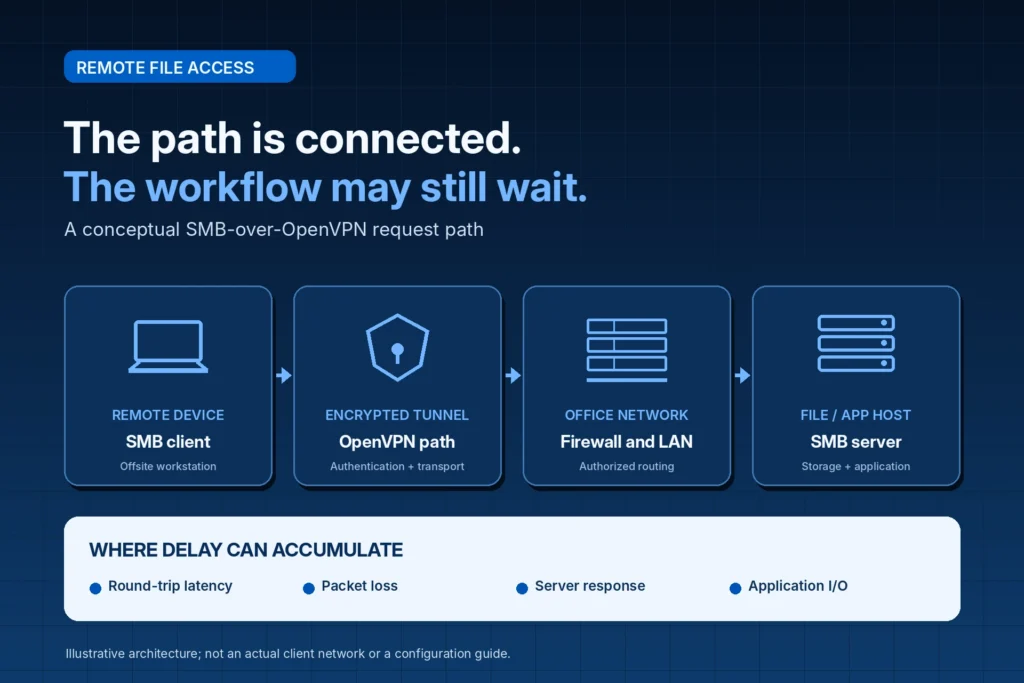
Why a Few Milliseconds Can Become a Noticeable Delay
A file operation may involve more than one exchange: locating a file, checking metadata, obtaining access, reading information, and committing changes. The exact sequence depends on the program and SMB implementation.
Consider a simplified illustration, not a measurement of any customer’s network. If a workflow required 40 sequential network exchanges and each round trip added 35 milliseconds, the network waits alone could total roughly 1.4 seconds. Server processing, endpoint inspection, and application work would add to that.
SMB can combine or parallelize operations, so this is a thought experiment, not a measured result.
The practical lesson is that bandwidth and responsiveness are not the same measurement.
Three Different Problems That Employees Call “Slow VPN”
| What employees observe | What it may suggest | What it does not prove |
|---|---|---|
| Large files copy slowly | Throughput, congestion, tunnel, or storage limitations | That SMB itself is incorrectly configured |
| Folders open slowly but a speed test looks fine | Repeated requests, latency, application, or server overhead | That the internet provider is healthy in every respect |
| Mapped drives disconnect intermittently | Packet loss, session interruption, path changes, or server issues | That OpenVPN is the sole cause |
OpenVPN’s performance troubleshooting guide explicitly distinguishes latency from throughput and identifies packet loss, routing, processing limits, and packet-size behavior as separate investigation areas.
Document the slow operation, not just a complaint that the VPN “feels bad.”
When Third-Party Software Uses an Office File Share
This problem becomes more consequential when the share supports a line-of-business application rather than ordinary documents.
A construction company may use dispatch or job-management software. An accounting office may depend on a shared financial application. A professional practice may open documents through a case-management or imaging workflow. Some perform frequent sequential reads and writes; others depend on application servers or databases.
The software vendor’s supported deployment model matters. A product that works over a local office LAN may not be approved for direct file-based access over a wide-area VPN. Running an unsupported workflow can raise reliability and data-integrity concerns.
An engineer should verify vendor requirements: “It opens” is not the same as “It is supported.”
What a Proper SMB-Over-VPN Test Should Establish
A single ping, port check, or copy test cannot represent an entire business workflow.
A controlled assessment compares several layers:
| Assessment layer | Question answered |
|---|---|
| VPN session | Can the employee establish an authorized tunnel? |
| SMB connection | Is an expected file-sharing connection established? |
| Network quality | What do relevant latency and loss observations indicate? |
| File operations | How long do approved folder, open, and save actions take? |
| Application workflow | Does the vendor-supported task complete accurately and consistently? |
| Server and endpoint | Are resource demands or protection tools contributing delay? |
A read-only Windows SMB observation
An authorized IT technician can inspect established SMB connections without changing the configuration:
# Read-only: show existing SMB client connections.
Get-SmbConnection |
    Select-Object ServerName, ShareName, Dialect, NumOpens
This shows existing connections and selected properties. It does not measure application latency, validate a third-party program, or diagnose the root cause. Microsoft documents the command in its SMB PowerShell reference.
Never run unapproved stress tests or experiments against a live accounting or database file. Use authorized test data, maintain production safeguards, and coordinate with the software vendor when needed.

Why Random Changes Can Make the Situation Worse
Slow file access is frustrating, and quick internet suggestions can sound tempting. But disabling security inspection, changing Windows networking settings, replacing a firewall, or migrating a server without evidence may create a new problem.
Windows, network adapters, SMB versions, and third-party applications behave differently; an unverified change can weaken security or supportability.
Microsoft’s advanced SMB troubleshooting guidance recommends evidence from both the client and server when diagnosing complex problems.
The professional standard is to establish a baseline, document findings, and validate approved changes. This article deliberately does not prescribe a universal configuration fix.
What a Massachusetts Business Should Ask Its IT Provider
Before authorizing a purchase or major change, ask for a documented assessment that answers five questions:
- Scope: Which employees, office locations, mapped drives, and applications are affected?
- Comparison: Does the same task behave differently inside the office versus remotely?
- Evidence: What observations separate network delay from server and application delay?
- Vendor support: Is the remote workflow approved by the third-party software provider?
- Acceptance test: How will employees verify that the issue is improved without risking production data?
The deliverable should be an understandable recommendation.
Why This Matters Across Eastern Massachusetts
A law firm in Boston or Cambridge may lose billable time waiting for matter files. An accounting practice in Waltham or Newton may struggle to open shared financial records near a deadline. Contractors in Framingham, Natick, or Bellingham may depend on office-hosted dispatch information while staff work remotely.
Similar constraints affect offices in Wellesley, Brookline, Needham, Norwood, Dedham, and Quincy. These are illustrative business situations, not claims about specific customers or measured outages.
Beyond frustration, employees may repeat transactions or create unofficial copies. Investigate the workflow rather than repeatedly restarting the VPN.
Frequently Asked Questions
Why is SMB slow over OpenVPN when my internet speed is fast?
A speed test primarily describes a particular transfer to a test endpoint. SMB performance can also depend on round-trip delay, request patterns, server processing, packet loss, and application design. The results are not interchangeable.
Does a successful SMB connection mean the application is healthy?
No. Connectivity does not prove acceptable response times, concurrent access, or application compatibility.
Can OpenVPN cause intermittent mapped-drive disconnections?
Tunnel or network interruptions can contribute, but server sessions, Windows clients, security controls, and the underlying network also require evaluation. A disconnected drive does not identify one root cause.
Is it safe to open an accounting or database file directly across a VPN?
Only if the vendor supports the architecture and its requirements are met.
Will a faster firewall or internet plan solve it?
Not necessarily. Hardware or bandwidth changes should follow evidence showing the actual bottleneck.
Can Mass IT Pro Solution assess SMB and OpenVPN performance?
Yes. Our business IT services include networking, remote access, Windows support, and coordination with third-party software providers. Recommendations depend on the environment and agreed scope.
Stop Troubleshooting the Symptom. Investigate the Workflow.
A green VPN status icon is only one piece of evidence. Your staff needs the shared files and business software behind that connection to respond consistently, preserve data integrity, and support the way they work.
Mass IT Pro Solution offers free initial business consultations for Massachusetts companies experiencing slow mapped drives, unstable SMB file shares, or third-party applications that lag over OpenVPN.
We can review the symptoms, explain the assessment scope, identify vendor dependencies, and propose appropriate next steps. Technical diagnosis, on-site work, and remediation are quoted according to the approved scope.
Request a Business Networking Assessment or call 508-254-4704. You can also explore our Business Network Solutions and Remote IT Support.
Mass IT Pro Solution | Massachusetts Business Networking, VPN & Windows File-Share Support
This article provides general technical information, not a diagnosis of any specific environment. Performance improvements and application compatibility cannot be guaranteed without an assessment. No production configuration changes are provided here.


