

An engineering-informed guide to building professional business websites that combine clear messaging, local SEO, mobile performance, accessibility, security, and measurable customer inquiries.
A potential customer finds your business through Google. They open your website on their phone, look at the homepage, and try to answer three questions.
What does this company actually do?
Can I trust it?
How do I contact someone?
If those answers are difficult to find, even a beautifully designed website can fail at its most important job.
Your website should make doing business with you easier, not make visitors work harder to understand your company.
Quick answer: Effective Massachusetts web design combines clear service information, mobile-friendly navigation, trustworthy business details, relevant local content, accessible forms, appropriate security controls, and measurable performance. A professional website should help visitors understand what a business offers, evaluate whether it meets their needs, and take a clear next step.
For Massachusetts small businesses, this requires more than purchasing a theme, adding a few stock photographs, and publishing a contact page.
It requires understanding how customers find the business, what information they need before making a decision, and how the website will be maintained after launch.
At Mass IT Pro Solution, we approach website design as both a business communication project and a technical implementation project.
Because a website that looks impressive but doesn’t function properly is not a finished solution.
What Customers Notice When They First Visit Your Website
Visitors don’t always read a homepage from beginning to end.
Many scan headings, navigation, images, service descriptions, and contact options to decide whether the page is relevant to their needs.
That makes the first visible section especially important.
A visitor should quickly understand:
- What you do: The primary service or product.
- Who you serve: The intended customers or industries.
- Where you operate: Your relevant service area or location.
- Why you are credible: Specific experience, authentic evidence, or useful information.
- What to do next: Call, request an estimate, book an appointment, or send an inquiry.
Compare two homepage messages
Imagine a Massachusetts commercial plumbing company.
Weak homepage message:
Welcome to our website. We provide outstanding service and innovative solutions. Customer satisfaction is our top priority.
The statement sounds professional, but it provides little information.
What service does the company provide? Is it residential or commercial? Where does it operate?
More useful homepage message:
Commercial Plumbing Services for Greater Boston Businesses
Installation, maintenance, and repairs for offices, retail properties, and commercial facilities.
Request a Commercial Plumbing Consultation
This example gives visitors specific information without forcing them to search through multiple pages.
The actual copy should reflect the company’s real services and coverage.
First-screen website review checklist
- The business’s primary service is understandable.
- The main heading identifies a real customer need.
- The navigation uses recognizable page names.
- A contact option is visible and usable on mobile.
- Important text is readable without zooming.
- Images support the actual service.
- The page does not rely on intrusive popups to communicate essential information.
- The visitor knows what action to take next.
A good first impression is not just visual polish.
It is clarity, credibility, and usability working together.
A Business Website Should Guide Visitors, Not Just Display Information
A small-business website should have a purpose beyond showing that the company exists.
Depending on the business, its primary goal may be:
- Generating consultation requests
- Receiving telephone inquiries
- Booking appointments
- Explaining professional services
- Selling products
- Qualifying commercial project leads
- Providing accurate customer information
- Supporting existing clients
Different goals require different website structures.
A law firm may want prospective clients to understand its practice areas before making an inquiry.
A contractor may need project galleries, service descriptions, and estimate requests.
An e-commerce business needs product discovery, accurate inventory information, and a dependable checkout process.
A medical practice may need accessible contact information, service descriptions, and directions to approved scheduling channels.
One generic homepage template is unlikely to serve all those businesses equally well.
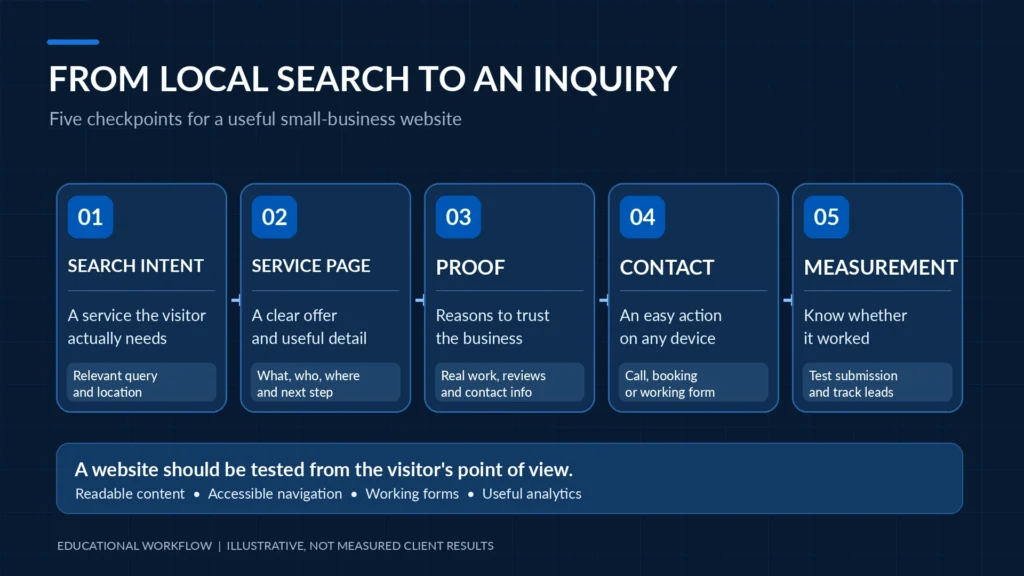
From search result to customer inquiry
An effective website helps visitors move through a logical sequence:
Relevant search → Useful service page → Credible information → Clear action → Working contact process
Consider a homeowner looking for a licensed contractor in Newton.
The visitor may begin with a specific search, land on a relevant service page, review the company’s experience and coverage, and then request an estimate.
If the page provides irrelevant information or makes the contact form difficult to find, the journey becomes unnecessarily complicated.
What should a service page include?
| Page element | Question it answers |
|---|---|
| Clear H1 heading | Am I in the right place? |
| Service explanation | What does this business actually provide? |
| Who the service is for | Does this apply to my situation? |
| Scope and process | What should I expect? |
| Real evidence | Why should I consider this provider? |
| Service area | Does the company work where I am? |
| Relevant FAQs | Are my common concerns addressed? |
| Contact option | What is the next step? |
A page does not need to be excessively long to answer these questions.
The appropriate amount of content depends on the complexity of the service and what customers reasonably need to know.
The objective is to remove unnecessary uncertainty, not fill the page with keywords.
Who Benefits From Professional Web Design in Massachusetts?
Different industries depend on their websites in different ways.
A useful design process starts by understanding those differences.
Professional offices and consulting businesses
Professional services firms often need to communicate expertise, service scope, industries served, and an understandable consultation process.
Clear navigation and professional presentation can help prospective customers determine whether the business is relevant.
Law firms
Law firm websites may require clear practice-area information, attorney biographies, accurate contact details, appropriate disclaimers, and careful handling of inquiry forms.
Website content and advertising may also need review for applicable professional-conduct requirements.
A law firm should not use unsupported claims about case outcomes or imply that submitting a form automatically creates an attorney-client relationship.
Medical, dental, and wellness practices
Healthcare-related websites should clearly explain services, office information, appointment procedures, and the intended use of contact forms.
A general website inquiry form should not be assumed suitable for receiving protected health information.
Where sensitive health information is collected, the organization needs an appropriate technical and compliance review.
Contractors and home-service businesses
A service business may benefit from:
- Specific service descriptions
- Relevant project photographs
- Accurate service areas
- Estimate-request forms
- Telephone contact options
- Frequently asked questions
- Real customer reviews where authorized
A clear project gallery may tell prospective customers more about the company’s capabilities than several paragraphs of generic marketing language.
Retail and e-commerce businesses
Retail websites need accurate product information, intuitive navigation, dependable mobile usability, and suitable payment and fulfillment processes.
A professional storefront must also account for platform maintenance, product updates, and the systems required to complete transactions.
New small businesses
A new company may need a smaller website with room to expand.
That can mean starting with a well-organized homepage, services, about page, contact page, and essential legal or informational pages.
The priority should be establishing a clear, supportable foundation.
A website does not need unnecessary complexity to appear professional. It needs the right structure for the business.
The Five Foundations of a High-Quality Small Business Website
The strongest business websites balance several disciplines.
Visual appearance is one.
Content, performance, accessibility, security, and ongoing maintenance are just as important.
1. Clear messaging and useful navigation
The website should make it easy to locate important information.
Use headings that describe real services.
Avoid hiding essential content behind unfamiliar navigation labels or elaborate animations.
Internal links should guide visitors toward related services rather than sending them through unrelated pages.
2. Responsive mobile design
A mobile-friendly website is more than a desktop layout compressed onto a small screen.
It should have:
- Readable text
- Suitable spacing
- Buttons that are practical to tap
- Navigation that works on touchscreens
- Forms that are easy to complete
- Images that fit the available space
- Content that does not overflow horizontally
Different screen sizes and input methods should be tested.
3. Measurable performance
Images, fonts, JavaScript, hosting, caching, and third-party scripts can all affect how quickly a website becomes usable.
Performance should be evaluated through actual measurements rather than promises that a particular theme or hosting plan will always be fast.
4. Accessibility and usability
People access websites using keyboards, screen readers, touchscreens, assistive technology, and different visual or motor capabilities.
The design should consider those needs from the beginning.
5. Trust and technical reliability
Accurate contact details, authentic photographs, relevant explanations, functioning forms, and appropriate website maintenance support a credible digital presence.
A site can look polished while containing broken links, insecure plugins, or a contact form that silently fails.
A professional launch should address both what visitors see and what happens behind the scenes.
Core Web Vitals: What Website Speed Actually Means in 2026
One of the biggest web design mistakes is equating speed with a single score.
A website might receive an impressive result in a laboratory performance test but behave differently on older phones, congested mobile connections, or pages with heavy interactive elements.
Google’s Core Web Vitals focus on three dimensions of the user experience.
The three Core Web Vitals
| Metric | What it measures | Good threshold |
|---|---|---|
| Largest Contentful Paint (LCP) | Loading performance of the main visible content | 2.5 seconds or less |
| Interaction to Next Paint (INP) | Responsiveness to user interactions | 200 milliseconds or less |
| Cumulative Layout Shift (CLS) | Unexpected visual movement | 0.1 or less |
These targets are evaluated using the 75th percentile of actual page experiences, with mobile and desktop considered separately.
They are useful performance objectives, not guarantees of search rankings or revenue.
Source: Google Web Vitals documentation.
What slows down a small business website?
Common contributors include:
- Oversized hero images
- Unoptimized image formats
- Large JavaScript libraries
- Unnecessary third-party widgets
- Excessive plugin dependencies
- Poorly configured caching
- Slow server responses
- Render-blocking resources
- Heavy animation effects
- Fonts that delay text rendering
- Layouts that load content without reserving space
Not every slow page has the same problem.
A developer should identify which resources affect the actual page before making changes.
Why image dimensions matter
Imagine a homepage that loads a large hero image without reserving the space it will occupy.
When the image appears, the content below it may move unexpectedly.
That can frustrate someone who is about to tap a button.
A correctly sized responsive image with appropriate dimensions can help the browser reserve layout space.
Example: A properly defined website image
<img
  src="/images/commercial-network-installation.webp"
  alt="Technician installing network equipment in an office"
  width="1280"
  height="720"
  decoding="async"
>
The example supplies descriptive alternative text and intrinsic image dimensions.
The image file, path, and alt text must match the actual content.
A real website should also use responsive image delivery where appropriate.
Important: Don’t automatically lazy-load the main above-the-fold hero image. That can delay the page’s largest visible element and worsen LCP.
Below-the-fold images may benefit from lazy loading, but the correct strategy depends on the page.
How to measure performance
Useful tools include:
- PageSpeed Insights for laboratory findings and available real-user data.
- Google Search Console for search performance and Core Web Vitals reporting.
- Browser developer tools for identifying network requests, layout shifts, and JavaScript activity.
A strong development process measures performance before and after meaningful changes.
The goal isn’t to chase a perfect score at any cost. It’s to improve how the website actually behaves for visitors.
Modern Animations, 3D Websites, and Interactive Effects: When Are They Worth It?
A website doesn’t have to look generic to perform well.
Modern interfaces can use thoughtful motion, interactive transitions, 3D elements, and other visual techniques to communicate a brand’s identity.
But these features should support the experience.
They should not become obstacles between the visitor and the service information.
The practical trade-off
A 3D hero or scroll-driven animation may create a memorable introduction.
It may also introduce:
- Additional JavaScript
- GPU processing requirements
- Longer initial loading
- More complex mobile behavior
- Accessibility challenges
- Motion sensitivity concerns
- Device-specific compatibility problems
That doesn’t mean advanced visual effects should be avoided.
It means they should be engineered intentionally.
A better approach to interactive design
For a site using WebGL, Three.js, GSAP, or other animation technologies, developers should consider:
- Whether the effect adds meaningful value
- How it behaves on mobile devices
- Whether essential content remains accessible without the effect
- What appears when WebGL isn’t available
- How keyboard users navigate the page
- Whether animation interferes with reading or contacting the business
- How the design handles reduced-motion preferences
- Which assets are loaded immediately and which can wait
Example: Respecting reduced-motion preferences
/* Illustrative accessibility enhancement.
   Apply to decorative motion only. */

@media (prefers-reduced-motion: reduce) {
  .decorative-animation {
    animation: none;
    transition: none;
  }
}
This is a basic example, not a complete accessibility solution.
An advanced 3D experience may also need JavaScript logic to stop rendering loops or provide an alternative static presentation.
A modern website should remain usable even when its decorative effects are unavailable.
The most sophisticated implementation is often the one that makes complex design feel effortless.
Website Accessibility: Why Responsive Design Isn’t Enough
A website can look beautiful on a phone and still be difficult for some people to use.
Consider a visitor who navigates with a keyboard instead of a mouse.
Can they reach the navigation menu and contact form?
Can they see which element currently has focus?
Does the form explain which fields are required?
Can someone using a screen reader understand an important image?
These are website-quality questions, not merely visual-design preferences.
Practical accessibility requirements to review
- Navigation works with a keyboard.
- Interactive controls have visible focus indicators.
- Headings follow a meaningful hierarchy.
- Important images have appropriate alternative text.
- Decorative images are handled appropriately.
- Text and interface controls use suitable contrast.
- Forms have labels and understandable error messages.
- Links make sense without relying only on surrounding text.
- Popups and menus manage focus appropriately.
- Content remains usable when enlarged or viewed on narrow screens.
- Motion does not prevent visitors from using the page.
- Important content is not available only through hover interactions.
The Web Content Accessibility Guidelines (WCAG) 2.2 provide a recognized framework for evaluating accessible web content.
What about ADA compliance?
Accessibility obligations can depend on the business, jurisdiction, and applicable law.
Building toward WCAG 2.2 Level AA can provide a practical technical objective, but claiming that a website is universally ADA compliant requires appropriate assessment of the actual site and applicable requirements.
Automated accessibility scanners can help identify certain issues.
They do not replace keyboard testing, assistive-technology review, or other appropriate evaluation.
Accessibility should be designed, tested, and maintained rather than promised based on a plugin or badge.
Secure WordPress Website Design: What Happens Behind the Homepage?
Many Massachusetts small businesses use WordPress because it offers content management, flexible development, and a broad ecosystem of themes and plugins.
But the flexibility introduces responsibilities.
WordPress itself, installed extensions, hosting, user accounts, and custom code all need to be managed appropriately.
A website can look modern while running outdated plugins or allowing unnecessary administrator access.
Website security checklist
- WordPress core is maintained on a supported release.
- Plugins and themes are reviewed and updated appropriately.
- Unnecessary extensions are removed.
- Administrative accounts use appropriate permissions.
- MFA is applied where supported and suitable.
- HTTPS is configured correctly.
- Website forms validate and safely process submitted information.
- Spam and abusive form submissions are addressed.
- Backups include the required website files and database.
- The recovery process has been reviewed or tested.
- Hosting and relevant PHP/runtime versions are maintained.
- Security-relevant changes are documented.
- Production changes can be tested before deployment where practical.
HTTPS isn’t an entire website security program
HTTPS encrypts traffic between a visitor’s browser and the website endpoint under the applicable connection.
It does not guarantee that the application code is secure, that the server cannot be compromised, or that information collected through a form is handled appropriately afterward.
Similarly, security headers can contribute to a defense-in-depth strategy.
But they must be selected and tested against the website’s actual behavior.
For example, a Content Security Policy can help restrict certain resources and script execution, but an overly restrictive policy can break essential website functionality.
Security controls require configuration and validation, not just installation.
Contact forms deserve special attention
A business inquiry form may be one of the most important parts of the website.
It should be reviewed for:
- Required and optional fields
- Appropriate input validation
- Server-side processing and sanitization
- Spam and abuse controls
- Email-delivery configuration
- Protection of submitted information
- Privacy notices where applicable
- Accessible error handling
- Clear submission confirmation
- Appropriate storage and retention
A successful-looking button click does not prove that the form delivered the inquiry.
Test the complete contact workflow
When a test submission is made, confirm:
- The visitor can complete the form.
- Validation errors are understandable.
- The submission reaches the expected destination.
- The recipient can distinguish it from spam.
- The visitor receives an appropriate confirmation.
- Sensitive information is not unnecessarily exposed in notifications or logs.
- Follow-up responsibility is defined.
A beautiful contact form that silently loses customer inquiries can undermine the entire website.
For ongoing guidance, WordPress maintains official documentation on hardening WordPress.
Local SEO for Massachusetts Businesses: Relevance Over Repetition
Local search optimization is one reason businesses invest in professional websites.
However, simply repeating a city name throughout a page does not establish geographic relevance.
A site claiming to serve every city in Massachusetts with nearly identical pages may create a confusing experience and potentially raise search-quality concerns.
The more useful approach is to explain the actual services, customers, locations, and reasons a visitor should consider the business.
What a useful local service page includes
For example, a business-networking provider serving Greater Boston might explain:
- Which networking services it offers
- Which customer types it supports
- Where on-site service is available
- How projects are assessed and scheduled
- What equipment or services may be required
- Examples of relevant completed work
- How to request an assessment
That is more useful than repeating “business networking Boston” twenty times.
Build a logical website structure
A professional services website might use the following page hierarchy.
HOME
 |
 +-- SERVICES
 |    |
 |    +-- Managed IT
 |    +-- Business Networking
 |    +-- Cybersecurity
 |    +-- Backup & Recovery
 |
 +-- INDUSTRIES
 |    |
 |    +-- Law Firms
 |    +-- Accounting Firms
 |    +-- Construction & Trades
 |
 +-- PROJECTS / CASE STUDIES
 |
 +-- ABOUT
 |
 +-- BLOG / RESOURCES
 |
 +-- CONTACT
Illustrative sitemap. The actual structure should reflect the business and its services.
Each service page should have a clear purpose.
Related industry and project pages can link to the relevant service pages where the connection is genuinely useful.
The goal is to help readers navigate and help search engines understand the site’s content.
Should every city have its own page?
Not automatically.
A dedicated city page should offer distinctive, useful information about serving that area.
For example, it might explain actual service coverage, relevant project experience, location-specific procedures, or details customers in that market need.
Publishing dozens of nearly identical location pages that differ only by city name is not a sound strategy.
A business also should not invent a physical office, address, or service location to appear more local.
Accurate geographic relevance is stronger than artificial location pages.
What about Google Business Profile?
A properly configured Google Business Profile can support local discovery for eligible businesses.
The business’s website and profile should use accurate business information, suitable categories, and a service area consistent with how the company actually operates.
Service-area businesses should follow Google’s applicable profile rules rather than displaying an ineligible or fictitious office address.
Local search depends on multiple factors beyond the website, and rankings are not guaranteed.
Technical SEO: What Should Be Included Before Launch?
A website needs a foundation that allows search engines to discover, interpret, and evaluate its pages.
Important elements may include:
- Clear page titles and meta descriptions
- Descriptive H1 and supporting headings
- Logical service-page URLs
- Relevant internal links
- Crawlable navigation
- Appropriate canonical URLs
- XML sitemaps
- Correct indexing settings
- Useful image descriptions
- Mobile usability
- Suitable structured data
- Google Search Console configuration
Each element serves a particular purpose.
Adding more schema markup does not automatically improve ranking.
Neither does forcing a focus keyword into every heading.
An important WordPress launch check: Accidental noindex
During development, a staging website may intentionally discourage indexing.
But production websites should not accidentally retain staging-specific indexing restrictions.
For an authorized website review, developers should check whether relevant production pages use a noindex directive.
For example:
<!-- Example of an indexing restriction.
     Appropriate for some staging pages,
     but not for an intended public service page. -->

<meta name="robots" content="noindex, nofollow">
The developer should also review other indexing controls, canonical configuration, server responses, and whether the intended production page is accessible to crawlers.
Removing one meta tag does not guarantee that Google will index or rank the page.
Google Search Console’s URL Inspection tool can help evaluate how Google sees an individual page.
Schema markup: Describe the business accurately
Structured data can help search engines interpret information that is already present on the page.
Depending on the site, relevant schema types may include:
| Schema type | Appropriate purpose |
|---|---|
| Organization | Identifies the business |
| WebSite | Describes the website |
| Service | Describes an actual offered service |
| BlogPosting | Describes an article |
| BreadcrumbList | Describes a breadcrumb trail |
| LocalBusiness | Describes a qualifying real business location or organization where appropriate |
The exact implementation should reflect verified business information.
A website should not generate fictitious business locations or multiple conflicting organization identities merely to target more search terms.
Google recommends using accurate organization information and validating supported structured data.
See Google’s Organization structured-data documentation.
Are FAQ sections useful for SEO and AI search?
Yes, when they answer genuine customer questions clearly.
A practical FAQ can help readers understand services, pricing considerations, schedules, and technical requirements.
However, FAQ markup should not be treated as a guaranteed way to obtain enhanced Google search results.
Google restricts FAQ rich-result visibility to particular types of authoritative websites.
A small-business website should publish FAQs because they help visitors, not because it expects a special search feature.
Writing for Search Engines, Answer Engines, and Real Customers
Search optimization increasingly involves more than traditional blue-link results.
Customers may research businesses using Google, AI-assisted search experiences, ChatGPT, Gemini, and other services.
These systems have different retrieval and ranking mechanisms.
No website technique can guarantee that a particular AI platform will recommend or cite a business.
But useful content benefits from being clear, specific, accurate, and structured.
A practical content approach
For an important service page:
Answer the main question early.
Explain what the service is and who it is for.
Use specific headings.
A heading such as “What Does a Managed IT Agreement Include?” communicates more than “Our Innovative Solutions.”
Describe real experience accurately.
Use legitimate projects, products, service procedures, and technical examples where relevant.
State limitations.
A provider that explains what isn’t included can be more useful than one promising an impossible result.
Support factual claims.
Reference appropriate primary documentation, standards, or other reliable sources for technical information.
Maintain consistent business identity.
The business name, services, contact information, and location details should be accurate across the website and relevant external profiles.
These practices help humans understand a business and make its information easier for various systems to interpret.
They do not guarantee AI visibility or search placement.
Google’s SEO Starter Guide provides a useful foundation for search-oriented site structure.
What Should Happen During a Professional Website Project?
A good website project is easier to evaluate when the process and deliverables are defined.
A client should know what information the developer needs, what decisions require approval, and how the finished site will be tested.

Phase 1: Discovery and business goals
Start with the business, not a theme demonstration.
Identify:
- Primary services or products
- Intended customers
- Service area
- Important differentiators
- Existing branding
- Desired contact actions
- Competitors and market context
- Required integrations
- Available photographs and content
- Budget and scheduling constraints
Deliverable: A defined project objective and scope.
Phase 2: Sitemap and content architecture
Plan the necessary pages, their purpose, and how visitors will move through them.
Identify the relationship between homepage content, service pages, supporting articles, testimonials, project galleries, and contact paths.
Deliverable: A proposed sitemap and page outline.
Phase 3: Copywriting and asset preparation
Gather accurate information about the business.
This may include:
- Service descriptions
- Business hours and contact information
- Professional credentials where applicable
- Authentic photography
- Customer-approved project examples
- Reviews used with suitable permission
- Frequently asked questions
- Required policies and disclosures
The business should review factual claims before publication.
Deliverable: Approved content and assets.
Phase 4: Design and responsive layout
Create a visual structure that supports the company’s brand and customer journey.
Review desktop and mobile presentation, navigation, buttons, typography, images, and form interaction.
Deliverable: Approved design direction.
Phase 5: Development and technical configuration
Build the website on an appropriate platform.
Configure content management, required integrations, performance features, form processing, analytics where agreed, and relevant security controls.
Use a staging environment or other controlled deployment process when practical.
Deliverable: A functional website ready for validation.
Phase 6: Quality assurance and launch
Testing should cover more than whether the homepage opens.
Review:
- Mobile and desktop behavior
- Navigation
- Forms and email notifications
- Accessibility considerations
- Performance
- Broken links
- SEO settings
- Security configuration
- Analytics behavior
- Required integrations
- Domain and DNS configuration
- Backup and recovery readiness
Deliverable: A launch checklist and documented outstanding issues.
Phase 7: Handoff and maintenance
The business should understand how to manage its website and who provides technical support afterward.
This may involve administrator training, account ownership, updates, maintenance, content changes, and planned improvements.
Deliverable: Appropriate access, documentation, and a defined post-launch arrangement.
A project should not be considered complete simply because the site is visible on the internet.
It should meet the approved acceptance criteria.
How to Test a Website Before Launch
Website quality assurance becomes more useful when it reflects actual customer behavior.
A developer may know the website works on their own workstation.
But visitors may use different devices, browsers, accessibility tools, and network connections.
Small-business website launch checklist
Visitor experience
- Homepage clearly describes the business.
- Main navigation works.
- Service pages contain accurate information.
- Important contact actions are easy to find.
- Phone links and relevant email links function.
- Forms can be completed on mobile.
- Confirmation and error messages are understandable.
- Required disclaimers and policies are present.
Engineering and performance
- Layout works across agreed screen sizes.
- Images display at suitable dimensions.
- Core Web Vitals have been reviewed.
- Important JavaScript interactions work.
- Keyboard navigation has been checked.
- Essential content remains usable without decorative animations.
- No critical browser-console errors remain unresolved.
- Important pages return expected HTTP status codes.
SEO and measurement
- Page titles and descriptions are reviewed.
- Heading hierarchy is logical.
- Canonical URLs are appropriate.
- Production indexing settings are correct.
- XML sitemap is accessible where applicable.
- Internal links reach the intended pages.
- Google Search Console setup is confirmed if included.
- Contact-event tracking is tested if part of the scope.
Security and operations
- Appropriate administrative access is established.
- Hosting and domain ownership are documented.
- HTTPS works as intended.
- Form handling and anti-spam measures are tested.
- Necessary backups are configured.
- Restore or recovery arrangements are understood.
- The update and maintenance owner is identified.
- Outstanding issues are documented.
An automated website scanner can assist with several of these checks.
It cannot independently verify every customer workflow or business requirement.
Someone should actually use the website as a prospective customer before declaring it finished.
WordPress, Shopify, Wix, or Custom Development: Which Should You Choose?
The best platform is not necessarily the one with the largest number of features.
It is the one that suits the business’s content, operations, maintenance capabilities, budget, and expected growth.
Website platform comparison
| Platform | Common strengths | Trade-offs to evaluate |
|---|---|---|
| WordPress | Flexible publishing, content architecture, themes and plugins, custom development | Hosting, updates, security, plugin compatibility |
| Shopify | Commerce-focused platform with managed core commerce infrastructure | Subscription and app costs, platform-specific customization |
| Wix | Hosted website builder with integrated editing experience | Design and development constraints for some advanced requirements |
| Custom-built website | High control over implementation and architecture | Development, maintenance, documentation, and support complexity |
A service company publishing articles, projects, and detailed service pages may benefit from WordPress.
A retail business with extensive product-management requirements may prefer a commerce-focused platform.
A business needing a straightforward informational website may not require custom application development.
Why custom development requires planning
A custom website can support distinctive design, advanced interaction, and specialized workflows.
But the business also needs to consider:
- Who maintains the code
- How dependencies are updated
- How new employees edit content
- What documentation is provided
- Whether the system relies on one developer
- How security issues are addressed
- What happens when the business changes providers
Custom development can be appropriate.
It shouldn’t create unnecessary dependence on technology nobody else can maintain.
Mass IT Pro Solution’s web design services cover WordPress, Shopify, Wix, and custom website work according to project requirements.
How Much Does Small Business Web Design Cost in Massachusetts?
Website pricing depends on what the business actually needs.
A small informational website does not have the same requirements as an online store, multi-location service website, or custom interactive experience.
What affects website project pricing?
| Cost factor | Why it matters |
|---|---|
| Number and complexity of pages | Content preparation, development, review |
| Design requirements | Custom layouts, branding, responsive behavior |
| Content writing | Research, service explanations, editing |
| Photography and media | Original assets, editing, licensing |
| SEO work | Content planning, metadata, internal links, technical checks |
| Integrations | Forms, scheduling, CRM, payment systems |
| E-commerce | Product catalog, checkout, taxes, fulfillment requirements |
| Interactive elements | Animation, custom code, advanced functionality |
| Security and hosting | Configuration, maintenance, monitoring |
| Accessibility testing | Required evaluation and remediation scope |
| Ongoing care | Updates, backups, content support, troubleshooting |
Compare the complete project scope
A website quote should explain:
- Which pages are included
- Who supplies the text and images
- Whether design revisions are limited
- Which plugins or subscriptions require separate payment
- Whether hosting is included
- Who owns the domain and website assets
- What SEO work is included
- Whether accessibility evaluation is included
- What happens after launch
- Whether maintenance is optional or required
- Which tasks are outside the quoted scope
An inexpensive website may be entirely suitable for a small company.
But a low initial price can become misleading when essential services are billed separately.
Similarly, an expensive website is not automatically faster, more secure, or more effective.
The right question isn’t simply, “What does the website cost?” It’s “What will be delivered, who maintains it, and how do we know it meets our requirements?”
Redesign or Repair: Does Your Business Really Need a New Website?
Not every outdated-looking website needs to be rebuilt from scratch.
Sometimes the underlying platform is suitable, but the content, navigation, or technical implementation needs improvement.
When focused improvements may be enough
Consider a site that already has:
- A reasonable content-management platform
- Valid service information
- A usable navigation structure
- Appropriate administrative ownership
- A technically maintainable theme
- Existing search visibility worth preserving
If its main problems are oversized images, weak calls to action, broken forms, or poor mobile spacing, targeted improvements may be appropriate.
When a redesign may be justified
A broader redesign may make sense when:
- The current platform cannot meet required functionality.
- Major pages have confusing architecture.
- The theme or code is difficult to maintain safely.
- Important accessibility issues are widespread.
- The website cannot support necessary integrations.
- The business’s branding or service model has fundamentally changed.
- Technical debt makes repeated repairs impractical.
Avoid destroying existing SEO during a redesign
A redesign should preserve or carefully plan changes to established URLs.
If important URLs must change, the team should evaluate:
- Appropriate redirects
- Existing internal links
- Canonical configuration
- Content preservation
- XML sitemaps
- Search Console reporting
- Existing rankings and traffic patterns
A redesign that looks better while accidentally breaking important service-page URLs can create unnecessary business risk.
A responsible developer should evaluate what already works before recommending that everything be replaced.
How Do You Know Whether Your Website Is Generating Leads?
A website’s effectiveness shouldn’t be measured only by how many visitors it attracts.
Traffic matters, but not every visitor is a potential customer.
For many service businesses, more useful measures involve qualified inquiries and the actions visitors take.
Useful website measurements
| Measurement | What it can help answer |
|---|---|
| Organic search impressions | Are relevant pages appearing in search results? |
| Organic search clicks | Are users entering the site from search? |
| Service-page visits | Which services attract visitor attention? |
| Contact-form submissions | Are visitors using the inquiry process? |
| Click-to-call interactions | Are visitors choosing to call from the website? |
| Appointment requests | Are visitors starting the booking process? |
| Qualified leads | How many inquiries fit the business’s target customers? |
| Form-delivery failures | Are potential inquiries being lost? |
These measurements have limitations.
For example, clicking a telephone link does not prove a call was completed.
A form submission does not automatically mean the inquiry became a paying customer.
And a visitor declining optional analytics tracking may not appear in the same way as a tracked visitor.
Why lead quality matters
Imagine one website attracts many visitors looking for residential repairs.
But the business primarily wants commercial contracts.
High traffic may look impressive in an analytics dashboard without contributing to the company’s actual growth objective.
A more useful approach is to align the website’s content and measurements with the intended customers.
Build a practical reporting process
A business could review:
What are people finding? Search queries and service pages.
What are they doing? Calls, forms, bookings, and relevant interactions.
What is failing? Broken forms, mobile problems, confusing pages.
What should change? Content, navigation, contact options, or technical performance.
This creates a basis for improving the website after launch.
A website should not be judged solely by traffic volume or a plugin’s SEO score.
What Should Website Maintenance Include After Launch?
A website is not a one-time technical asset that can be ignored indefinitely.
Even a relatively simple business website may need updates, content changes, troubleshooting, and security attention.
For WordPress websites, maintenance responsibilities can include:
- WordPress core updates
- Plugin and theme compatibility
- Hosting and PHP support
- Website backups
- Form-delivery checks
- User-account reviews
- Performance monitoring
- Broken-link correction
- Content updates
- Recovery planning
- Security issue remediation
Some activities occur on a schedule.
Others are triggered by a discovered issue, business change, or vendor update.
The exact service depends on the maintenance agreement.
What happens when a website isn’t maintained?
Potential problems include:
- Unsupported plugins
- Broken forms
- Outdated service descriptions
- Security vulnerabilities
- Incompatible software updates
- Inaccessible content
- Broken third-party integrations
- Degraded performance
Not every unmaintained site will experience every problem.
But a business should understand who is responsible for reviewing and correcting issues as they arise.
Ownership and handoff matter
Before starting a project, clarify:
- Who owns the domain registration?
- Who controls DNS?
- Who owns the hosting account?
- Who has WordPress administrator access?
- Who owns the original design and media assets under the contract?
- Which plugins have recurring licenses?
- How are backups accessed and restored?
- What happens if the business changes developers?
A well-managed website should not depend on one person’s undocumented credentials or an account the business cannot access.
The owner should understand what they own, what they license, and who maintains it.
Massachusetts Web Design: Why Local Relevance Matters
Massachusetts businesses often operate across several neighboring cities and towns.
But the right website structure should reflect where a company actually provides services and how customers choose it.
Greater Boston and Cambridge
Professional offices and service businesses may need detailed service explanations, accurate contact information, and clear inquiry options.
Newton, Wellesley, Needham, and Dedham
Local service providers may benefit from explaining the work they perform, demonstrating relevant experience, and making service coverage easy to understand.
Waltham and Framingham
Business-to-business companies, contractors, and professional service firms may need websites that explain more complex services and qualify project inquiries.
Worcester and Central Massachusetts
Growing businesses may need scalable service pages, updated content, mobile-friendly contact options, and technical support that continues after launch.
These are examples of website-planning considerations, not assumptions that every customer in a particular town behaves the same way.
Geographic targeting should reflect real service availability, customer needs, and useful content.
Mass IT Pro Solution provides website services for Massachusetts businesses, with the project approach defined around the business’s actual requirements.
Questions to Ask Before Hiring a Website Designer
Before signing a website development agreement, ask:
- Will you review our existing website and business goals before recommending a redesign?
- Who writes and approves the website content?
- Will the design be tested across mobile and desktop devices?
- How will contact forms and business inquiries be validated?
- What performance and accessibility checks are included?
- Who handles domain, DNS, hosting, and platform access?
- Which SEO foundations are included?
- Will you provide an understandable sitemap and content structure?
- Are third-party themes, plugins, and licenses included in the cost?
- What security and backup arrangements are provided?
- What happens if we need changes after launch?
- Will we retain appropriate ownership and control of our website?
The developer should also explain what is excluded.
A credible answer may sometimes be, “That requires a separate scope.”
That is more useful than promising unlimited work and discovering the limitations later.
Frequently Asked Questions About Massachusetts Web Design
What should a small-business website include?
Most small-business websites benefit from a clear homepage, useful service or product pages, accurate business information, an about page, and a working contact process. Additional pages may include projects, industries, FAQs, articles, policies, or e-commerce functions depending on the business.
How much does web design cost in Massachusetts?
Pricing depends on page count, content preparation, design complexity, integrations, platform, SEO scope, hosting, security, and ongoing maintenance. A written proposal should identify included services, exclusions, recurring charges, and ownership arrangements.
Is WordPress a good choice for a Massachusetts small business?
WordPress can be a practical choice for businesses needing flexible content management, service pages, blogs, project portfolios, and custom development. It also requires appropriate hosting, updates, security controls, and maintenance.
Is Shopify or WordPress better for an online store?
The best platform depends on catalog requirements, checkout needs, integrations, editing preferences, operating costs, and technical responsibilities. Shopify provides managed commerce infrastructure, while WordPress with suitable commerce plugins offers different customization and maintenance options.
Does a new website guarantee better Google rankings?
No. Search visibility depends on competition, content relevance, website quality, domain history, links, local signals, and other factors. Proper website development can establish a stronger technical and content foundation, but rankings and timelines cannot be guaranteed.
What is local SEO in website design?
Local SEO involves helping a website clearly communicate its services and legitimate geographic relevance. This may include useful local content, accurate business information, appropriate internal links, on-page SEO, and suitable Google Business Profile configuration.
Do I need a separate page for every Massachusetts city?
Not necessarily. Dedicated location pages should provide distinctive, useful information. Repeating nearly identical content with different city names is not a sound strategy.
Why does website speed matter?
Performance affects how quickly visitors can see content, interact with controls, and navigate the site. Core Web Vitals provide useful measures of loading, responsiveness, and visual stability. Improving performance supports usability but does not guarantee sales or rankings.
Can a WordPress website be secure?
WordPress can be operated securely when the platform, extensions, hosting, user access, and custom code are appropriately managed. No platform is immune to every vulnerability. Security requires ongoing maintenance and recovery planning.
Is a mobile-responsive website automatically accessible?
No. Responsive design addresses how layouts adapt to different screens. Accessibility also involves keyboard operation, semantic content, form labeling, focus behavior, contrast, assistive technology, and other requirements.
Can a business website use 3D animations without becoming slow?
It is possible to create interactive experiences while paying attention to performance and usability. Results depend on asset size, rendering techniques, mobile optimization, accessibility support, and fallback behavior. The design needs to be tested rather than assumed to perform well.
Does Mass IT Pro Solution provide website maintenance?
Mass IT Pro Solution offers website maintenance and technical support, including updates, troubleshooting, content changes, and other work according to the service agreement. The precise coverage and pricing should be confirmed in the project or maintenance proposal.
Your Website Should Be an Asset Your Business Can Depend On
A professional website is more than a modern homepage.
It is a combination of business messaging, content architecture, visual design, technical development, accessibility, search readiness, security, and ongoing support.
A visitor should understand the company.
A prospective customer should be able to find relevant information.
A contact form should actually deliver the inquiry.
A website owner should understand who maintains the platform.
And when the business grows, the website should have a reasonable path for updates and improvements.
The best business website is not necessarily the one with the most animations or the most pages. It’s the one designed around the customer’s needs and the business’s actual goals.
For some companies, that means a complete redesign.
For others, it means improving a website they already own.
The right recommendation begins with an assessment.
Need Professional Web Design in Massachusetts?
Mass IT Pro Solution helps Massachusetts businesses build, redesign, improve, and maintain professional websites.
Our services can include WordPress development, website structure, content planning, responsive design, technical SEO foundations, performance improvements, hosting guidance, and ongoing maintenance.
We also work with Shopify, Wix, and custom website implementations when appropriate for the project.
Whether your business needs a new website or wants to understand why its current site isn’t meeting expectations, we can review the requirements and propose an appropriate scope.
Request a Website Design Consultation
When contacting us, include your existing website address, business type, primary services, target locations, and the main improvement you want to make.
Mass IT Pro Solution
Massachusetts Web Design | WordPress Development | Website Maintenance | Local SEO Foundations | Business IT Services
Phone: 508-254-4704
Email: support@massitpro.com
Serving Greater Boston, MetroWest, Worcester, and surrounding Massachusetts communities.
Website performance, search visibility, accessibility, lead generation, security, and project costs depend on the actual implementation, business requirements, hosting environment, competition, maintenance, and other factors. No web design service can guarantee specific search rankings, conversion rates, continuous availability, protection against all attacks, or legal compliance. Project deliverables and maintenance responsibilities depend on the approved scope and written agreement.
Technical and Editorial References
- Google Search Central: SEO Starter Guide
- Google: Core Web Vitals
- Google Search Console: Getting Started
- Google: Organization Structured Data
- W3C: Web Content Accessibility Guidelines 2.2
- W3C: WCAG 2.2 Quick Reference
- WordPress: Hardening WordPress
- WordPress: Website Backup Guidance
- Google Search Central: Creating Helpful, Reliable, People-First Content