

How to move Gmail, calendars, Google Drive, and Shared Drives to Microsoft 365 without overlooking identity security, permissions, DNS, user training, or business-critical data.
Your company decides to move from Google Workspace to Microsoft 365. The new mailboxes are ready, Microsoft licenses have been purchased, and someone suggests changing the DNS records on Friday afternoon.
Then the questions begin.
What happens to the office manager’s shared calendar? Where will the company files in Google Shared Drives go? Will Gmail labels become Outlook folders? What about the scanner that emails documents, the website’s contact form, and the former employee whose Google account still owns important files?
Moving email is only one part of a Google Workspace migration. Moving the business’s workflows is the harder part.
Quick answer: A successful Google Workspace to Microsoft 365 migration begins with discovery, licensing and identity preparation, data and permission mapping, security configuration, and a pilot. Email, calendars, contacts, and files are then transferred using an appropriate supported method. The mail cutover requires coordinated DNS and application changes, followed by technical validation, employee support, and a controlled retirement of Google Workspace.
For Massachusetts businesses, the migration also needs to account for confidential records, customer information, retention requirements, and the technology employees depend on every day.
The goal is not simply to replace Gmail with Outlook.
It is to establish a Microsoft 365 environment that is appropriately configured, usable, secure, supportable, and ready for the company’s next stage of growth.
Should Your Business Move From Google Workspace to Microsoft 365?
Not every business needs to migrate.
Google Workspace and Microsoft 365 are both established business productivity platforms. Each offers email, file collaboration, document creation, administrative tools, and security capabilities.
The decision should depend on operational requirements, licensing, application compatibility, and user preferences.
When Microsoft 365 may be a better fit
A migration may be worth evaluating when your business:
- Relies heavily on desktop Word, Excel, Outlook, or PowerPoint.
- Needs more structured Windows device administration.
- Wants to manage identity, endpoints, and productivity services within Microsoft’s ecosystem.
- Collaborates extensively through Teams, SharePoint, and OneDrive.
- Has specific Microsoft application integrations.
- Wants to consolidate certain existing Microsoft licenses and services.
- Is expanding its use of Entra ID, Intune, or Microsoft security capabilities.
- Has employees whose workflows are better supported by Microsoft 365.
When staying on Google Workspace may be reasonable
Remaining on Google Workspace may be appropriate when:
- Employees primarily work in Docs, Sheets, Gmail, and Google Meet.
- Existing collaboration and sharing arrangements are working well.
- Important workflows depend on Google-specific applications or automation.
- The business has limited need for desktop Microsoft applications.
- Migration costs and disruption outweigh the expected benefits.
- Required security and administration capabilities can be achieved in the current environment.
Microsoft 365 is not automatically more secure, more compliant, or more productive than Google Workspace.
Those outcomes depend on the license, configuration, governance, devices, employees, and services actually used.
A credible migration recommendation should explain why changing platforms benefits the particular company.
What Actually Migrates From Google Workspace to Microsoft 365?
The first technical mistake businesses make is treating Google Workspace as one large folder that can be copied into Microsoft 365.
In reality, the platform contains different workloads with different structures, permissions, and migration limitations.
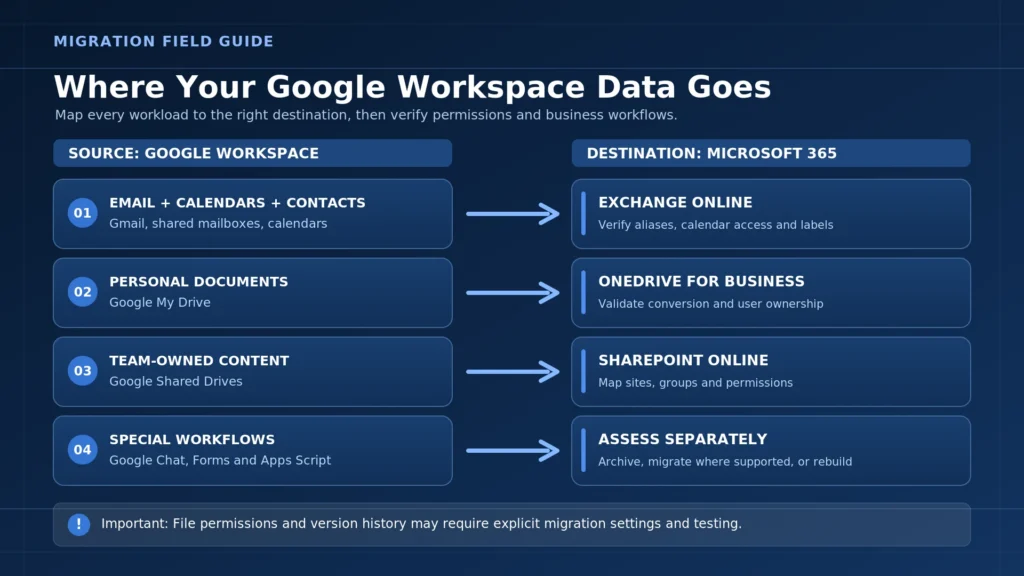
Google Workspace to Microsoft 365 mapping
| Google Workspace component | Typical Microsoft 365 destination | What needs special attention |
|---|---|---|
| Gmail | Exchange Online | Labels, folders, rules, aliases, forwarding, mailbox size |
| Google Calendar | Outlook / Exchange Online calendar | Shared calendars, room resources, delegation, recurring events |
| Google Contacts | Outlook / Exchange Online contacts | Custom fields, contact groups, duplicates |
| Google My Drive | OneDrive for Business | Ownership, sharing, Google-native formats |
| Google Shared Drives | SharePoint Online | Site architecture, permissions, metadata, ownership |
| Google Chat | Teams or separate archive | Conversation history, exports, supported migration methods |
| Google Groups | Microsoft 365 groups, distribution groups or other suitable structures | Membership, aliases, collaborative inbox behavior, archives |
| Google Forms | Microsoft Forms or an alternative workflow | Question logic, responses, workflows, linked data |
| Google Sites | SharePoint or redesigned website | Page structure, embedded content, features |
| Google Apps Script | Power Automate, Power Apps or another supported solution | Code, triggers, permissions, external integrations |
| Google Vault | Applicable preservation and eDiscovery arrangement | Legal holds, retention, export and record integrity |
This is a planning map, not a guarantee that every workload transfers automatically.
Microsoft’s native tools support several major migration workloads, including Gmail-related data and Google Drive content, but coverage and behavior depend on the selected workflow.
A complete assessment should identify unsupported information and determine how it will be preserved, converted, replaced, or excluded with approval.
Phase 1: Discover the Existing Google Workspace Environment Before Migrating Anything
Before creating migration batches, an IT engineer needs to understand the source environment.
Consider a twelve-person professional services company.
It may appear to have twelve mailboxes.
But its actual environment could include:
- Twelve licensed users
- Three shared Google Groups addresses
- An office manager’s shared calendar
- Two external accountants with file access
- Several Google Shared Drives
- A multifunction printer using Gmail SMTP
- A WordPress website sending contact-form messages
- Mobile phones connected to Gmail
- A former employee who owns important documents
- Google Vault retention or holds
- Third-party applications authenticated through Google
If those dependencies aren’t documented, a mailbox migration can finish successfully while business operations remain broken.
Discovery checklist
- Identify all active, suspended, and former Google Workspace users.
- Inventory primary addresses, aliases, and group addresses.
- Document mailbox sizes and unusual data volumes.
- Review shared calendars and delegated access.
- Inventory My Drive and Shared Drives.
- Identify external file sharing and ownership.
- Review Google-native files, scripts, forms, and integrations.
- Identify Google Chat and Vault retention requirements.
- List equipment and applications using Google email services.
- Review domains, DNS hosting, and administrative ownership.
- Record existing security and MFA settings.
- Identify business-critical workflows and acceptable cutover windows.
Why document ownership matters
A file stored in an employee’s My Drive may actually be a company-critical document.
A Shared Drive may contain folders shared with external clients.
An old service account may be sending payroll reports or automated application messages.
A proper migration identifies these dependencies before accounts are disabled.
Deliverable: A source inventory and migration-scope document showing what will move, what will not, and which decisions need business approval.

Phase 2: Prepare the Microsoft 365 Tenant, Licensing, and Security
The destination tenant should be ready before production data is moved.
This means more than purchasing Microsoft 365 licenses.
It includes planning identity, administrator access, user roles, device management, collaboration structure, and security.
Choose licensing based on actual requirements
| Microsoft 365 plan | General suitability | Important consideration |
|---|---|---|
| Business Basic | Web/mobile productivity, business email, collaboration | Does not provide the same desktop Office application entitlement as Standard |
| Business Standard | Business email, collaboration, desktop Office applications | Advanced identity and device-management needs may require additional licensing |
| Business Premium | Productivity plus additional identity, endpoint, and device-management capabilities | Policies and protections still require appropriate implementation |
| Enterprise plans | Organizations needing different scale or advanced compliance and security features | Features vary by SKU and add-on |
Some organizations may also need separate email protection, backup, archiving, or compliance services.
And paid Microsoft 365 Copilot capabilities are not automatically included with every Microsoft 365 Business Premium subscription. Confirm the exact bundle and users.
A five-person company may have different needs for its owner, bookkeeper, office staff, and field employees.
Assign licenses based on job requirements and the security baseline, not simply because every employee works for the same company.
Secure tenant preparation checklist
- Establish customer ownership and appropriate administrative access.
- Verify the business domain without prematurely redirecting mail.
- Prepare users, groups, and required mailboxes.
- Assign appropriate licenses.
- Configure MFA and suitable identity protections.
- Review privileged administrative roles.
- Plan device management for Windows, macOS, and mobile devices.
- Review external sharing defaults.
- Configure appropriate audit and retention capabilities.
- Review conditional access features where licensed.
- Plan backup and recovery coverage.
- Document emergency administration and account-recovery procedures.
Important: Domain ownership verification is not the same operation as changing the domain’s MX record.
The business can often prepare a Microsoft 365 tenant and verify the domain while Gmail remains the production mail system.
The exact steps depend on the existing domain, tenant, and identity configuration.
Phase 3: Select the Right Migration Tool
In 2026, businesses have more native Microsoft migration options than older articles may suggest.
Microsoft offers Google Workspace migration workflows through the Microsoft 365 administration experience, including supported migration paths for mailbox data and Google Drive content.
For example:
- Exchange migration workflows support Google Workspace mail, calendars, and contacts under applicable methods.
- Microsoft Migration Manager supports movement of supported Google Drive content into OneDrive and SharePoint.
- Microsoft has introduced simplified Google migration experiences designed for small and midsize organizations.
That means a ten-user company with a relatively straightforward environment may not need an expensive third-party tool.
However, the smallest environment is not always the simplest.
A three-person law firm with complicated client permissions and retention requirements may require more migration planning than a twenty-person company using ordinary mailboxes and a few shared folders.
Native Microsoft tools versus third-party migration tools
| Consideration | Microsoft native migration tools | Third-party migration tools |
|---|---|---|
| Basic supported mailbox migration | Available | Commonly available |
| Calendar and contact migration | Available through supported Google migration methods | Depends on product |
| Google Drive to OneDrive/SharePoint | Supported through Migration Manager | Depends on product |
| Shared Drive handling | Supported with appropriate mapping and limitations | Varies by product |
| Complex permissions | Requires careful settings, mapping, and testing | May offer specialized mapping features |
| Unsupported Google data | May need a separate preservation or conversion process | Coverage varies significantly |
| Reporting | Native scan, migration, and error reports available | Product-specific reporting |
| Cost | No separate third-party license for some included tooling | Often additional licensing and labor |
| Best choice | When supported functionality meets the requirements | When a verified capability gap justifies it |
Products such as BitTitan MigrationWiz, AvePoint Fly, and Movebot may be worth evaluating, but no product should be recommended merely because the project is large or legally sensitive.
Ask what exact workload it supports, what it cannot migrate, how it handles permissions, and what evidence it produces.
Avoid the IMAP-only trap
A basic IMAP migration usually moves email, not the full business collaboration environment.
If the project also requires calendar items, contacts, Shared Drives, Google Chat preservation, and application integrations, an IMAP-only approach will be incomplete.
Use the migration method that matches the approved scope.
Microsoft technical references:
Phase 4: Migrate Gmail, Calendars, Contacts, and Shared Mailboxes
Email migration requires more than transferring messages.
A business may rely on mail aliases, rules, delegated inboxes, shared addresses, calendars, and distribution lists.
These need to be mapped to appropriate Microsoft 365 structures.
Why Gmail labels cause confusion in Outlook
Gmail labels and Outlook folders use different organizational models.
A Gmail message can have multiple labels.
An ordinary Outlook message is generally organized within a folder, although other metadata and categorization mechanisms are available.
During a migration, the selected method may translate labels into folder-like structures.
Depending on the tool and configuration, that can produce confusing organization, apparent duplication, or unexpectedly large migrated mailboxes.
What administrators should do
Before migration:
- Review label structures on representative users.
- Identify labels that are unnecessary or duplicated.
- Confirm how the selected tool handles messages with multiple labels.
- Test with a mailbox that uses complicated labels.
- Review the resulting Outlook folders and message counts.
- Resolve important differences before migrating everyone.
Don’t assume that a tool’s label-to-folder conversion produces the same experience users had in Gmail.
For users with complex Gmail organization, a short training session may be more valuable than attempting to reproduce every label exactly.
Calendars and contacts need separate validation
Calendar migrations can involve limitations around room bookings, shared calendars, delegated access, colors, and certain event details.
Contact migration can also have limitations involving custom fields or additional addresses.
A successful mailbox transfer does not prove that shared scheduling works properly.
Mail and calendar pilot checklist
- User can sign in to Outlook on the web.
- Historical mail is accessible as expected.
- Important folders and labels were mapped acceptably.
- Internal and external messages can be sent and received.
- Aliases and agreed group addresses work.
- Required calendars are accessible.
- Recurring meetings and important appointments are reviewed.
- Contacts and contact lists are validated.
- Delegated access is configured as approved.
- Mobile devices are ready for the new account.
- Known migration errors are documented.
Phase 5: Move Google Drive and Shared Drives Into the Correct Microsoft 365 Structure
This is where many migrations become more complex than expected.
A company may have spent years creating Google Drive folders without a formal information architecture.
Permissions might be assigned to individuals instead of groups.
The same document may appear in several shared locations.
External collaborators may have access to files that nobody has reviewed recently.
Moving those structures without evaluating ownership can preserve confusion or introduce new access problems.
My Drive and Shared Drives have different destinations
My Drive: Individual work files will often move into the corresponding user’s OneDrive for Business.
Shared Drives: Departmental or team-owned content will often be better suited to SharePoint Online document libraries or Teams-connected SharePoint sites.
Not every file needs its own SharePoint site.
And not every employee’s private working document belongs in a company-wide shared library.
The design should reflect ownership and collaboration requirements.
Example SharePoint information architecture
                  MICROSOFT 365
                       |
              SHAREPOINT ONLINE
                       |
       +---------------+---------------+
       |               |               |
       v               v               v
   OPERATIONS       FINANCE         PROJECTS
      SITE            SITE            SITE
       |               |               |
   Approved staff  Limited access  Project groups
       |               |               |
   Shared files     Financial       Job files
                    documents       and plans

              ONEDRIVE FOR BUSINESS
                       |
                Individual work
                 and approved
                  file sharing
Illustrative information architecture. Actual sites, permissions, and separation requirements depend on the organization.
Important 2026 migration limitations
Microsoft Migration Manager supports Google-native file conversion, including:
- Google Docs to Word documents
- Google Sheets to Excel workbooks
- Google Slides to PowerPoint presentations
But conversion does not guarantee identical behavior.
Complex formulas, scripts, macros, advanced formatting, and application-specific functionality need review.
Microsoft also documents several settings that are easily missed:
File permissions: File-level permissions are not migrated by default in some Migration Manager workflows. Destination inheritance can determine who gets access unless appropriate options are chosen.
Version history: By default, only the latest file version may be copied. Earlier versions require appropriate supported settings and validation.
Orphaned files: Certain unorganized Google Drive files may not be scanned, migrated, or listed in ordinary migration reports.
Unsupported content: Some Google file and application types require separate handling.
These aren’t minor details.
A business may think the migration is complete while employees are unable to access required files or historical versions were not preserved.
SharePoint validation checklist
- Every required Shared Drive has a defined destination.
- Site owners and access groups have been approved.
- External sharing has been reviewed.
- Required file and folder permissions are verified.
- Important Google-native files open correctly after conversion.
- Critical spreadsheet formulas and workflows are tested.
- Required version history is preserved or otherwise accounted for.
- Orphaned and unsupported items are reviewed.
- Important shared links are tested or recreated.
- Representative users can perform their normal work.
A migration log showing files copied is not proof that every user has the correct access or that every converted spreadsheet functions as intended.
What Happens to Google Chat, Groups, Forms, and Apps Script?
These workloads should never be treated as incidental.
A small law firm might have important discussions in Google Chat.
An accounting business might use Google Forms for client intake.
A contractor might rely on a Google Apps Script that automatically distributes spreadsheet reports.
Those are business processes, not just files.
Google Chat to Teams
Microsoft’s standard Google Workspace mailbox and Drive migration workflows do not provide a general, guaranteed one-to-one conversion of all Google Chat history into native Microsoft Teams conversations.
Some tools may offer specialized migration or archiving capabilities.
Their precise supported source and destination features must be confirmed for the project.
If historical conversations matter, investigate Google Workspace export and preservation options, including applicable Google Vault capabilities.
Exporting chat history into an archive does not mean those conversations will appear as ordinary Teams messages.
Also remember that export availability can depend on retention settings, account permissions, and whether messages were preserved in the first place.
Google Groups
A Google Group used as a simple distribution address may map to a Microsoft distribution group.
But a collaborative inbox or discussion archive may require a different design.
Group email addresses, members, permissions, archives, and forwarding behavior should be reviewed before cutover.
Google Forms
A Google Form may have responses, linked Sheets, notifications, add-ons, or business workflows.
Moving a form’s questions does not necessarily recreate those dependencies.
Plan to test each important form or rebuild it using an appropriate supported application.
Google Apps Script
Google Apps Script automations are not automatically translated into Power Automate workflows.
Scripts may use Google APIs, spreadsheets, triggers, permissions, and external services.
Each critical automation needs its own inventory, redesign decision, and functional test.
A migration is incomplete when the data arrives but the business process depending on that data no longer works.
Phase 6: DNS Cutover, SPF, DKIM, DMARC, and Mail Flow
DNS cutover is the moment when many business owners start paying attention.
But changing the MX record should be one of the later steps, not the first.
Before mail routing changes, the Microsoft 365 tenant, users, mailboxes, security settings, and migration method should be ready.
What the main DNS records do
| Record | General purpose | Migration consideration |
|---|---|---|
| MX | Directs incoming email toward the designated mail system | Updated at approved mail cutover |
| SPF | Identifies authorized sending services through DNS | Must account for legitimate senders during coexistence |
| DKIM | Supports cryptographic signing and verification of messages | Configure and verify the relevant sending platform |
| DMARC | Establishes handling and reporting expectations for authentication alignment | Preserve appropriate policy while reviewing alignment |
| Autodiscover | Helps supported Outlook clients discover Exchange configuration | Configure according to Microsoft guidance |
| Other CNAME/TXT records | Verification and service-specific functions | Review rather than replacing unrelated records |
Why the SPF record deserves careful attention
A business might send legitimate email through:
- Google Workspace
- Microsoft 365
- Its website contact form
- A customer management platform
- A scheduling application
- A scanner or business appliance
- An email marketing service
During a transition, more than one platform may temporarily send on behalf of the same domain.
SPF should be designed around those legitimate services.
Publishing multiple separate SPF TXT records for the same domain is not the correct way to authorize multiple senders.
The appropriate record should be reviewed as one coherent policy, subject to the SPF specification’s limits and the company’s actual sending architecture.
Do not blindly replace a working SPF record with a generic Microsoft example while older systems are still sending.
DKIM and DMARC must be validated, not just enabled
DKIM signing needs to be configured for the services actually sending mail.
DMARC depends on authentication alignment and the organization’s selected policy.
A domain can have SPF and DKIM records present while legitimate applications still fail alignment.
Conversely, weakening an existing DMARC policy just to make a migration easier can create unnecessary exposure.
The goal is to preserve or improve valid email authentication while avoiding disruption to legitimate senders.
Safe, read-only PowerShell checks
An authorized Windows administrator can examine public DNS records without changing them.
# Replace example.com with the business domain.
# These commands only query DNS records.

$domain = "example.com"

# Current inbound mail-routing records
Resolve-DnsName -Name $domain -Type MX

# Current TXT records, including SPF if published
Resolve-DnsName -Name $domain -Type TXT

# DMARC policy record
Resolve-DnsName -Name "_dmarc.$domain" -Type TXT
These commands can help confirm which records a DNS resolver currently returns.
They do not prove that email authentication is correctly configured or that mail delivery works.
DKIM requires checking the appropriate selector records and actual signed messages.
DNS changes should be reviewed against the authoritative configuration, propagation behavior, and supported Microsoft setup instructions.
A controlled mail cutover sequence
- Confirm the approved cutover window.
- Verify mailboxes, aliases, groups, and migration readiness.
- Review relevant DNS TTL values in advance.
- Confirm SPF, DKIM, and DMARC transition requirements.
- Preserve the existing DNS configuration for reference.
- Update the required MX and related records.
- Complete the appropriate final or incremental migration steps.
- Test inbound and outbound mail.
- Check internal mail, aliases, and third-party applications.
- Monitor the old and new environments for delayed or misrouted messages.
- Record the cutover and unresolved items.
Reducing a DNS TTL can help certain record changes propagate sooner, but it does not guarantee that all cached records disappear immediately.
Can You Migrate With Zero Downtime?
Zero downtime should not be guaranteed.
A staged migration may substantially reduce disruption, especially if most data is copied before production mail routing changes.
But the project can still involve interruptions involving:
- DNS caching and mail routing
- Mailbox access
- Mobile device reconfiguration
- Outlook setup
- Reauthentication
- Calendar sharing
- File permissions
- OneDrive sync
- Third-party applications
- Google-based sign-in dependencies
The correct question is not simply, “Will email be down?”
It is:
Which business functions may be interrupted, for how long, what dependencies exist, and what will we do if validation fails?
A migration cutover isn’t always easily reversible
Changing an MX record back to Google does not reverse data already migrated, permissions already changed, or messages received into Microsoft 365.
Rollback planning should identify what can realistically be restored and what would require synchronization or reconciliation.
| Migration issue | Possible response |
|---|---|
| One Outlook profile fails | Resolve the affected client without necessarily reversing mail routing |
| A Shared Drive permission is wrong | Correct destination access after confirming intended ownership |
| A website stops sending emails | Review SMTP/API authentication and approved sending service |
| Mail delivery is misrouted | Investigate DNS, mail routing, recipient configuration, and logs |
| A critical workflow is unavailable | Use the approved business continuity or migration contingency plan |
| Unresolved data differences remain | Preserve both environments while reconciliation continues |
Keep Google Workspace accessible for an agreed transition period until critical data, mail flow, permissions, and business dependencies are validated.
Do not cancel the source service merely because the MX record has been changed.
A Practical Migration Timeline for a Massachusetts Small Business
There is no guaranteed migration schedule.
A five-user environment with ordinary mailboxes may be simpler than a five-user law firm with complex Shared Drives, retention requirements, and application integrations.
A sample project plan could look like this:
| Stage | Typical activities | Acceptance point |
|---|---|---|
| Discovery | Inventory users, data, applications, permissions, and risk | Approved migration scope |
| Destination preparation | Tenant, licensing, identity, security, file destinations | Microsoft 365 readiness |
| Pilot | Representative mailbox, calendar, files, devices | Pilot issues understood |
| Pre-stage | Copy supported data and monitor errors | Migration progress reviewed |
| Cutover | Final coordination, DNS, mail flow, clients | Essential business functions tested |
| Stabilization | Resolve exceptions, train users, verify data | Approved business handoff |
| Source retirement | Preserve required records, remove dependencies, review billing | Authorized Google Workspace shutdown |
Why we recommend a pilot
A pilot should represent the complex parts of the business, not just its easiest mailbox.
For example:
- One employee with many Gmail labels
- One user with a large mailbox
- A delegated calendar
- A representative Shared Drive
- A user with multiple mobile devices
- An employee relying on important Google-to-third-party integrations
A pilot of two carefully selected users may reveal more than moving five simple accounts first.
Don’t use a generic “48-hour cutover” promise
Mail routing changes and user readiness are not always completed on the same schedule.
The project plan should reflect data size, technical dependencies, user availability, service constraints, and business deadlines.
For a Massachusetts accounting firm, completing a migration immediately before a filing deadline may be a poor operational decision even when the technical work appears straightforward.
Technical Acceptance: How Do You Know the Migration Actually Worked?
A migration tool reporting “Completed” is useful.
It is not the only acceptance criterion.
A successful migration should be validated against the approved scope and the workflows people actually need.
Example acceptance matrix
| Workload | Validation test | Responsible party |
|---|---|---|
| Identity | Approved users can sign in and complete MFA | IT and designated user |
| Internal and external test messages succeed | IT | |
| Mailbox history | Representative folders and important messages are checked | IT and user |
| Calendar | Required events, sharing, and delegated scheduling function | User and IT |
| Contacts | Required records are available | User |
| Aliases and groups | Approved business addresses route correctly | IT |
| OneDrive | Representative personal files open and sync as intended | IT and user |
| SharePoint | Correct users can access agreed shared content | Site owner and IT |
| External sharing | Approved partners can access appropriate content | Business owner and IT |
| Device access | Outlook and required apps work on supported devices | IT and user |
| Applications | Website, printers, scanners, and business integrations work | IT and application owner |
| Data protection | Agreed backup and retention arrangements are reviewed | IT and business owner |
An acceptance report should also identify exceptions.
For example, a complex Google Sheets automation may require a separate project to recreate in Excel or Power Automate.
A historical chat archive may be retained outside Teams.
A delegated calendar may require manual recreation.
Completing the migration means that the agreed requirements have been tested, not that Google and Microsoft will behave identically.
Security and Compliance: What Massachusetts Businesses Need to Consider
A cloud migration creates an opportunity to improve security, but moving platforms does not automatically establish compliance.
The organization must review its actual data, applicable requirements, licensing, technical controls, and administrative procedures.
Massachusetts 201 CMR 17.00
Organizations that own or license certain defined personal information about Massachusetts residents may be subject to 201 CMR 17.00.
The regulation establishes information-security requirements, including a written information security program with safeguards appropriate to the covered organization.
A migration project may require review of:
- User and administrator access
- Authentication and account controls
- Protected file locations
- Device security
- Encryption requirements where applicable
- Logging and monitoring
- Service-provider responsibilities
- Employee procedures
- Retention and disposal
- Third-party access
Hiring an MSP or migrating to Microsoft 365 does not establish compliance by itself.
The organization remains responsible for understanding and meeting applicable legal obligations.
Official source: Massachusetts 201 CMR 17.00.
Healthcare: HIPAA and Microsoft 365
Healthcare organizations handling electronic protected health information (ePHI) need to consider applicable HIPAA requirements and their actual relationship with cloud service providers.
Microsoft offers a HIPAA Business Associate Agreement (BAA) through its applicable Online Services Data Protection Addendum for in-scope services.
A separate individually signed Microsoft BAA is not automatically required for every qualifying Microsoft 365 customer.
The organization should verify that the relevant service, licensing arrangement, and contractual terms are covered.
A BAA also does not mean the environment is automatically HIPAA compliant.
The organization still needs an appropriate risk assessment, safeguards, policies, access controls, training, and procedures.
Technical controls may include MFA, device protection, auditing, suitable encryption, restricted sharing, and other measures justified by the organization’s risk assessment and requirements.
Features such as Conditional Access, Purview capabilities, and advanced DLP may require specific licenses.
IT providers should coordinate with the organization’s privacy, security, and compliance professionals rather than presenting a Microsoft license as a compliance certification.
Microsoft reference: Microsoft HIPAA and HITECH compliance offering.
Law Firms: Confidentiality, Matter Access, and Retention
Law firms should consider obligations concerning client confidentiality, access controls, preservation, and records management.
Microsoft 365 can support structured document access through SharePoint and Teams.
However, creating a SharePoint site for each legal matter is not automatically necessary or appropriate for every firm.
The information architecture should consider:
- Matter ownership
- User and group permissions
- Ethical walls or access separation where required
- External client collaboration
- Document retention
- Legal holds
- Auditability
- Third-party integrations
- Approved document management systems
Microsoft Purview supports certain eDiscovery, retention, and audit capabilities, subject to licensing, configuration, and product limitations.
Preserving required legal records must be planned before Google accounts, Chat history, or Vault configurations are removed.
An attorney or qualified compliance professional should determine legal obligations.
Accounting and Financial Services: Sensitive Records and Client Access
Accounting and financial firms may process tax documents, payroll information, financial records, and customer data.
A migration should examine both security and the workflows that accountants rely on.
Important considerations include:
- Secure access to client files
- Appropriate MFA and device controls
- Restricted sharing
- Approved retention requirements
- Secure document exchange
- Historical records
- Backup and recovery
- Financial application integrations
Some accounting and financial organizations may have additional responsibilities under applicable federal or state requirements, including the FTC Safeguards Rule where relevant.
Those obligations are not satisfied merely by enabling Microsoft 365 security features.
Google Workspace vs. Microsoft 365: Benefits and Trade-Offs
A useful migration assessment should acknowledge both advantages and disadvantages.
| Decision factor | Potential Microsoft 365 advantage | Trade-off to consider |
|---|---|---|
| Desktop productivity | Full Office applications with appropriate licensing | License and workstation requirements |
| Identity management | Entra ID integration and advanced controls with eligible plans | Administrative complexity |
| Device management | Intune capabilities with eligible licensing | Enrollment and policy design |
| Collaboration | Teams and SharePoint structures | User training and permission architecture |
| Exchange Online and Outlook integration | Gmail workflow differences | |
| Automation | Power Automate and wider Microsoft ecosystem | Existing Google scripts may require redevelopment |
| Security and compliance | Broad optional tools and features | Coverage depends on SKU, policy, and governance |
| Costs | Potential consolidation of existing Microsoft services | Migration labor, licenses, training, add-ons |
There is no responsible reason to claim that SharePoint always scales better than Google Drive or that every industry primarily operates on Microsoft 365 without relevant evidence.
The business should evaluate the platform against its own requirements.
Common Google Workspace Migration Mistakes
Several problems recur because the project team focuses on transferring data instead of maintaining business functions.
Mistake 1: Changing MX records before the destination is ready
Better approach: Prepare the tenant, user accounts, routing requirements, and pilot first.
Mistake 2: Assuming Gmail labels are Outlook folders
Better approach: Test how the chosen migration method maps complex labels and communicate differences.
Mistake 3: Sending every Shared Drive into one SharePoint folder
Better approach: Define sites, libraries, owners, permissions, and external collaboration requirements.
Mistake 4: Forgetting website forms and automated senders
Better approach: Inventory applications, printers, scanners, and third-party platforms sending through Google.
Mistake 5: Treating sync success as permission validation
Better approach: Test actual access using representative authorized users.
Mistake 6: Deleting Google accounts too early
Better approach: Confirm data, retention, ownership, and business dependencies before decommissioning.
Mistake 7: Ignoring Google Chat and Vault records
Better approach: Identify legal and business preservation requirements and verify export options before shutdown.
Mistake 8: Failing to train employees
Better approach: Provide targeted guidance on Outlook, Teams, OneDrive, SharePoint, and new sign-in procedures.
Mistake 9: Assuming new Microsoft licenses make the tenant secure
Better approach: Configure and validate applicable identity, device, email, and sharing controls.
Mistake 10: Declaring completion before acceptance
Better approach: Use an agreed testing matrix, document exceptions, and obtain an authorized business handoff.
A Business Owner’s Google Workspace to Microsoft 365 Migration Checklist
Use this checklist when reviewing a migration proposal or preparing for a technical discovery call.
Before migration
- We know how many Google Workspace users and mailboxes exist.
- We have inventoried aliases, Groups, Shared Drives, and important calendars.
- We know which Google services our business applications depend on.
- We have identified required records, retention, and legal holds.
- We have confirmed Microsoft 365 license requirements.
- We understand the migration method and its limitations.
- A pilot and cutover plan have been approved.
- We have identified business owners responsible for validation.
During migration
- Destination identities and security controls are ready.
- Mailbox and file migration progress is reviewed.
- Migration failures and unsupported items are documented.
- Required permissions are mapped and tested.
- DNS and sender-authentication changes are controlled.
- Users have clear instructions for the cutover.
- Critical applications and automated email senders are tested.
After migration
- Email and calendars work as expected for representative users.
- SharePoint and OneDrive permissions have been validated.
- Important files and supported document conversions have been checked.
- Mobile devices and desktop applications are functioning.
- Business-critical integrations have been tested.
- Backup and retention ownership has been reviewed.
- Required historical records are preserved.
- Exceptions and follow-up work are documented.
- Google Workspace remains available until retirement is approved.
- The business understands ongoing Microsoft 365 administration and support.
How Much Does a Google Workspace to Microsoft 365 Migration Cost?
Migration pricing depends on more than mailbox count.
A quote should consider:
| Pricing factor | Why it affects the project |
|---|---|
| Users and mailboxes | Account provisioning, migration, and support effort |
| Mailbox size | Data transfer and verification workload |
| Shared Drives | Mapping, permission design, and file migration |
| Google-native applications | Conversion or redevelopment needs |
| Calendars and shared resources | Recreation and access validation |
| Security configuration | MFA, policies, device management, licensing |
| Workstations and mobile devices | Outlook setup and application deployment |
| Compliance requirements | Preservation, documentation, and testing expectations |
| Third-party migration tools | Additional licensing and implementation |
| User training | Time needed to support workflow changes |
| Stabilization | Post-cutover troubleshooting and exception handling |
A ten-user business with straightforward email may have a relatively simple project.
A ten-user organization with several Shared Drives, complex Google Sheets automation, and preservation requirements may need much more planning.
A professional proposal should explain the migration scope and exclusions.
The number of email addresses alone is not enough to produce a reliable estimate.
Google Workspace Migration Services for Massachusetts Businesses
Mass IT Pro Solution supports Microsoft 365 setup, migration planning, identity administration, Exchange Online, OneDrive, SharePoint, Teams, licensing, and related business IT services.
For a Massachusetts small business, we begin by reviewing the existing environment and identifying what the organization needs to preserve and support.
Boston and Cambridge
Professional firms may need dependable email cutovers, secure document access, and coordination with existing cloud applications.
Waltham, Newton, and Wellesley
Law firms, accounting practices, and consulting businesses may require careful identity, mailbox, file-permission, and retention planning.
Framingham and Worcester
Contractors, nonprofits, and other growing businesses may need support moving shared files, setting up employees, and integrating Microsoft 365 with workstations and field operations.
These are typical migration considerations, not claims about specific client outcomes.
Remote and on-site assistance depends on project scope and location.
Our Microsoft 365 and cloud solutions cover tenant setup, email migration, ongoing administration, and troubleshooting.
Frequently Asked Questions About Google Workspace to Microsoft 365 Migration
Can you migrate Gmail to Outlook without losing emails?
Supported migration methods can transfer qualifying mailbox data, but no migration should be advertised as guaranteeing zero data loss. Administrators should review migration limits, errors, mailbox counts, and representative messages and preserve an appropriate recovery or source-access plan.
Will our business email address change?
Not necessarily. Businesses can generally retain an existing custom domain and email addresses while changing the mail platform. Domain verification, recipient setup, and DNS changes must be coordinated.
How long does a Google Workspace to Microsoft 365 migration take?
It depends on users, mailbox size, files, permissions, tools, technical dependencies, and business requirements. A small migration may be relatively straightforward; complex collaboration environments can require more planning and validation.
Will there be email downtime during migration?
A staged approach may reduce disruption, but zero downtime cannot be guaranteed. DNS caching, client configuration, authentication, third-party senders, and other dependencies can affect the cutover.
What happens to Gmail labels?
Gmail labels do not behave exactly like Outlook folders. The result depends on the selected migration method, and complex labels should be tested before full deployment.
Can Google Shared Drives be migrated to SharePoint?
Yes, supported Google Drive migration tools can move Shared Drive content to SharePoint. Administrators still need to review destination design, identity mapping, permissions, version history, and unsupported content.
Do Google Docs, Sheets, and Slides become Office files?
Microsoft Migration Manager can convert supported Google-native documents into Word, Excel, and PowerPoint formats. Complex functionality, scripts, formatting, and other features may not behave identically after conversion.
Will Google Chat history appear inside Microsoft Teams?
Not automatically through the standard Microsoft Google mailbox and Drive migration workflows. Export, retention, archive, and specialized migration options must be assessed separately.
Is Microsoft 365 Business Premium required for migration?
Not necessarily. The correct license depends on the workloads, applications, identity, device-management, and security requirements. Certain advanced features require Business Premium or other qualifying subscriptions.
Is Microsoft 365 more secure than Google Workspace?
Neither platform should be considered automatically more secure. Both provide significant security capabilities. Effective protection depends on licensing, settings, identity management, devices, user practices, and ongoing administration.
Does Microsoft 365 include a HIPAA BAA?
Microsoft offers a HIPAA BAA for in-scope services through the applicable contractual terms, including its Data Protection Addendum. Customers should verify coverage and their own obligations. A BAA does not automatically establish HIPAA compliance.
Should we cancel Google Workspace as soon as email starts working?
No. First verify migrated data, mail routing, files, permissions, retention obligations, integrations, and required historical records. Retire Google Workspace only through an approved decommissioning plan.
A Good Migration Doesn’t End When Outlook Opens
It’s tempting to define success as the moment the first Outlook mailbox starts receiving email.
But that is only one checkpoint.
A real business migration should leave employees able to communicate, access the correct documents, use critical applications, collaborate appropriately, and recover necessary information.
It should also leave the company with clear ownership of its domain, Microsoft 365 tenant, administrator access, security policies, and ongoing support.
The right migration is not the one that moves the most data the fastest. It is the one that preserves the business’s required information and workflows while introducing a supportable new environment.
Planning a Google Workspace to Microsoft 365 Migration in Massachusetts?
Mass IT Pro Solution helps Massachusetts businesses review their Google Workspace environment, prepare Microsoft 365, plan the migration, and address the technical work involved in email, identity, collaboration, and user access.
We can help identify which data can move through supported tools, which workflows require additional attention, and how the project should be validated before Google Workspace is retired.
Request a Microsoft 365 Migration Assessment
When contacting us, include the number of email users, approximate Google Drive storage, number of Shared Drives, current domain provider, and any business applications using Google accounts or email.
Mass IT Pro Solution
Microsoft 365 Migration | Exchange Online | Teams | SharePoint | OneDrive | Cybersecurity | Managed IT
Phone: 508-254-4704
Email: support@massitpro.com
Serving Greater Boston, MetroWest, Worcester, and surrounding Massachusetts communities.
Google Workspace and Microsoft 365 are trademarks and services of their respective providers. Migration capabilities, licensing, tool availability, and platform behavior can change. Workloads, support, costs, and acceptance criteria depend on the approved project scope. No migration is guaranteed to be disruption-free, loss-free, or automatically compliant with legal or regulatory requirements. Regulatory discussion is general information, not legal advice.
Primary Technical and Regulatory References
- Microsoft: Switch from Google Workspace to Microsoft 365
- Microsoft: Google Workspace Mail Migration
- Microsoft: Consolidated Google Workspace Migration
- Microsoft: Migration Manager for Google Drive
- Microsoft: Google Drive Migration Preparation and Limitations
- Microsoft: Unsupported Files in Migration Manager
- Google: Export Your Organization’s Data
- Microsoft: HIPAA and HITECH Compliance Offering
- Massachusetts: 201 CMR 17.00