

How to recognize recurring IT problems, calculate the impact of downtime, identify cybersecurity gaps, and decide whether managed IT support is right for your business.
Your office manager has become the unofficial IT department. Outlook stops working, so someone restarts the computer. The Wi-Fi drops during a customer meeting. A former employee’s Microsoft 365 account is still active because nobody knows who was responsible for disabling it.
Nothing has completely failed. Your business is still operating.
But how much of your company’s time is spent keeping technology working instead of using it to get work done?
Quick answer: A small business may need managed IT services when recurring technology issues interrupt work, employee access is poorly controlled, security and backups lack clear ownership, or the organization has outgrown its informal support arrangements. Managed IT establishes ongoing responsibilities for covered systems, rather than relying exclusively on emergency repairs.
The decision isn’t determined by company size alone. A six-person law firm may have more demanding IT and security requirements than a twenty-person organization using only a few cloud applications.
Here are ten warning signs, how to evaluate their seriousness, and what a well-managed IT environment should look like.
What Are Managed IT Services, and What Do They Actually Change?
Managed IT services are an ongoing arrangement in which a provider assumes defined responsibility for supporting and maintaining selected business technology systems.
Depending on the contract, this can include:
- Technical help desk and user support
- Windows and macOS workstation management
- Microsoft 365 administration
- Patch management and device monitoring
- Endpoint cybersecurity
- Email and identity protection
- Network and firewall management
- Backup oversight and recovery planning
- Employee onboarding and offboarding
- Vendor coordination and technology planning
The important phrase is defined responsibility.
Paying a monthly fee doesn’t automatically mean every system is monitored, every incident is covered, or every support request receives immediate attention.
A useful managed IT agreement identifies which users, devices, applications, locations, and services are covered, along with the applicable support hours, response targets, and exclusions.
Reactive IT support versus managed IT
| Question | Reactive or break-fix IT | Managed IT |
|---|---|---|
| Who notices recurring problems? | Often employees or management | Provider may review trends across covered systems |
| Who handles software updates? | Requested as needed or managed internally | Defined patch-management responsibility |
| Who manages employee access? | Whoever receives the request | Documented onboarding and offboarding procedures |
| Who reviews backup failures? | Depends on separately arranged services | Assigned responsibility if backup oversight is included |
| Who investigates cybersecurity alerts? | Separate service or incident engagement | Defined security service, where contracted |
| How are support costs handled? | Usually per incident or hour | Recurring fee with documented scope and exclusions |
| Who plans technology replacements? | Business owner or internal staff | Provider may assist through scheduled reviews |
Neither model is inherently suitable for every business.
The difference is how responsibility is assigned and maintained between individual incidents.
Sign #1: The Same IT Problems Keep Returning
An employee’s Outlook profile stops syncing every few weeks.
A printer disappears from the network.
A shared drive disconnects.
A workstation slows down, gets restarted, and temporarily works again.
These problems can appear unrelated, but repeated failures often indicate that the immediate symptom is being addressed without enough investigation into the underlying cause.
Why recurring support tickets matter
A repeated failure can involve several layers of technology.
| Reported problem | Possible underlying issue | What should be investigated |
|---|---|---|
| Outlook repeatedly disconnects | Authentication, client, network, or service issue | Microsoft 365 status, device logs, identity and connectivity |
| Shared folder becomes unavailable | DNS, permissions, server, or VPN issue | Access path, server health, network communication |
| Printer repeatedly goes offline | IP addressing, driver, network, or device fault | Printer logs, assigned address, connection and spooler |
| Workstation frequently freezes | Storage, memory, driver, application, or hardware issue | Event logs, hardware diagnostics, resource usage |
These are possibilities, not diagnoses.
A technician should use evidence to narrow the cause rather than immediately reinstalling software or replacing hardware.
What managed IT should change
A provider should be able to review recurring incidents, identify trends, and document relevant corrective actions.
For example, if three employees repeatedly lose access to the same shared application, the provider should investigate whether those incidents share a dependency.
Question for your current provider: Can you show which problems have recurred over the past three months and what was done to investigate them?
If nobody tracks recurring issues, the organization may repeatedly pay to restore service without understanding why it failed.
Sign #2: Downtime Is Quietly Consuming Employee Productivity
Not every business interruption involves a complete outage.
Sometimes employees lose fifteen minutes waiting for a login issue to be resolved.
Sometimes a law firm can’t access a shared document during a client meeting.
An accounting office may lose access to its financial software during a reporting deadline.
A construction company’s field supervisor may be unable to retrieve a project file.
The direct technical problem may be small.
The business impact may not be.
What does IT downtime actually cost?
A useful starting point is to calculate affected employee time.
Illustrative example:
A twelve-person office experiences three recurring interruptions in one month. Each interruption affects eight employees for thirty minutes.
[
8\text{ employees}\times0.5\text{ hours}\times3=12\text{ employee-hours}
]
If the assumed fully burdened labor cost is $40 per hour:
[
12\times$40=$480
]
That’s $480 of labor capacity affected in the example, not a verified loss, additional payroll expense, or an estimate of what Mass IT Pro Solution clients experience.
Actual financial impact depends on whether employees can perform other work, whether customer transactions are delayed, and whether billable time or revenue is lost.
A more complete downtime worksheet
| Factor | What to record |
|---|---|
| Number of affected employees | How many couldn’t perform their normal work |
| Duration | How long the interruption affected them |
| Frequency | How often the same problem occurred |
| Business function | Billing, customer communication, scheduling, sales, or operations |
| Workaround | Whether employees could perform alternative tasks |
| Additional costs | Overtime, vendor fees, missed deadlines, or recovery expenses where documented |
What managed IT should change
A provider can establish incident priorities based on business impact, maintain records of recurring interruptions, and monitor agreed systems for relevant failures.
This cannot eliminate every outage, but it gives the business a structured process for managing technology problems.
Warning sign: Nobody can explain which systems cause the most disruption or how frequently the same problems return.
Sign #3: One Employee Has Become the Unofficial IT Department
Many small businesses have someone everyone turns to when technology stops working.
It might be the office manager, administrator, bookkeeper, or owner.
That person is asked to:
- Reset employee passwords
- Set up new computers
- Manage Microsoft 365 accounts
- Fix printers
- Call the internet provider
- Resolve software problems
- Coordinate equipment purchases
- Troubleshoot Wi-Fi
- Investigate suspicious emails
- Explain why backups are failing
They may be capable and genuinely helpful.
But their actual job may have little to do with administering a business technology environment.

The hidden operational risk
When one employee informally handles everything, the company may have limited documentation, inconsistent technical decisions, and no backup person when that employee is unavailable.
The employee may also have administrative privileges they were never trained to manage securely.
This creates a key-person dependency.
Consider what happens if the employee takes vacation, changes roles, or leaves the company.
Who knows the administrator accounts, licenses, vendors, device inventory, and recovery procedures?
What managed IT should change
An MSP can provide a defined technical escalation path, maintain agreed documentation, and handle specialized work while allowing the office manager to coordinate business priorities.
The goal isn’t to remove the employee from every technology conversation.
It’s to stop making them personally responsible for work requiring skills, time, and authority outside their role.
Question to ask: If our unofficial IT person is unavailable tomorrow, can someone else safely administer the environment?
Sign #4: Employee Onboarding and Offboarding Are Inconsistent
A new employee arrives, but their laptop isn’t ready.
They don’t have the correct Microsoft 365 license.
They cannot access the shared files required for their position.
MFA enrollment is incomplete.
Instead of working, they spend their first morning waiting for accounts to be created.
This is frustrating, but offboarding can involve greater security and data-retention consequences.
Why offboarding is more than deleting an account
A departing employee may have access to:
- Microsoft 365 and cloud applications
- Business email and files
- VPN or remote access
- Line-of-business applications
- Financial or customer systems
- Shared credentials
- Company laptops and mobile devices
- Third-party vendor portals
Disabling one account may not remove access to every system.
And deleting a Microsoft 365 user without an appropriate data-preservation plan can create additional problems involving business records, email, OneDrive, retention policies, or legal holds.
Microsoft’s guidance separates sign-in restriction, session revocation, data preservation, license management, and account deletion.
A professional offboarding checklist
- Confirm the approved departure date and the person authorizing access changes.
- Identify relevant business, cloud, VPN, and third-party accounts.
- Block or remove access in the appropriate systems.
- Revoke active sessions and tokens where supported and appropriate.
- Recover managed equipment and authorized business information.
- Address shared credentials and delegated access.
- Preserve necessary email and documents according to policy and legal obligations.
- Review forwarding rules, shared mailbox needs, and ownership of work.
- Adjust or remove licensing only after considering data and service dependencies.
- Document completion and any unresolved access paths.
Actual procedures depend on the organization’s identity architecture, contracts, and data-retention requirements.
Technical reference: Microsoft’s former employee removal and data security guidance.
What managed IT should change
The MSP and business leadership should agree on repeatable onboarding and offboarding procedures, with clear authorization and completion checks.
Warning sign: Former employees retain access because nobody owns the complete departure process.
Sign #5: Microsoft 365 Has Become Difficult to Administer
Microsoft 365 may start with a few mailboxes.
Over time, it becomes central to a company’s communication and document workflows.
The business adds Teams, OneDrive, SharePoint, shared mailboxes, external collaborators, mobile devices, and different licensing plans.
Meanwhile, different people may make changes without reviewing the overall configuration.
Common signs of Microsoft 365 management problems
- Accounts remain active after employees leave.
- Multiple users have unnecessary administrator privileges.
- MFA policies are inconsistently applied.
- Staff cannot find the correct SharePoint or Teams files.
- Shared mailboxes and distribution groups lack clear ownership.
- Licensing costs are poorly understood.
- External sharing permissions have never been reviewed.
- Nobody knows which applications have been granted tenant permissions.
- Cloud backup and retention responsibilities are unclear.
Not every one of these is evidence of compromise.
But each can justify an administrative review.
A useful Microsoft 365 management review
| Area | What should be checked |
|---|---|
| Users | Active, disabled, external, and departed identities |
| Privileged accounts | Who has administrative roles and why |
| MFA and access policies | Coverage, exclusions, and appropriate security controls |
| Licensing | Assigned licenses and business requirements |
| Exchange Online | Mailboxes, forwarding, rules, and relevant security configuration |
| SharePoint and Teams | Ownership, sharing, and access permissions |
| Devices | Which devices are managed and under what policy |
| Backup and retention | Supported workloads, retention rules, independent recovery needs |
| Application integrations | Authorized access and permission review |
What managed IT should change
Ongoing Microsoft 365 administration can bring ownership to licensing, account access, support, configuration changes, and security reviews.
The provider should document what it manages and identify any cloud services outside the agreement.
Question to ask: Who can demonstrate that our most important Microsoft 365 security and administrative settings are configured as intended?
Sign #6: Cybersecurity and Software Updates Are Inconsistent
Installing antivirus software is not the same as managing cybersecurity.
A business may have endpoint security on some computers while others run unsupported software.
MFA may be enforced for certain employees but not administrators.
A firewall may have been installed years ago without a meaningful configuration review.
Security alerts may be generated but never investigated.
The problem isn’t always missing technology.
Sometimes it’s missing responsibility.
Why a layered approach matters
The CISA small-business cybersecurity resources emphasize measures such as MFA, software updates, backups, encryption, employee awareness, and logging.
The NIST Cybersecurity Framework 2.0 Small Business Quick-Start Guide provides a framework for organizing security activities around six functions:
Govern, Identify, Protect, Detect, Respond, and Recover.
These functions are not products to purchase.
They describe different responsibilities involved in managing cybersecurity risk.
What business owners should be able to verify
| Security control | Evidence worth requesting |
|---|---|
| Endpoint security | Which covered devices have the agreed protection installed and functioning |
| Patch management | Update status and important unresolved exceptions |
| MFA | Where it’s enforced and which accounts require further review |
| Privileged access | Administrator roles and their business justification |
| Email security | Agreed filtering, authentication, and response arrangements |
| Security alerts | Who reviews, investigates, and escalates them |
| Incident response | A defined contact and escalation procedure |
| Backups | Protected workloads, failed jobs, and recovery-test status |
A dashboard showing security software installed does not establish that every device is protected against every threat.
Likewise, a firewall report showing thousands of blocked connections doesn’t prove that thousands of attacks were successfully prevented.
A safe Windows workstation health check
For an authorized technician, the following PowerShell commands provide an initial, read-only snapshot of selected workstation information.
# Identify the Windows operating system
# and the most recent boot time.

Get-CimInstance Win32_OperatingSystem |
    Select-Object Caption, Version, LastBootUpTime
# Display local volume capacity.
Get-Volume |
Select-Object DriveLetter, Size, SizeRemaining# On systems where Microsoft Defender information
# is available, inspect selected status fields.
Get-MpComputerStatus |
Select-Object AntivirusEnabled,
RealTimeProtectionEnabled,
AntivirusSignatureLastUpdatedImportant interpretation: These commands do not conduct a security audit, prove that all updates are installed, or establish compliance. The Defender command may be unavailable or its output may require additional interpretation when third-party endpoint protection is installed.
Never make production security changes solely on the basis of one command result.
What managed IT should change
A defined security plan assigns responsibility for protecting covered systems, handling exceptions, and escalating relevant findings.
The service agreement should distinguish automated monitoring, human security investigation, and ordinary IT help desk coverage. Those are not necessarily available on the same schedule.
Warning sign: Security tools exist, but nobody knows who investigates the alerts or verifies important exceptions.
Sign #7: Backups Exist, but Nobody Can Show a Successful Restore
Business owners frequently hear that backups are running.
But that answer does not establish whether recovery is possible.
A backup service may be protecting only selected workstations.
An important server may be excluded.
Microsoft 365 data may have different retention and recovery coverage than expected.
An old backup may be inaccessible because of account, encryption-key, or platform changes.
Questions worth asking
- What systems and data are protected?
- Which devices and cloud applications are outside the backup scope?
- How are backup failures handled?
- Where are recovery copies stored?
- Are backup credentials and management access protected?
- How much recent data could we lose?
- How long might recovery take?
- When was the last controlled restore test?
- Who has responsibility for carrying out recovery?
Backup success versus recovery readiness
| What you know | What remains unanswered |
|---|---|
| “The backup ran successfully.” | Can the data actually be restored? |
| “The files are in the cloud.” | Are all required workloads protected? |
| “We have multiple copies.” | Are they accessible, usable, and appropriately protected? |
| “The server is backed up.” | Can applications and dependencies be recovered? |
| “Microsoft 365 stores our documents.” | Do native retention and configured backup meet our recovery requirements? |
What managed IT should change
The provider should establish the agreed backup scope, investigate failures, and document appropriate recovery testing.
Recovery priorities should be based on business impact.
For example, the system responsible for processing customer orders may need a different recovery target than a workstation containing only replaceable software.
A good recovery plan identifies the recovery point objective (RPO) and recovery time objective (RTO) appropriate to the business.
An RPO describes the acceptable amount of potential data loss in time.
An RTO describes a target duration for restoring a business function after an interruption.
Neither is automatically guaranteed by purchasing backup software.
Warning sign: Nobody can produce a recent recovery-test result for systems the business cannot operate without.
Sign #8: Office Wi-Fi, Networking, or Remote Access Has Become Unreliable
Many small-business networks grow one emergency purchase at a time.
A basic router is installed.
An inexpensive switch is added under a desk.
A wireless extender is placed near a meeting room.
Another access point is connected without documenting how the network is configured.
Eventually, no one knows which device controls routing, where the cabling terminates, or which equipment is still supported.
Common symptoms
- Teams or Zoom calls regularly freeze.
- Business applications are slow on certain devices.
- Guest Wi-Fi reaches internal resources unexpectedly.
- Printers and other devices disappear from the network.
- Employees lose VPN access.
- Wi-Fi performance varies significantly between work areas.
- POS terminals disconnect.
- Equipment requires frequent restarts.
These symptoms do not automatically justify replacing the entire network.
An engineer should investigate the relevant environment first.
What a network assessment should examine
| Component | Potential review |
|---|---|
| Internet service | Availability, capacity, and provider-reported issues |
| Router or firewall | Support status, policies, logs, and resources |
| Network switching | Link speeds, port errors, PoE capacity |
| Cabling | Termination quality and connectivity |
| Wireless access points | Coverage, interference, capacity, configuration |
| DNS and DHCP | Addressing and name-resolution behavior |
| Security segmentation | Intended restrictions between network segments |
| Applications | Dependencies and end-to-end functionality |
A speed test alone cannot establish network health.
Video calls, for example, depend on latency, jitter, and packet loss, not merely download speed.
What managed IT should change
A provider can document the infrastructure, monitor agreed network components, troubleshoot recurring faults, and plan changes based on actual requirements.
Some organizations need an installation project first, followed by a smaller maintenance arrangement.
Others need ongoing network management as part of a broader managed IT agreement.
Warning sign: The office experiences recurring connectivity problems, and no one can explain the network topology or identify who maintains its equipment.
Sign #9: Every Technology Vendor Blames Someone Else
An employee cannot use a business application.
The software vendor says the network is the problem.
The internet provider says its service is healthy.
The firewall vendor says the traffic is being allowed.
The application provider says the server needs an update.
The business owner is left coordinating calls between companies with no clear technical owner.
This is a common operational problem in environments with several technology suppliers.
What vendor coordination should look like
A competent IT lead should be able to:
- Establish which business function is affected.
- Collect evidence from the relevant systems.
- Identify the responsible vendor or likely dependency.
- Open and track appropriate support cases.
- Coordinate authorized tests or changes.
- Record the findings and resulting actions.
- Verify the business function when the issue is resolved.
The MSP cannot compel another company to resolve its own service failures or override a vendor’s licensing and support policies.
But it can help establish the technical facts and reduce the burden placed on employees.
Example: A cloud-based phone system stops working
The issue might involve the provider’s service, local internet connectivity, a network configuration, or endpoint hardware.
A provider should narrow the failure using available evidence before assigning blame.
What managed IT should change: The business has a defined technical contact responsible for coordinating within the agreed support scope.
Warning sign: Management regularly spends hours repeating the same symptoms to several vendors because nobody owns the investigation.
Sign #10: Your Business Has Grown, but Its IT Processes Haven’t
A five-person company may operate successfully with a simple environment.
As the business expands, technology responsibilities expand too.
There may be more workstations, remote employees, cloud applications, locations, sensitive records, vendors, and customer requirements.
But the company may still have the same informal IT processes it used years earlier.
Growth creates new dependencies
| Business change | IT responsibility that may grow |
|---|---|
| Hiring employees | Device provisioning, licensing, permissions, support |
| Opening another office | Connectivity, security, network design, documentation |
| Adding remote workers | Device management, identity security, remote access |
| Adopting cloud applications | Integration, administration, availability planning |
| Handling more sensitive information | Access controls, data protection, governance |
| Serving regulated industries | Safeguards, documentation, contractual obligations |
| Using more software vendors | Coordinated support and lifecycle planning |
Massachusetts data-security considerations
Massachusetts regulation 201 CMR 17.00 applies to organizations that own or license certain defined personal information about Massachusetts residents.
The regulation establishes requirements for protecting that information, including a written information security program and appropriate administrative, technical, and physical safeguards.
Not every item stored in a business system falls under the regulation’s definition of personal information.
And using managed IT services does not automatically establish compliance.
The organization remains responsible for understanding applicable obligations, which may also involve sector-specific rules and contractual requirements.
Official reference: Massachusetts 201 CMR 17.00.
What managed IT should change
The provider can help maintain an equipment inventory, document risks, plan replacements, implement agreed technical safeguards, and align technology decisions with the organization’s growth.
The company may also need legal, compliance, insurance, or specialized application advice outside the MSP’s role.
Warning sign: Important technology and security decisions only get attention when a customer, auditor, vendor, or employee asks a question no one can answer.
How Many Warning Signs Mean Your Business Needs Managed IT?
There is no validated industry rule stating that two, four, or five of these problems automatically mean a company needs an MSP.
Severity, frequency, business impact, and ownership matter more than a simple score.
For example, a business with recurring printer issues and one slow workstation may benefit from targeted troubleshooting.
A company with only one warning sign, such as a former employee retaining access to sensitive systems, may need urgent corrective action.
A practical decision matrix
| Situation | Suggested next step | Why |
|---|---|---|
| Isolated, low-impact technical issue | Focused repair or project | Ongoing managed coverage may not be necessary |
| Several recurring problems without clear patterns | Technical assessment and incident review | Determine whether issues share an underlying cause |
| Repeated interruptions affecting critical operations | Structured support and maintenance evaluation | The business may need defined escalation and preventive work |
| Unclear backup or security ownership | Prompt risk and recovery assessment | Potential exposure may justify action regardless of problem count |
| Growing environment with no internal IT capacity | Managed or co-managed IT evaluation | Ongoing responsibilities need accountable owners |
The question that matters most
If this issue happens again tomorrow, does your business know who owns it, how it will be investigated, and what the recovery plan is?
If the answer is consistently unclear across important systems, a structured support arrangement is worth considering.
A Business-Owner Self-Assessment: 10 Questions
Use this checklist during a management meeting or provider review.
- Recurring issues: Are the same technical problems repeatedly interrupting employees?
- Downtime: Are technology interruptions affecting customers, deadlines, or productive time?
- Key-person dependency: Does one nontechnical employee handle most IT responsibilities?
- Employee lifecycle: Are onboarding and offboarding inconsistent or poorly documented?
- Microsoft 365: Are licenses, permissions, MFA, or administration difficult to oversee?
- Cybersecurity: Can anyone demonstrate patch status, protection coverage, and alert ownership?
- Backups: Can the business produce recent, relevant recovery-test results?
- Networking: Are connectivity issues recurring without a documented diagnosis?
- Vendor management: Is there no technical owner coordinating third-party support?
- Growth: Has the business expanded beyond its original technology processes?
For each checked item, identify the affected system, business impact, responsible person, and proposed next action.
The number of checked boxes is a conversation starter, not a certification, maturity rating, or validated cybersecurity score.
What Should a Managed IT Provider Actually Deliver?
A managed IT agreement should produce more than a list of installed applications.
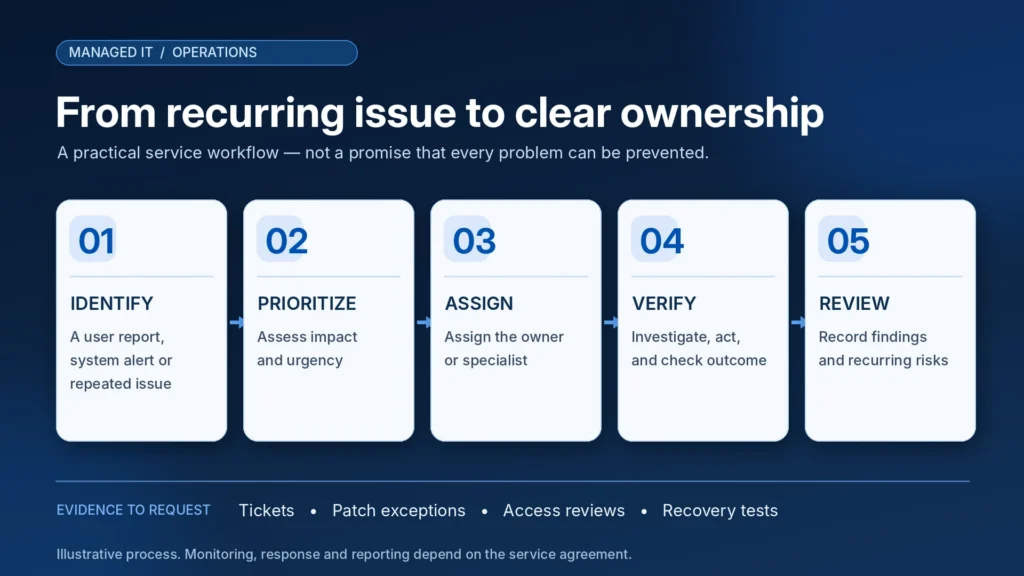
It should create a defined operating process.
An example looks like this:
       USER / DEVICE / SYSTEM
                |
                v
       SUPPORT OR MONITORING
                |
                v
       TRIAGE AND PRIORITIZE
          Business impact
                |
                v
       ASSIGNED RESPONSIBILITY
     Help desk / engineer / security
                |
                v
       INVESTIGATE AND RESPOND
                |
                v
       VALIDATE BUSINESS FUNCTION
                |
                v
       DOCUMENT AND FOLLOW UP
                |
                v
         REVIEW RECURRING RISKS
This is an illustrative workflow, not a guarantee of response times or coverage.
Ask for measurable service evidence
| Responsibility | Useful evidence |
|---|---|
| Support | Ticket records, priorities, escalations, recurring-issue review |
| Devices | Inventory and management coverage |
| Updates | Patch status and documented exceptions |
| Microsoft 365 | Account changes, administrative decisions, access reviews |
| Security | Agreed monitoring scope, relevant alerts and escalations |
| Backups | Failed jobs, protected workloads, restore-test results |
| Network | Inventory, configuration records, health findings |
| Planning | Risks, lifecycle issues, and agreed next actions |
The provider should explain which reports are available under the contract and how often they will be reviewed.
The goal isn’t to collect dashboards. It’s to know whether someone is doing the work your company depends on.
What Does Managed IT Cost Compared With Break-Fix Support?
There is no universal answer.
Break-fix support can be less expensive for businesses with simple technology needs and infrequent issues.
Managed IT may offer advantages where the company needs ongoing support, security controls, monitoring, cloud administration, backups, and an accountable technical team.
But recurring services also create ongoing costs.
A fair comparison requires the same assumptions.
Compare the full scope
| Cost area | Questions to ask |
|---|---|
| Monthly fee | Per user, per device, per site, or a hybrid? |
| Microsoft 365 | Are licenses included or separately billed? |
| Cybersecurity | Which services and monitoring coverage are included? |
| Backup | What data, devices, storage, and retention are covered? |
| Help desk | Which users, hours, and issues are included? |
| On-site visits | Included, limited, or billed separately? |
| Infrastructure | Are servers, firewalls, switches, and Wi-Fi included? |
| Projects | What counts as a separate project? |
| Setup | Is onboarding or remediation charged separately? |
| Contract | Minimum term, cancellation, hardware ownership, and handoff? |
A plan that costs less each month may exclude services the company still needs to buy elsewhere.
A comprehensive plan may cost more than a simple environment actually requires.
The right comparison is the total cost of the responsibilities your business needs covered.
Mass IT Pro Solution offers customizable managed IT and cybersecurity arrangements. We can evaluate the environment and prepare a proposal defining included services, licensing, and any additional work.
When Break-Fix or Co-Managed IT May Be Enough
A comprehensive managed IT agreement isn’t the only option.
Break-fix support may be appropriate when
The business has relatively few devices, occasional technical issues, low operational complexity, and an appropriate internal process for security, updates, backups, and account administration.
However, low device count doesn’t eliminate security responsibilities.
Co-managed IT may be appropriate when
The business already has an internal IT employee or department but needs support in selected areas.
For example, internal staff might handle employee support while an MSP assists with endpoint monitoring, cybersecurity, Microsoft 365 administration, backups, or complex networking.
The agreement should define where internal responsibility ends and external responsibility begins.
Project-based IT may be appropriate when
A business needs a specific improvement, such as:
- Replacing an unsupported firewall
- Correcting network cabling
- Migrating Microsoft 365
- Rebuilding a server
- Implementing a backup solution
- Standardizing employee workstations
A defined project may solve the immediate requirement without justifying a broader recurring contract.
The correct service model follows the business’s needs.
What Should an Initial IT Assessment Examine?
Before committing to an agreement, leadership should understand the environment.
A practical assessment can organize findings into four areas.
1. Inventory and dependencies
Which users, workstations, servers, cloud applications, network devices, and vendors support the business?
Which systems are most critical to daily operations?
2. Security and recovery
Who manages administrator access?
Are important devices and applications supported?
Who reviews security alerts?
Which backups exist, and what recovery tests have been performed?
3. Support and recurring issues
What has failed repeatedly?
How are support requests handled?
Are there common root causes or known limitations?
4. Cost and planning
Which licenses and services are already being purchased?
Are any important capabilities duplicated or missing?
What changes are urgent, and which can be scheduled?
Example assessment outcome
| Finding | Priority | Recommended action |
|---|---|---|
| Former employee retains active access | Prompt review | Follow authorized access-removal procedures |
| Critical backup has never been restored in a test | High review priority | Validate backup coverage and recovery procedure |
| Three workstations regularly lose printer access | Routine technical investigation | Determine cause before replacing equipment |
| Microsoft 365 licenses lack assigned ownership | Administrative cleanup | Review accounts, licensing, and permissions |
| Firewall support lifecycle is approaching a deadline | Planned remediation | Review replacement or supported upgrade options |
These are illustrative findings, not a record of any particular Mass IT Pro Solution customer.
The assessment should identify risk and business impact without exaggerating the need for replacement products or a recurring contract.
Why Local Managed IT Support Can Matter in Massachusetts
Many technology problems can be resolved remotely.
But network cabling, hardware failures, firewall replacements, access point installations, workstation deployments, and site assessments may require hands-on work.
For Massachusetts companies, a provider capable of coordinating both remote and on-site support can be useful.
Consider the differences between:
A Boston law firm: Secure document access, reliable email, user permissions, and support during client work.
An accounting office in Waltham: Dependable workstations, financial applications, backup, and security around sensitive information.
A construction company in Framingham: Office connectivity, field employees, Microsoft 365, network infrastructure, and access to project information.
A professional services business in Worcester: Support for a growing mix of workstations, cloud applications, vendors, and security responsibilities.
These are illustrative business requirements, not claims about individual customer incidents.
Location alone doesn’t establish that a provider is competent. Relevant technical experience, documented responsibilities, clear communication, and suitable on-site availability matter more.
Mass IT Pro Solution provides IT services across Greater Boston, MetroWest, Worcester, and surrounding Massachusetts communities, with remote and on-site coverage based on the agreement and location.
How Mass IT Pro Solution Helps Businesses Take Control of IT
At Mass IT Pro Solution, we work with Massachusetts businesses that need support for computers, Microsoft 365, networking, cybersecurity, backup, and daily technology operations.
Some companies contact us because of recurring technical failures.
Others need help protecting accounts, setting up new employees, replacing outdated equipment, or establishing more consistent support procedures.
Our approach is to understand the environment before recommending a service arrangement.
That may lead to a standalone technical project, a recurring support agreement, or a broader managed IT and cybersecurity proposal.
We want business owners to know which systems are covered, who is responsible for the work, and what the next step should be when something goes wrong.
You can explore our managed IT services for Massachusetts businesses or review real projects completed by Mass IT Pro Solution to understand our service areas and work.
Coverage, support targets, monitoring, and project responsibilities are defined in the applicable agreement.
Frequently Asked Questions About Managed IT Services
What are the main signs a business needs managed IT services?
Recurring technology problems, employee downtime, unclear security ownership, inconsistent user onboarding and offboarding, untested backups, poorly managed cloud systems, and growing infrastructure complexity are common reasons to consider a managed IT assessment.
How many employees should a business have before hiring an MSP?
There is no universal employee threshold. A small company with sensitive information or critical applications may need structured IT support, while a larger organization with capable internal staff may prefer co-managed services.
Is managed IT the same as IT help desk support?
No. Help desk support addresses user problems and technical requests. Managed IT can include help desk services while also assigning responsibility for maintenance, monitoring, security, backups, administration, and planning.
Can managed IT prevent all downtime?
No. Managed IT can establish monitoring, maintenance, support, and recovery processes intended to reduce certain operational risks. It cannot guarantee uninterrupted availability or prevent every outage.
Does managed IT include cybersecurity?
Cybersecurity may be included, but the exact tools, monitoring, investigation, and incident-response responsibilities depend on the agreement. Businesses should verify what is covered instead of assuming every managed IT plan includes full security operations.
Does Microsoft 365 require ongoing IT administration?
Microsoft 365 provides built-in administration and security capabilities, but organizations still need to manage identities, licenses, permissions, devices, sharing, and applicable security policies. The complexity depends on the environment.
Is antivirus enough for a small business?
No. Antivirus is one control. Businesses should also consider MFA, patch management, access controls, email protection, employee procedures, monitoring, backups, and incident-response planning based on their requirements.
How do I know whether my backups are reliable?
Confirm what data is protected, review backup errors, understand retention and recovery requirements, and request evidence of appropriate restore tests. A successful backup notification alone doesn’t prove that business systems can be recovered.
Can an MSP work with our current office manager or IT employee?
Yes. An MSP can handle selected responsibilities while internal staff continue managing business priorities or existing technical systems. The division of work should be clearly documented.
Is managed IT always cheaper than hiring an employee?
No. The economics depend on coverage, staffing needs, required expertise, service complexity, and licensing. Managed IT may be cost-effective for organizations needing several technical specialties without hiring a complete internal team.
Does managed IT automatically make a business compliant with Massachusetts 201 CMR 17.00?
No. A provider can assist with technical safeguards and related documentation. The organization must still determine whether the regulation applies and address relevant administrative, technical, physical, and governance requirements.
How much do managed IT services cost in Massachusetts?
Pricing depends on users, devices, licensing, backups, cybersecurity, infrastructure, support hours, and contract scope. Request a written comparison of included services and additional charges rather than evaluating providers solely on the advertised starting rate.
The Real Warning Sign Is Nobody Owning the Problem
Businesses don’t usually decide they need an MSP because they suddenly have too many computers.
They reach that decision when technology responsibilities become difficult to manage consistently.
When employees repeatedly lose time.
When cloud accounts become disorganized.
When security and backup questions cannot be answered.
When a business owner becomes responsible for coordinating every technician and vendor.
The question isn’t whether your company needs more IT software. It’s whether the people, processes, and support arrangements around your technology are keeping pace with the business.
For some organizations, a focused repair or cleanup project will be enough.
For others, ongoing managed IT services may provide the structure they have been missing.
Ready to Find Out Where Your Business Stands?
Mass IT Pro Solution can help you review your current IT environment, identify important risks and recurring problems, and determine whether project-based, managed, or co-managed support makes sense.
Tell us your approximate employee count, the technology you rely on, and the problems that keep returning.
Request a Business IT Assessment
Mass IT Pro Solution
Managed IT Services | Business IT Support | Microsoft 365 | Cybersecurity | Backup & Recovery
Serving Greater Boston, MetroWest, Worcester, and surrounding Massachusetts communities.
Phone: 508-254-4704
Email: support@massitpro.com
Assessment scope and any applicable charges should be confirmed before scheduling. Managed IT coverage, response targets, security monitoring, backup services, and other responsibilities depend on the written agreement. No provider can guarantee uninterrupted service, prevention of all cybersecurity incidents, complete data recovery, or regulatory compliance.
Independent Technical and Regulatory Sources
- CISA: Cybersecurity Resources for Small and Medium Businesses
- CISA: Require Multifactor Authentication
- NIST SP 1300: Cybersecurity Framework 2.0 Small Business Quick-Start Guide
- Microsoft Learn: Remove a Former Employee and Secure Company Data
- Microsoft Learn: Revoke User Access in Microsoft Entra ID
- Massachusetts 201 CMR 17.00: Standards for Protecting Personal Information