

At 8:10 Monday morning, your bookkeeper cannot open the accounting system. Your staff cannot reach shared files. A customer is waiting on a proposal, and your IT provider says, “The backups ran last night.”
That sounds reassuring until someone asks a harder question: When was the last time you actually restored something, checked that it worked, and timed the process?
The short answer: A successful backup job is not proof of a successful recovery. Backup restore testing means recovering protected files, applications, or systems into a controlled environment, confirming they work, and documenting how much data and time the business would lose. If nobody can produce a recent test result, recovery is still an assumption.
Why a green backup report is not enough
A backup platform can report Success because a scheduled task completed. That does not necessarily mean it captured every file you care about, that a database is consistent, or that you could rebuild the systems your employees actually use.
Consider what can go wrong even when the backup job itself appears healthy:
- The server was backed up, but a critical accounting database or application-specific data folder was excluded.
- The files are intact, but the replacement server is missing software installers, encryption keys, configuration files, or required licenses.
- A virtual machine starts, but employees cannot sign in because identity, DNS, or network dependencies were not included in the recovery plan.
- A cloud restore is technically possible, but downloading and rebuilding everything takes longer than the company can afford to be closed.
- The same compromised credentials can delete or damage both the production systems and their accessible backups.
For a Massachusetts law office, that might mean staff cannot open case files. For an excavating contractor, it might mean dispatch records, plans, and estimates are unavailable. For an accounting firm, it might mean year-end work stops while someone tries to reconstruct a database.
The distinction matters: Backup monitoring tells you whether protection jobs ran. Restore testing tells you whether selected data can be recovered. Disaster recovery testing asks whether the business can resume its essential work, including the applications, access, people, and dependencies behind those files.
What counts as a real backup restore test?
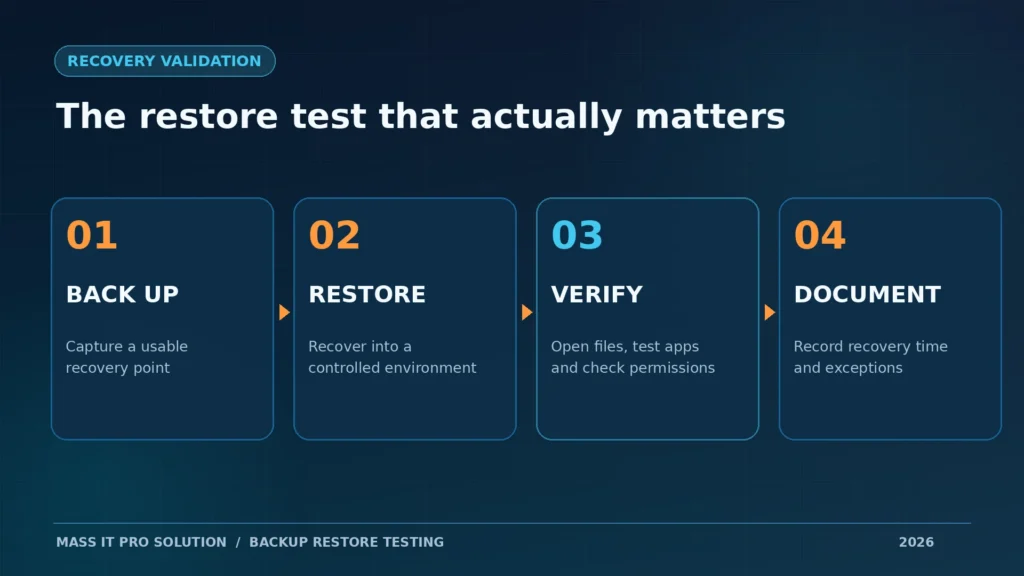
A backup is meaningfully tested when you restore a defined workload, verify that the recovered data or application works, compare the result with an agreed recovery objective, and keep evidence of the test. Merely seeing a green dashboard or boot screenshot is a lower level of assurance.
| What your IT team checked | What it proves | What it does not prove |
|---|---|---|
| Backup job completed | The backup software reported a completed job | That all necessary data was protected or can be restored |
| Backup set passed an integrity check | The selected backup data passed a platform-level check | That users can open an application and work |
| Restored a file and opened it | A chosen file could be recovered and read | That a full server or business workflow can recover |
| Booted an isolated server image | An operating system can start | That databases, services, credentials, and integrations work |
| Recovered an application and completed a business transaction | A defined workflow operated in the test environment | That every workload will recover, or that the whole company meets its recovery target |
The strongest evidence is often ordinary: a dated test ticket, the chosen recovery point, what was restored, how long it took, whether the business owner could use it, and any unresolved problems.
The question to send your IT provider:
“Please send us the date of our last restore test, which systems or files were recovered, whether they were usable, how long recovery took, and what remains untested.”
A responsible IT team should be able to answer clearly or tell you what has not yet been validated. You are not looking for a perfect claim. You are looking for visibility.
What IT professionals say actually fails in recovery
This is not just a theoretical security warning. In public discussions among system administrators and managed service providers, people repeatedly distinguish a backup that exists from a restore that has been verified. These are practitioner reports, not independently audited incident investigations.
Field report: the backups existed, but the last usable copy was a week old
In a 2022 sysadmin discussion about recovering from ransomware, one practitioner described discovering during an incident that the available recovery point was approximately a week old because the backup environment had also been affected. The report described restoring servers and workstations over an extended response period.
That is the failure business owners rarely ask about. The issue was not simply whether any files existed. It was which clean recovery point was still available after the attack reached the backup environment.
Lesson: Ask who can delete backups, whether protected copies are isolated or immutable where supported, and whether the IT team has tested recovery when the primary network is unavailable.
Field report: “It booted” is not the same as “we can work”
In a 2025 r/sysadmin discussion about real restore validation, administrators compared automated boot checks with hands-on testing. The practical question raised was whether anyone checked application health, databases, and logs after a machine reached its login screen.
Lesson: A screenshot of a booted server is useful evidence, but it is not evidence that QuickBooks, a line-of-business database, shared drives, permissions, or remote access are functioning.
The less obvious Microsoft 365 test problem
In a discussion among MSP technicians about Microsoft 365 restore testing, practitioners raised a different issue: restoring real customer data into a test destination without exposing private information, changing production mailboxes, or creating unnecessary duplicate content.
Lesson: A proper test needs a safe destination and an agreed scope. “We never tested it because we didn’t want to touch production” is a reason to design a controlled test, not to skip validation indefinitely.
What would happen if your business needed recovery today?
Imagine a 20-person construction company with project files in Microsoft 365, an accounting application on a Windows server, and a network drive used for estimates. On Monday morning, ransomware makes the server unavailable.
The IT team can restore the server image. But then the questions begin: Is the accounting database clean? Can the application open it? Is the file share connected to the correct permissions? Are the Microsoft 365 files protected separately? Does someone have the credentials and licenses needed to bring everything back?
This is an illustrative recovery scenario, not a claim about an actual Mass IT Pro Solution client. It shows why a business needs more than one recovery test.
A recovery test should follow the business workflow:
Choose a known-good recovery point
                |
                v
Restore into an isolated test location
                |
                v
Verify files + services + user access
                |
        Does the work function?
             /       \
           NO         YES
           |           |
     Record failure   Record time,
     and fix gap      data gap, proof
           \           /
            \         /
          Retest and sign off
No legitimate test should risk overwriting live data by accident. The destination, isolation, permissions, and restoration method need approval before anyone starts.
Two numbers every owner should know: RPO and RTO
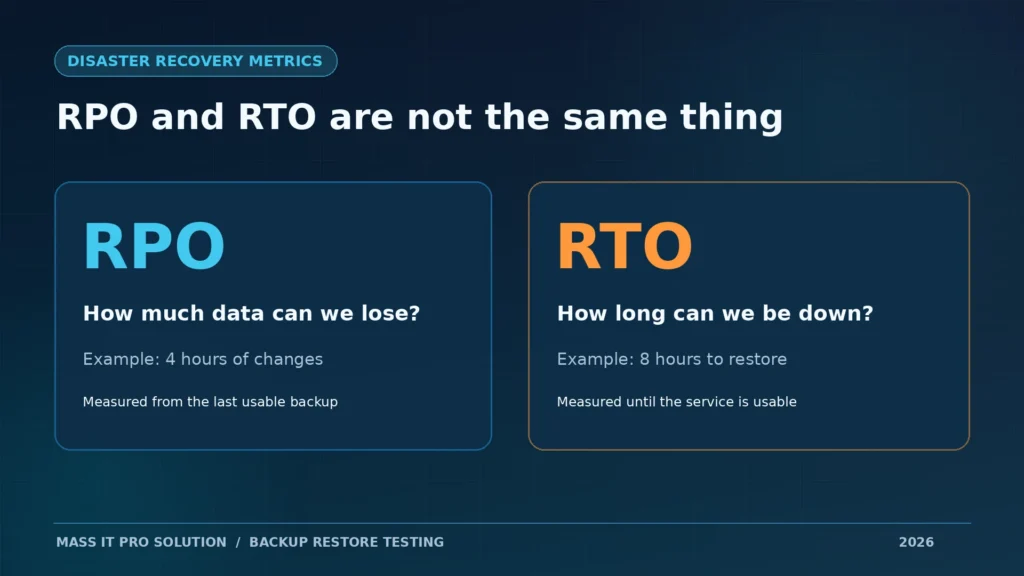
IT teams use two terms to turn “we’ll get it back” into a measurable plan.
- Recovery Point Objective (RPO): How far back the recovered data may need to go. An RPO of four hours means the business plans for a possible loss of up to four hours of changes.
- Recovery Time Objective (RTO): How long a service may be unavailable before the disruption becomes unacceptable. An RTO of four hours is a recovery target, not a promise that every incident ends in four hours.
These are business decisions informed by IT, not numbers the backup vendor should choose for you. The NIST definitions of RPO and RTO describe the underlying recovery concepts.
| Business system | Example RPO target | Example RTO target | What must be tested |
|---|---|---|---|
| Accounting and invoicing | 4 hours | 8 hours | Open the application, verify a representative record, confirm users can work |
| Shared project files | 24 hours | 4 hours | Restore versions, confirm folder permissions and access |
| Email and collaboration | 4 hours | 8 hours | Recover selected mail or files and verify the required workflow |
These numbers are illustrations, not standard targets or service commitments. A business processing hundreds of transactions an hour might need much shorter objectives. A smaller company might reasonably accept longer recovery times for noncritical systems.
Here is the uncomfortable calculation: if the latest usable recovery point is from Sunday at 6 p.m. and the failure happens Monday at 10 a.m., the potential data gap is 16 hours, even if the restore itself takes only 90 minutes. Fast recovery and recent data are different things.
Seven questions to ask your IT department this week
You do not need to know which backup product your provider uses. You need evidence that the protection matches your business.
- When was the last restore test, and what exactly was restored? Ask for a date and a specific workload, not “we monitor backups daily.”
- Did someone verify the restored data or application? Opening a sample document is different from completing a test transaction in the accounting system.
- What is our newest usable recovery point? If you suffered a failure now, how many hours or days of work could disappear?
- How long did the last test actually take? Was the result measured from the start of recovery to the point when a user could work?
- What happens if the office, server, or administrator account is compromised? Ask where the protected copies are and who can modify or delete them.
- Are Microsoft 365, laptops, servers, databases, and shared folders covered? Ask for an inventory. Backup protection is not automatically identical across these systems.
- Who owns the recovery plan if our usual IT person is unavailable? Ask where the procedures, emergency contacts, credentials, and necessary licenses are securely maintained.
A vague answer is a reason to investigate, not automatic proof of negligence. Some businesses have never set formal recovery objectives. That needs to be fixed jointly by ownership and IT.
How to run a useful restore test without disrupting production
A well-designed test does not require deliberately deleting a live server. The scope should match the risk and use an isolated environment or separate test destination wherever possible.
A practical test sequence for a small business:
- Pick the workload. Choose one that actually matters to operations: a finance database, a shared project folder, or a critical Microsoft 365 mailbox or SharePoint site.
- Select the recovery point. Record its timestamp, age, retention status, and whether it is believed to be clean. During a real cyber incident, investigate compromise timing before trusting a restore point.
- Choose a safe destination. Use an isolated virtual machine, nonproduction folder, or approved alternate cloud location. Confirm that the restore will not replace production data.
- Execute and time the recovery. Record start time, completion time, data transferred, errors, and any manual dependencies.
- Test something meaningful. Open a restored file, query a representative record, start required services, check permissions, and confirm a normal user workflow where feasible.
- Document gaps and schedule a retest. A test that fails can still be valuable. What matters is whether someone fixes the cause and verifies the repair.
For ransomware preparedness, CISA recommends maintaining offline, encrypted backups and regularly testing their availability and integrity. Where appropriate, immutability, access separation, and recovery credentials should also be part of the design.
A technical check for Windows Server administrators
If an environment uses Windows Server Backup, this read-only command in an elevated Command Prompt can list recorded backup versions:
wbadmin get versionsMicrosoft documents the command and its permissions in wbadmin get versions. A version listing helps identify candidate recovery points. It does not validate whether a backup can be restored. Administrators must use the restore procedure supported by their actual backup product and test in an approved destination. This command is not applicable to every third-party or cloud backup platform.
For many businesses, your IT provider should do this engineering work. Owners should ask to see the outcome, not be expected to operate their own production recovery systems.
Does Microsoft 365 already back everything up?
No single answer applies to every Microsoft 365 tenant. Microsoft 365 includes service resilience, recycling, version history, and retention capabilities, but those features are not interchangeable with a configured backup policy or an independently defined recovery plan.
Microsoft also offers a dedicated Microsoft 365 Backup service. As of September 2026, Microsoft announced generally available granular restore for selected OneDrive and SharePoint files and folders, alongside its existing recovery capabilities. Actual protection and restore options depend on the backup service, licensing, configuration, workload, and permissions. See Microsoft’s 2026 feature updates and restore documentation.
For your business, ask for a direct demonstration of the data types you rely on:
- Can the IT team restore an important email without disturbing unrelated mail?
- Can it recover an earlier version of a SharePoint or OneDrive document to an approved destination?
- Are shared mailboxes, Teams-related data, permissions, and other workloads in scope for the specific protection product?
- How are deleted users and departed employees handled, and what are the actual retention periods?
“It’s in the cloud” is a location, not a documented recovery strategy. If your organization depends on email and shared documents, a Microsoft 365 protection and recovery review belongs alongside server backup testing.
How often should a Massachusetts business test its backups?
There is no sensible one-size-fits-all schedule. A business with a billing server, several cloud systems, and frequent changes needs more assurance than a low-change environment. The following is a practical starting schedule to discuss with your IT team, not a universal legal requirement:
| Activity | Suggested starting cadence | Owner-visible evidence |
|---|---|---|
| Review backup jobs and alerts | After each scheduled job, with alert escalation | Monitoring record and resolved exceptions |
| Restore a sample file or selected cloud item | Monthly | Dated restore ticket and verification |
| Restore and validate a critical application or server | Quarterly | Test result, measured elapsed time, unresolved gaps |
| Exercise a wider disaster recovery scenario | Annually and after major changes | Updated runbook, owners, recovery sequence, lessons learned |
Test more frequently after platform migrations, software replacements, unusual backup failures, changes in staffing, or significant changes to business-critical systems. If legal or contractual obligations apply, align the schedule and evidence with those actual requirements.
A one-page backup recovery checklist for business owners
Ask your provider to go through this with you. Do not accept an unchecked box as proof; ask what document or test supports the answer.
- We know which business systems and cloud workloads are protected.
- We have agreed which systems must come back first.
- We know our acceptable data-loss window (RPO) and downtime target (RTO).
- Recent backup failures are monitored, assigned, and resolved.
- At least one relevant file or application restore has been completed and verified.
- Recovery copies are protected against unauthorized deletion or modification.
- Restores can be performed without compromising or overwriting production data during a test.
- Recovery steps, credentials, licensing dependencies, and responsible people are documented securely.
- The last test has a date, result, elapsed time, and follow-up actions.
If three or four boxes are unknown, that does not automatically mean your backups are unusable. It means your current recovery readiness is not sufficiently documented for the business to make an informed decision.
What a useful recovery test report should look like
A business owner should not need to decode a 40-page technical log. The underlying logs matter, but the summary should explain what was tested and whether the business can operate.
| Test detail | Example entry |
|---|---|
| Workload | Accounting server and representative company file |
| Last test | October 2026, scheduled test window |
| Recovery point | Previous evening, time recorded in ticket |
| Destination | Isolated recovery virtual machine |
| Validation | Application launched; sample transaction opened; permissions checked |
| Measured recovery time | 3 hours, 25 minutes |
| Target | 4 hours |
| Result | Pass for tested workflow only |
| Open items | Printer integration and offsite internet dependency not tested |
Illustrative reporting example, not an actual Mass IT Pro Solution customer test or a performance claim. Notice how the report states what has not been tested. That is part of trustworthy engineering.
If your IT provider cannot produce a recent test, what should you do?
Do not demand a full production failover tomorrow morning. Start with a documented review of backup coverage, protected destinations, and recovery points. Then agree on one controlled restore test for a system your business actually uses. Record the result. Prioritize fixes. Expand to more critical workflows and a broader disaster recovery exercise.
At Mass IT Pro Solution, we work with Massachusetts businesses that need a clearer picture of their backup and disaster recovery readiness, from office environments around Boston and Cambridge to professional services and trades across MetroWest and Central Massachusetts. That includes reviewing coverage, backup alerts, recovery dependencies, and whether a practical restore test can be performed safely. The right scope depends on your systems and risk, not a claim that every incident can be recovered in a fixed number of hours.
Your next question should not be, “Are we backed up?” It should be, “Show us the last time we proved we could recover.”
Request a backup and recovery review or contact Mass IT Pro Solution to discuss what is currently protected, what is missing, and what should be tested first.
Frequently asked questions
Is a successful backup the same as a tested backup?
No. A successful job confirms the platform reported that the backup operation completed. A restore test recovers chosen data or systems and verifies they work. Both checks matter, but they provide different levels of confidence.
Can a business restore from backups after ransomware?
Sometimes, provided usable recovery points exist and the recovery environment can be secured. Ransomware can affect accessible backup systems too. Recovery should use carefully selected clean points and a process that avoids reinfecting restored systems. No backup design guarantees recovery in every incident.
How long does it take to restore a business server?
There is no fixed time. It depends on the amount of data, available bandwidth, hardware, application dependencies, backup type, and whether recovery is local or cloud-based. Measure an actual representative restore and compare it with your business’s RTO.
How often should IT test backups?
Monitoring should occur for every scheduled backup job. Many small businesses can begin with periodic sample-file restores, quarterly testing of critical workloads, and a broader annual recovery exercise, then adjust based on risk, operational changes, and applicable requirements.
Can Microsoft 365 files and emails be recovered?
Yes, through different Microsoft 365 native mechanisms and properly configured backup solutions, subject to their coverage and limits. Ask the administrator to show a recovery of the specific mailbox, file, or SharePoint workload your organization depends on.