
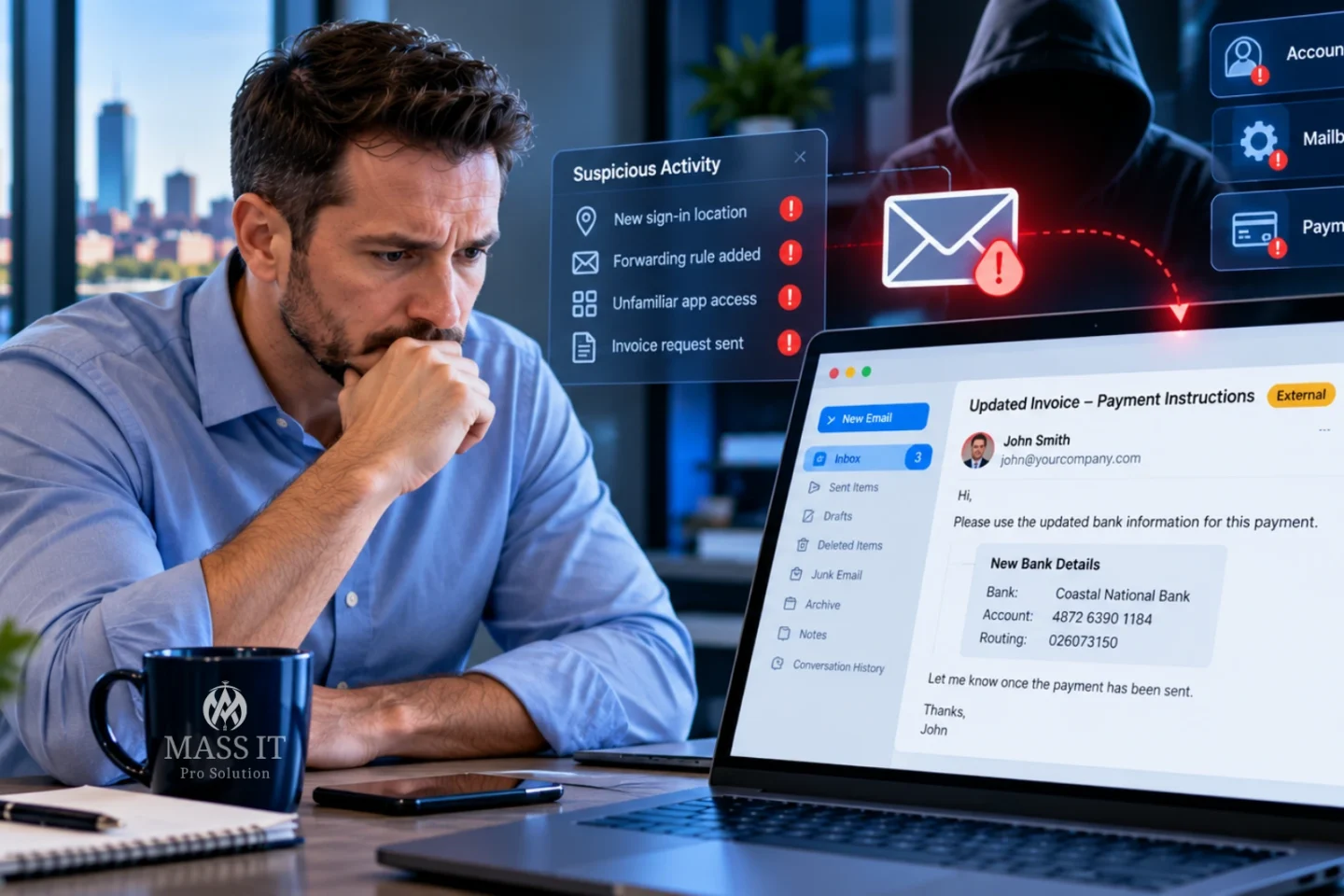
How Massachusetts businesses can recognize compromised Microsoft 365 and Google Workspace accounts, investigate suspicious mailbox activity, protect customer payments, and respond before an email incident becomes a larger financial problem.
Your customer calls the office with a question.
They received an invoice from your company yesterday. Everything looked normal: the sender’s name, the ongoing email conversation, the invoice amount, even the familiar signature.
But the banking information was different.
Someone told them your company had changed accounts.
You never authorized that change.
Now the uncomfortable questions begin.
Did someone impersonate your business? Did an attacker access an employee’s email account? Has someone been reading conversations with your customers? And did anyone else receive the same instructions?
Quick answer: Business email compromise (BEC) is a form of fraud in which attackers impersonate trusted business contacts or gain access to legitimate email accounts to manipulate payments, steal information, or redirect communications. Warning signs can include unexpected banking changes, suspicious sign-ins, unauthorized forwarding rules, altered mailbox settings, and customers receiving messages employees did not intentionally send. Suspected compromise requires prompt verification, containment, evidence preservation, and investigation.
For Massachusetts small businesses, the danger is not limited to a lost password.
It can affect customer relationships, confidential information, vendor payments, payroll instructions, and the trust people place in communications from your company.
A compromised mailbox may look completely normal to its owner while someone else is using it.
The first step is understanding what actually happened, not assuming that every suspicious email means the company’s domain or account was hacked.
What Is Business Email Compromise?
Business email compromise, commonly called BEC, is a category of social-engineering fraud that uses the appearance of legitimate business communication to deceive someone.
The FBI identifies BEC as a serious form of online financial fraud. Common scenarios involve fraudulent payment instructions, impersonated executives, vendor invoice changes, and real estate transactions.
An attacker does not always need to install malware or break into a company’s network.
Sometimes a convincing email is enough.
Other incidents involve unauthorized access to a genuine mailbox.
Four situations that can look similar
| Threat | What happens | Does it prove your email account was hacked? |
|---|---|---|
| Display-name impersonation | Someone sends mail using the name of your employee or executive | No |
| Lookalike domain | An attacker uses a similar-looking email domain | No |
| Email spoofing | A message attempts to forge the sender’s email identity | No |
| Actual account compromise | An unauthorized person accesses a legitimate email account or associated session | Yes, when supported by investigation |
A fifth possibility is a compromised vendor.
Your own accounts may be secure, but an attacker may gain access to a trusted supplier’s mailbox and send a convincing invoice change from that real account.
These distinctions matter.
The response to a forged email is not necessarily the same as the response to a confirmed mailbox intrusion.
An appropriate investigation should determine which accounts, messages, systems, and parties were actually affected.
How a Business Email Compromise Attack Can Unfold
Consider a hypothetical accounting firm in Waltham.
The firm regularly exchanges invoices and financial documents with a business client.
An attacker obtains unauthorized access to one employee’s mailbox or an associated authentication session.
Instead of immediately sending hundreds of suspicious messages, the attacker reads ongoing correspondence.
They identify a conversation involving an upcoming payment.
At the right moment, they send or manipulate a message requesting updated banking information.
The message appears relevant because it refers to a real invoice and an existing business relationship.
If the recipient follows the new instructions without independently verifying them, money may be sent to an account controlled by the attacker.
Why these attacks can be convincing
The fraudulent request may contain accurate information:
- The client’s name
- A real invoice amount
- A familiar employee signature
- Details from an existing email conversation
- Legitimate project information
- An expected payment date
- The actual name of a vendor or accountant
Those details can make the email seem authentic.
But they do not independently establish that the payment request was authorized.
Example BEC attack path
      ATTACKER GAINS INFORMATION
           OR ACCOUNT ACCESS
                    |
                    v
         REVIEWS COMMUNICATIONS
       Invoices • Contacts • Timing
                    |
                    v
        CREATES A BELIEVABLE REQUEST
        New account • Urgent payment
                    |
                    v
        RECIPIENT TRUSTS THE EMAIL
                    |
                    v
         PAYMENT OR DATA RELEASE
                    |
                    v
      BUSINESS DISCOVERS THE FRAUD
Illustrative scenario, not a documented Mass IT Pro Solution client incident. Actual attacks may follow different paths and may not involve mailbox intrusion.
The critical defense is to establish a verification process that does not depend solely on the email requesting the change.
Nine Warning Signs of a Possible Business Email Compromise
A single unusual event does not always mean an attacker is present.
Employees make mistakes. Mail rules can be misconfigured. Legitimate service providers may update their systems.
But certain events justify investigation, particularly when several occur together.

1. A vendor or employee suddenly changes payment instructions
This is one of the most important warning signs.
A supplier requests that an invoice be paid to a different bank.
An employee asks payroll to change direct-deposit details.
A real estate contact sends new wire instructions shortly before a closing.
The request may be legitimate.
But changes involving money should be independently verified using a known, trusted contact method.
Never use only the phone number supplied in the suspicious message as proof of legitimacy.
2. Customers receive messages your staff didn’t knowingly send
A customer may receive an invoice, document request, or unusual payment message appearing to come from your company.
The employee may deny sending it.
Possible explanations include spoofing, a lookalike domain, a compromised account, delegated access, or an application that was authorized to send messages.
The investigation should establish the actual sending path.
3. Important emails disappear or move into unexpected folders
An employee notices that customer replies are missing.
Messages may be moving into Deleted Items, Junk Email, Archive, or another folder because of a rule.
Microsoft specifically identifies suspicious inbox rules and unexplained missing messages as potential signs of account compromise.
Not every missing email is malicious, but unusual automated movement deserves review.
4. An unfamiliar forwarding address appears
Some email platforms allow messages to be forwarded automatically to another mailbox.
That can be legitimate for an approved business workflow.
It can also allow an attacker to receive incoming messages without logging in repeatedly.
An unknown external forwarding address should be investigated promptly.
Changing the password alone may not remove a malicious forwarding configuration.
5. Employees receive unexpected authentication prompts
A user receives an MFA approval prompt even though they aren’t trying to sign in.
Someone notices an unfamiliar authentication method added to their account.
A password reset notification appears unexpectedly.
These events may indicate attempted unauthorized access or account changes.
They should be reported through the business’s approved security channel.
6. Sign-in activity doesn’t match the employee’s normal behavior
An identity platform may record unusual sign-in times, devices, locations, IP addresses, or authentication patterns.
However, geographic information is not always definitive.
VPNs, mobile carriers, cloud infrastructure, and legitimate travel can complicate location interpretation.
A suspicious sign-in should be correlated with device information, session details, authentication methods, user activity, and other available evidence.
7. An unfamiliar application has access to email or account data
Some cloud applications use OAuth authorization rather than storing a user’s password.
An employee may be tricked into granting an application permission to read email or access files.
That application may retain access until its permissions are reviewed and revoked appropriately.
Microsoft’s compromised-account guidance specifically recommends reviewing unauthorized application consent grants.
8. A mailbox begins sending unusual messages
An employee’s contacts receive unexpected links, fraudulent requests, or messages containing unfamiliar signatures.
The account may also be restricted from sending if the email provider detects suspicious outbound activity.
That is a reason to investigate, not automatic proof that the user’s computer has malware.
9. A customer reports a payment or invoice conversation you cannot explain
A customer says someone on your team confirmed a new payment account.
The message may reference an actual invoice or contain information not normally available to an outsider.
The company should preserve the communication and investigate whether an email account, third-party vendor, shared document, or other system exposed relevant information.
Don’t dismiss a customer’s report simply because the employee’s Sent Items folder looks normal.
A mailbox investigation may need message trace, audit records, rules, delegated access, and other evidence.
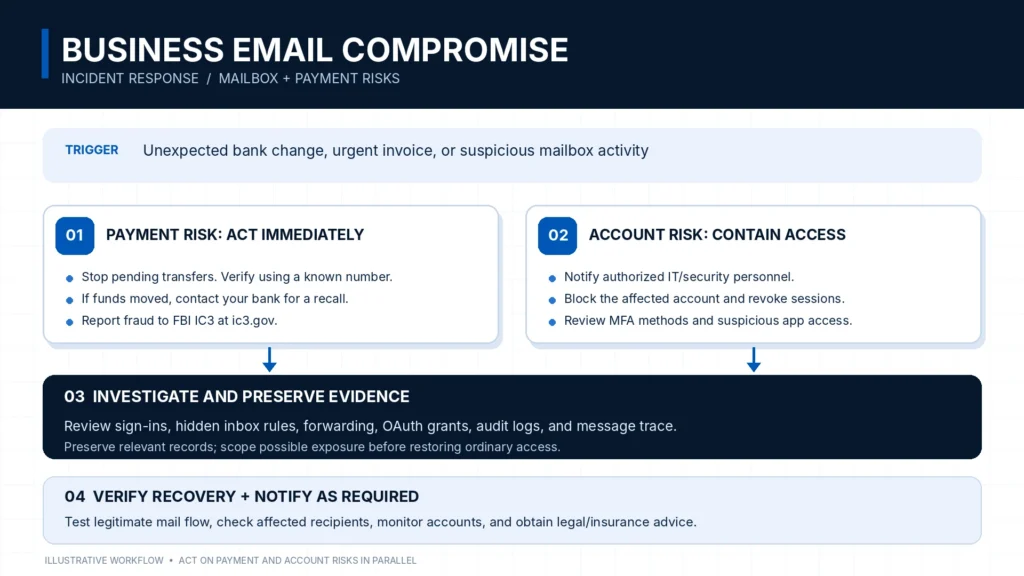
What Should You Do in the First 15 Minutes if You Suspect BEC?
The first few minutes are about preventing further harm and getting the right people involved.
The actions depend on whether the concern involves payment fraud, suspected account access, or both.
If an unauthorized transfer may already have occurred, contact the financial institution immediately. Don’t wait for the complete IT investigation.
The FBI’s Internet Crime Complaint Center recommends contacting the originating bank as soon as fraud is recognized to request an appropriate recall or reversal and filing a detailed complaint at IC3.gov.
Immediate response checklist
- Stop any pending payment associated with suspicious instructions.
- Verify the payment or request using a previously established contact method.
- If money was sent, contact the originating financial institution immediately.
- Ask the bank about recall, reversal, and other available fraud-response procedures.
- Notify the company’s authorized IT or security contact through a trusted channel.
- Identify the accounts, messages, and business transactions potentially affected.
- Preserve relevant emails, headers, transaction records, and timestamps.
- Have authorized administrators contain potentially compromised accounts.
- Do not send new passwords or sensitive recovery details to the suspected mailbox.
- Coordinate affected-party communications and regulatory review as appropriate.
If payment fraud and account compromise are both suspected, financial response and technical containment should begin in parallel.
What employees should not do
Do not attempt to negotiate with a suspected attacker.
Do not blindly approve additional MFA requests.
Do not change banking instructions based on the same suspicious email thread.
Do not delete the evidence because the message looks embarrassing.
Do not factory-reset a computer or erase a mailbox before an authorized responder considers preservation needs.
And do not assume that a quick password change completes the investigation.
Who should be contacted?
| Situation | Immediate contact |
|---|---|
| Unauthorized payment or wire transfer | Financial institution’s fraud department; FBI IC3 |
| Suspected Microsoft 365 mailbox compromise | Authorized Microsoft 365 administrator or security responder |
| Suspected Google Workspace account compromise | Authorized Google Workspace administrator or security responder |
| Customer received fraudulent instructions | Business leadership and designated incident-response contact |
| Possible disclosure of protected information | Legal/privacy lead and qualified incident-response personnel |
| Cyber-insurance notification question | Insurance broker or insurer according to policy requirements |
These actions should be coordinated with the company’s incident-response procedures where available.
No response plan can guarantee recovery of transferred funds or prevention of further damage.
Microsoft 365 Account Compromised? Why a Password Reset May Not Be Enough
Microsoft 365 is often the center of a company’s business communication.
An account may provide access to Exchange Online mail, Teams, OneDrive, SharePoint, and connected applications.
When that identity is compromised, the investigation should consider the wider account environment.
Microsoft’s recommended response areas
Microsoft’s official compromised-account guidance addresses:
- Blocking the affected account while the investigation proceeds.
- Resetting or securing credentials through the correct identity system.
- Revoking active sign-in sessions.
- Reviewing authentication methods.
- Inspecting unauthorized application consent.
- Reviewing privileged roles and delegated access.
- Inspecting mailbox forwarding and inbox rules.
- Investigating sign-in, audit, and mail-flow evidence.
- Restoring normal access only after appropriate checks.
The exact sequence depends on the incident, identity architecture, and evidence-preservation requirements.
For example, an organization using hybrid identity may need to address the account in its authoritative on-premises identity system as well as in Microsoft 365.
Why MFA alone may not resolve an active compromise
MFA is an important security control.
But some attacks target authenticated browser sessions or trick users into authorizing unwanted access.
If an attacker already has usable session material or application authorization, changing only the password may not eliminate every access path.
A responder should review relevant sessions, MFA registrations, application permissions, and associated services.
Revocation also has platform-specific behavior; administrators should confirm that containment is effective rather than assuming every application session is immediately terminated.
What about SharePoint and OneDrive?
If an attacker gains access to a Microsoft 365 identity, the incident may involve more than the mailbox.
Depending on the user’s permissions, connected services may expose company files or collaboration data.
Investigators should determine whether additional workloads require review.
A mailbox compromise does not automatically establish that every accessible file was read or downloaded.
That conclusion requires appropriate investigation and available evidence.
Technical Investigation: Check Inbox Rules and Email Forwarding
This section is for authorized Microsoft 365 administrators and IT professionals.
These examples are read-only inspections of an Exchange Online mailbox.
They do not disable users, reset passwords, delete messages, or change forwarding configuration.
You need the appropriate Exchange Online administrative permissions and a secure administrative session.
Connect to Exchange Online
# Requires the supported ExchangeOnlineManagement
# module and appropriate administrator permissions.

Connect-ExchangeOnline
Connecting establishes an authenticated administrative session. Use the organization’s approved administrative process.
Check mailbox-level forwarding
# Replace with the authorized mailbox.
# Read-only: does not modify forwarding.

$mailbox = "user@company.example"

Get-Mailbox -Identity $mailbox |
    Format-List ForwardingAddress,
                ForwardingSmtpAddress,
                DeliverToMailboxAndForward
What to investigate: Any unexpected forwarding recipient, particularly an external address.
However, some legitimate business processes use forwarding.
An unfamiliar setting is a finding to investigate, not automatic proof of malicious access.
Check all inbox rules, including hidden rules
# Read-only inspection of mailbox rules.
# IncludeHidden helps reveal rules that may not
# appear in ordinary Outlook interfaces.

Get-InboxRule -Mailbox $mailbox -IncludeHidden |
    Format-List Name,
                Enabled,
                RedirectTo,
                ForwardTo,
                ForwardAsAttachmentTo,
                MoveToFolder,
                DeleteMessage,
                Identity
An investigator should look for unexpected rules that:
- Redirect messages to unknown recipients.
- Forward messages externally.
- Move relevant correspondence into obscure folders.
- Delete selected messages.
- Apply unusual conditions to invoices, banks, or particular contacts.
Do not delete every rule that looks unfamiliar.
Some mailboxes have legitimate automation, and arbitrary removal can disrupt business workflows or destroy useful investigative context.
Preserve the relevant evidence and determine whether the rule was authorized.
What these commands cannot tell you
These commands don’t establish:
- Who created a rule
- Whether an attacker read specific messages
- Whether an email was successfully delivered
- Whether a user granted malicious OAuth permissions
- Whether the workstation is compromised
- Whether payment information was stolen
- Whether all unauthorized access has ended
An experienced investigation needs multiple evidence sources.
Microsoft’s compromised email account response guidance documents the mailbox-rule and forwarding checks above.
What Else Should an IT Engineer Investigate?
A business email compromise investigation should answer five questions:
How was access obtained?
Which identities or systems were affected?
What did the unauthorized party do?
What information or payments may have been affected?
What evidence supports restoring normal operations?
Evidence worth reviewing
| Evidence source | What it may help establish | Important limitation |
|---|---|---|
| Microsoft Entra sign-in logs | Authentication events, device and network context | Retention and available detail vary |
| Microsoft Purview audit logs | Selected mailbox, file, and administrative activities | Event coverage depends on settings, licensing, and retention |
| Exchange message trace | Mail-routing and delivery information | Does not by itself prove who authored a message |
| Mailbox rules and forwarding | Current routing or concealment configuration | Current state doesn’t necessarily reveal the complete history |
| OAuth/application consent | Applications with delegated access | Requires interpretation of permissions and activity |
| MFA registration records | Registered authentication methods | Does not alone establish which individual used them |
| Relevant message headers | Sending path and authentication results | Header interpretation requires context |
| Finance records | Whether payment instructions or destinations changed | Does not establish how the fraudulent request was created |
Why evidence preservation matters
Investigators may need to determine whether unauthorized access occurred before a suspicious invoice was sent.
If the team immediately deletes messages, clears rules, reinstalls systems, or removes accounts without documenting them, important evidence may be lost.
Security personnel should balance prompt containment against preservation requirements.
Both matter.
An incident can require immediate access restrictions while forensic review continues.
Does the business need a specialist?
Not every suspicious email requires a full forensic investigation.
A simple lookalike-domain message that was blocked before anyone acted may need reporting, verification, and appropriate preventative review.
But suspected unauthorized mailbox access, financial fraud, sensitive-data exposure, or persistent access may require a deeper incident-response engagement.
The scope should follow the available evidence and business risk.
What if Your Company Uses Google Workspace Instead of Microsoft 365?
Business email compromise is not limited to Microsoft 365.
Companies using Gmail and Google Workspace can also experience account takeover, fraudulent messages, unauthorized forwarding, and malicious application permissions.
Google’s administrator guidance recommends temporarily suspending a suspected compromised account, reviewing relevant activity, resetting credentials, revoking applicable access, and checking for unauthorized configuration changes.
Google Workspace investigation checklist
- Identify the affected user and verify the report.
- Have an authorized administrator contain the suspected account.
- Review sign-in and relevant security activity.
- Inspect forwarding, filters, and delegation.
- Review connected applications and OAuth access.
- Examine unauthorized recovery-option changes.
- Review relevant administrative changes.
- Preserve messages and evidence.
- Restore access using approved identity and recovery procedures.
- Check related Drive and application access if indicated.
Google’s response procedures vary according to account type, edition, and identity configuration.
A consumer Gmail account and a managed Workspace tenant may have different administrative capabilities.
Official reference: Google Workspace: Identify and Secure Compromised Accounts.
SPF, DKIM, and DMARC Passed. Could the Email Still Be Fraudulent?
Yes.
This is one of the most misunderstood aspects of business email security.
A message may pass email authentication checks and still contain a fraudulent request.
That does not necessarily mean SPF, DKIM, or DMARC failed to work.
Those technologies address aspects of sender authentication.
They do not establish the honesty of the person or business process behind a message.
What each control actually does
| Control | Primary purpose | What it cannot guarantee |
|---|---|---|
| SPF | Identifies authorized sending infrastructure for the applicable envelope domain | That the message’s content is legitimate |
| DKIM | Cryptographically associates a message with a signing domain and protects signed content from undetected modification | That the legitimate account or service wasn’t abused |
| DMARC | Evaluates alignment of the visible From domain with supported authentication results and provides domain policy/reporting | That every authenticated sender is trustworthy or every impersonation is stopped |
Scenario A: Lookalike domain
An attacker registers a domain resembling the real business.
They configure SPF, DKIM, and DMARC correctly for their own domain.
Messages from that domain may pass authentication because the attacker legitimately controls it.
The email can still be deceptive.
Scenario B: Compromised legitimate account
An attacker gains access to a real employee mailbox.
They send fraudulent instructions using the company’s legitimate email system.
That message may pass the domain’s normal authentication checks.
The failure is unauthorized account access or misuse, not necessarily defective DNS authentication.
Scenario C: Authorized sending service is misused
A business uses a legitimate application to send notifications from an authenticated domain.
If the application or its message-handling process can be abused, authenticated mail may still contain deceptive content.
Whether this happened requires technical evidence.
SPF pass + DKIM pass + DMARC pass does not establish that a business communication is authorized or safe.
Those results are valuable, but they are only part of an investigation.
Microsoft’s anti-spoofing guidance explains the relationship between authentication checks and phishing protection.
What if a Customer Already Sent Money to the Fraudulent Account?
This is a financial emergency as well as a potential cybersecurity incident.
The FBI advises victims to contact their financial institution as soon as fraud is discovered.
The financial institution may be able to initiate a recall or other recovery procedure.
The ability to recover funds depends on the transfer method, timing, destination, receiving institution, and other circumstances.
There is no guarantee that a payment can be recovered.
Immediate financial-response checklist
- Contact the originating bank through its established fraud channel.
- Explain that the transfer may have been induced by business email fraud.
- Provide the transaction reference, amount, date, beneficiary details, and other information requested by the bank.
- Ask about recall, reversal, indemnification, and other available recovery procedures.
- File a report with the FBI Internet Crime Complaint Center at IC3.gov.
- Preserve invoice versions, payment instructions, email messages, and relevant communications.
- Notify the appropriate business decision-makers.
- Coordinate technical investigation and legal or insurance guidance where applicable.
The FBI notes that appropriate bank requests and reporting should happen quickly.
The bank, not the MSP, determines which financial recovery procedures are available.
Important: Prevent a second fraudulent transfer
During an incident, attackers may continue attempting to redirect payments.
The business should verify outstanding invoices and recently changed banking details using known contact information.
If suppliers or customers might receive affected instructions, coordinate appropriate notices through verified communication channels.
Do not use the suspicious mailbox as the sole channel for confirming that the situation is safe.
Does Business Email Compromise Mean Your Company Had a Data Breach?
Not automatically.
A fraudulent message, a compromised mailbox, and a legally reportable data breach are related but distinct concepts.
An organization must determine what information was accessed, acquired, disclosed, or used, and which legal obligations apply.
Massachusetts breach-notification considerations
Massachusetts General Laws Chapter 93H establishes breach-notification requirements involving certain personal information about Massachusetts residents.
The scope of protected personal information under the law is specific.
Not every business email, customer name, or commercial invoice meets that definition by itself.
But relevant records may include covered combinations of identifying and sensitive information.
When statutory notification conditions are met, the organization may have obligations involving affected individuals and state authorities.
Those requirements should be assessed promptly with qualified legal counsel.
What the IT investigation can contribute
Technical responders may help establish:
- Which accounts were affected
- The relevant period of unauthorized activity
- Available evidence of message or file access
- Whether relevant information was transmitted externally
- Whether additional systems were affected
- What containment actions were performed
- Which findings remain uncertain
However, technical personnel should not independently declare that no reportable breach occurred simply because antivirus scans were clean.
Likewise, one suspicious login does not automatically mean every document available to the user was accessed.
What about regulated organizations?
Law firms, accounting practices, healthcare providers, and financial services organizations may have additional contractual, professional, or regulatory duties.
A business should involve appropriate counsel and compliance personnel when evaluating those requirements.
A managed IT provider can support technical investigation and remediation. It does not replace the organization’s legal decision-making responsibilities.
Official reference: Massachusetts Requirements for Data Breach Notifications.
How to Reduce Business Email Compromise Risk Before an Incident
Not every BEC attempt can be prevented.
But businesses can reduce several common avenues of compromise and fraud.
Technical controls
- Enforce appropriate MFA for users and administrators.
- Use phishing-resistant authentication methods where supported and appropriate.
- Review unnecessary administrative privileges.
- Maintain supported email and identity platforms.
- Configure and validate SPF, DKIM, and DMARC.
- Review available anti-phishing and impersonation protections.
- Restrict automatic external forwarding where appropriate.
- Govern user consent to third-party applications.
- Monitor suspicious sign-ins and important mailbox changes.
- Keep endpoint and device security appropriately maintained.
- Establish a documented compromised-account response procedure.
Business-process controls
Technical protection cannot independently verify that a banking change is legitimate.
The business needs an approved procedure for financial requests.
- Independently verify changes to vendor banking instructions.
- Use known phone numbers or another previously established trusted channel.
- Require appropriate approval for high-risk payments.
- Separate payment initiation and authorization where practical.
- Apply verification procedures to payroll and direct-deposit changes.
- Train employees to report suspicious messages promptly.
- Maintain current contact information for important vendors.
- Define who communicates with customers during an email incident.
- Know which financial institution and IT contacts to notify.
Why two approvals may be stronger than one
A business may choose to require separate verification and approval for certain payment changes.
For example, one employee receives and verifies the change request while another authorized person approves the updated payment destination.
The correct control depends on the organization’s size, banking capabilities, and transaction risks.
No approval process guarantees that fraud cannot occur, but defined procedures can reduce dependence on one email conversation.
The objective is to make unusual payment requests difficult to approve without independent verification.
Business Email Security Checklist for Massachusetts Owners
You don’t need to become a Microsoft 365 engineer to ask the right questions.
Use this checklist with your current IT provider.
Identity and account security
- We know who administers Microsoft 365 or Google Workspace.
- Important accounts use suitable MFA.
- Administrative permissions are reviewed.
- Former employees and vendors do not retain unnecessary access.
- Unfamiliar application permissions are investigated.
- We have an approved process for securing a compromised account.
Email and monitoring
- SPF, DKIM, and DMARC have been reviewed for our actual sending services.
- Relevant phishing and impersonation protections are configured.
- Mailbox forwarding rules and suspicious changes can be reviewed.
- Security alerts have assigned review responsibilities.
- The business understands relevant logging and retention limitations.
- We know how to obtain technical assistance if an account is compromised.
Financial and operational controls
- Vendor banking changes require independent verification.
- Employees know how to report suspicious payment instructions.
- We have the bank’s fraud contact information.
- We know who coordinates customer communications.
- Incident records and relevant evidence will be preserved appropriately.
- Business leadership knows when to involve legal or insurance advisers.
A checklist is useful only if someone can confirm which controls exist and which still require attention.
How to Know Whether Your Email Recovery Is Complete
Restoring access to an account is not necessarily the same as finishing an incident.
A responsible recovery process should establish that unauthorized access paths have been addressed to the extent reasonably possible and that legitimate business communication is working again.
Example recovery acceptance matrix
| Review area | Validation question |
|---|---|
| Account access | Can only authorized users sign in through approved methods? |
| Authentication | Have suspicious MFA registrations and sessions been investigated? |
| Application access | Are unexpected app permissions or consent grants addressed? |
| Mailbox configuration | Have unauthorized forwarding, rules, and delegation changes been addressed? |
| Mail flow | Can the user send and receive legitimate business messages? |
| Related services | Have relevant SharePoint, OneDrive, or other connected workloads been reviewed? |
| Customer exposure | Have potentially affected communications been identified and assessed? |
| Financial risk | Have suspicious banking or invoice changes been reviewed? |
| Evidence | Are findings, limitations, and response actions documented? |
| Ongoing monitoring | Is follow-up monitoring assigned where appropriate? |
A clean-looking inbox is not evidence that every unauthorized session, permission, or financial risk has been addressed.
Some investigations will remain uncertain because logs were unavailable, historical records expired, or third-party information could not be obtained.
Those limitations should be recorded rather than replaced with unsupported assurances.
Why Business Email Compromise Matters to Massachusetts Industries
The basic attack mechanism is similar across industries.
The financial and operational consequences can be different.
Law firms in Boston and Cambridge
Law firms may exchange confidential client information, settlement instructions, financial documents, and time-sensitive communications.
Suspicious account activity may require careful investigation, client confidentiality considerations, and appropriate legal or professional review.
Accounting and financial offices in Waltham and Newton
Accounting practices may handle invoices, payroll information, tax documents, and financial instructions.
A convincing email that changes a payment destination or requests confidential records can create significant operational and client risk.
Construction and trades businesses in Framingham and Worcester
Contractors often coordinate project payments, deposits, invoices, and supplier relationships through email.
An altered vendor invoice or fraudulent banking instruction may affect an ordinary payment workflow.
Medical and dental practices
Healthcare organizations may use email for administrative coordination, vendor payments, and limited business communications.
If protected health information may be involved, additional privacy and incident-response requirements may apply.
Nonprofits and professional services
Nonprofits and professional offices may operate with small administrative teams and several external vendors.
Clear financial approval processes and assigned email-security responsibilities can be particularly valuable where one person handles multiple functions.
These are risk scenarios and operational considerations, not claims that particular Mass IT Pro Solution clients experienced the described attacks.
What About Homeowners and Residential Email Fraud?
Business email compromise is often associated with companies, but related email fraud can also affect individuals.
For example, a homebuyer may receive altered wire instructions that appear to come from a real estate or closing professional.
Someone may impersonate a contractor, accountant, or trusted service provider.
If you are a homeowner and receive unexpected banking instructions:
- Do not rely exclusively on the email containing the new instructions.
- Verify the request using a previously established contact method.
- If money was sent, contact your bank immediately.
- Preserve the suspicious messages and payment records.
- Report appropriate internet fraud to the FBI through IC3.
- Seek account-security assistance if you believe your own email was accessed.
For ordinary home-computer malware concerns, our residential computer and virus-removal services are a separate service area.
A residential email scam does not automatically require the same forensic response as a compromised corporate Microsoft 365 tenant.
How Mass IT Pro Solution Helps With Email Security and Microsoft 365
At Mass IT Pro Solution, we help Massachusetts businesses review and improve the systems surrounding business email.
Depending on the authorized scope, that can include Microsoft 365 administration, account security, MFA, email-security configuration, endpoint protection, and technical investigation of suspicious activity.
For an email-compromise concern, a technical assessment may examine:
- Account and tenant administration
- Suspicious sign-in activity
- Mailbox rules and forwarding
- MFA registrations and application permissions
- Relevant mail-flow and audit evidence
- Other affected cloud services
- Security configuration and recommended corrective work
We also help businesses improve their broader cybersecurity and endpoint protection and Microsoft 365 management.
Financial fraud recovery remains the responsibility of the relevant financial institutions and authorities. Legal and regulatory determinations require qualified advisers.
We do not promise to recover stolen funds or guarantee that every historical activity can be reconstructed.
The objective is to investigate the evidence available, address identified risks within the agreed scope, and help the business establish a more defensible email-security process.
Frequently Asked Questions About Business Email Compromise
How do I know if my business email was hacked?
Possible warning signs include suspicious sign-ins, unexpected MFA changes, unfamiliar forwarding rules, missing messages, unauthorized app permissions, and reports of messages the employee didn’t knowingly send. No single sign always proves compromise. An authorized administrator should review relevant evidence.
Can a hacker send email from my real Microsoft 365 account?
Yes, if an attacker gains unauthorized access to a legitimate account or another approved sending mechanism. Messages sent through an authenticated system may pass normal email-domain authentication checks. That doesn’t make their content legitimate.
Can an email pass SPF, DKIM, and DMARC and still be phishing?
Yes. Authentication results help assess the sending domain and message authentication. They do not prove that an authenticated account wasn’t compromised or that a lookalike domain isn’t being used deceptively.
Does changing the Microsoft 365 password remove an attacker?
Not necessarily. A responder may also need to revoke sessions, inspect MFA registrations, review application consent, examine mailbox forwarding and rules, and investigate related access.
Can attackers hide emails using Outlook rules?
Yes. Unauthorized inbox rules may move, forward, redirect, or delete selected messages. Microsoft recommends checking inbox rules, including hidden rules, when investigating compromised mailboxes.
Can attackers access OneDrive or SharePoint through a compromised email account?
A compromised Microsoft 365 identity may provide access to other services that the user is authorized to use. Whether an attacker accessed any particular files must be investigated rather than assumed.
What should I do if a customer received a fraudulent invoice from our company?
Preserve the reported message and invoice, verify the sending path, notify authorized IT/security personnel, identify related communications, and coordinate an appropriate customer response. If a payment was made, the payer should contact the relevant financial institution immediately.
What if I already sent a wire transfer to a scammer?
Contact your bank’s fraud department immediately and ask about available recall or reversal procedures. File a report with the FBI’s Internet Crime Complaint Center at IC3.gov. Recovery is time-sensitive and not guaranteed.
Does an email compromise automatically require Massachusetts breach notification?
No. The organization must determine whether the incident meets applicable legal notification criteria, including whether covered personal information was affected. Legal counsel should review relevant state, federal, contractual, and sector-specific obligations.
Is Google Workspace vulnerable to business email compromise too?
Yes. Google Workspace accounts can be targeted through phishing, account takeover, deceptive consent requests, and fraudulent business communications. Google’s administrator guidance includes procedures for containing suspected compromised accounts and reviewing relevant account activity.
Is email security software enough to stop BEC?
No. Email security tools can help identify and block certain threats, but BEC can also involve legitimate compromised accounts, convincing impersonation, and financial-process manipulation. Identity security and independent payment verification remain important.
Can Mass IT Pro Solution help investigate suspicious business email activity?
Mass IT Pro Solution provides Microsoft 365, cybersecurity, endpoint, and business IT services. The specific investigation, containment, evidence review, and remediation activities depend on the environment, available administrative access, urgency, and agreed engagement scope.
Your Customer Shouldn’t Be the First Person to Tell You Something Is Wrong
A business doesn’t need hundreds of infected computers to experience serious email fraud.
Sometimes the incident begins with one convincing message.
One compromised account.
One changed banking instruction.
Or one customer who trusts an email that appears to come from your company.
The most useful preparation combines secure identities, well-managed email systems, meaningful monitoring, independent financial verification, and a response process employees understand.
Business email compromise is not just an email problem. It is a trust, access-control, and financial-process problem.
The right time to establish those responsibilities is before an attacker tests them.
Concerned About a Compromised Business Email Account in Massachusetts?
If you suspect unauthorized access to a Microsoft 365 or Google Workspace account, unexplained mailbox changes, fraudulent customer messages, or compromised business communications, contact an authorized IT/security responder promptly.
Mass IT Pro Solution can discuss a technical assessment of the affected environment and identify suitable next steps within the approved scope.
Request a Business Email Security Assessment
For an urgent financial transfer concern, contact your bank immediately rather than waiting for an IT consultation.
Mass IT Pro Solution
Microsoft 365 Security | Email Security | Cybersecurity | Managed IT Services
Serving Greater Boston, Cambridge, Waltham, Newton, Framingham, Worcester, and surrounding Massachusetts communities.
Phone: 508-254-4704
Email: support@massitpro.com
This article is general cybersecurity and incident-response information, not a substitute for incident-specific forensic, legal, financial, or regulatory advice. Evidence availability, investigation results, account recovery, financial recovery, and any notification duties depend on the facts and applicable requirements. No security service guarantees prevention of all fraud, identification of every compromised account, or recovery of stolen funds.
Independent Technical, Financial, and Regulatory References
- FBI: Business Email Compromise
- FBI IC3: BEC and Immediate Financial Response
- Microsoft: Respond to a Compromised Cloud Email Account
- Microsoft: Get-InboxRule PowerShell Reference
- Microsoft: Anti-Spoofing Protection
- Microsoft: SPF Authentication Guidance
- Microsoft: DMARC Authentication Guidance
- Google Workspace: Identify and Secure Compromised Accounts
- Massachusetts: Data Breach Notification Requirements
- Massachusetts General Laws Chapter 93H, Section 3