
Your office has antivirus. Microsoft 365 is running. The firewall has a security subscription. Your IT provider says everything is monitored.
Then an employee cannot access a shared application, a suspicious login appears, and nobody can confirm whether yesterday’s backup is recoverable.
Every vendor points somewhere else.
Who is actually responsible for investigating the problem?
Quick answer: Managed IT and cybersecurity services provide ongoing oversight of agreed business systems, including user support, patching, identity security, endpoint protection, networking, and backup recovery. Their value depends on clearly assigned responsibilities, timely investigation, documented exceptions, and verified results, not merely installed software.
For Massachusetts businesses, the difference matters when employees depend on several connected systems to complete one ordinary task.
Why Managed IT and Cybersecurity Must Work Together
A business network is rarely one isolated system.
An employee opens a Windows laptop, authenticates through Microsoft 365, connects through Wi-Fi, and accesses a cloud or server-based application.
Every step depends on something different.
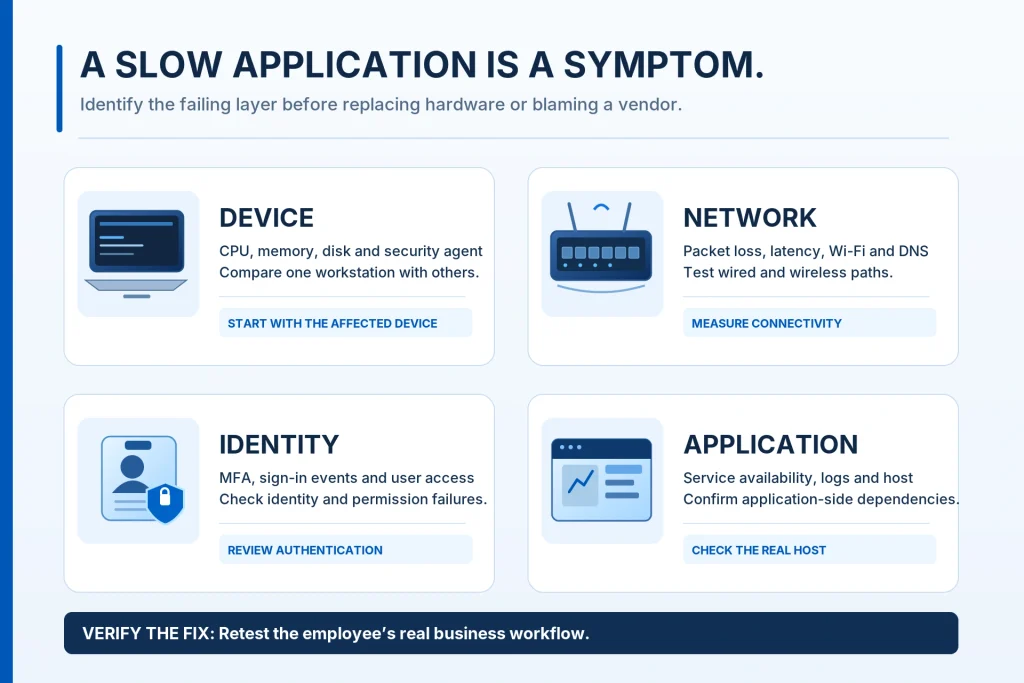
A weak connection may involve the wireless network. An authentication failure may involve Microsoft Entra ID. A slow file share may involve the workstation, network, server, VPN, or application.
Security adds another layer. Devices need updates, accounts need access controls, alerts require review, and backup failures need investigation.
An MSP should understand how these systems depend on one another.
NIST’s Cybersecurity Framework 2.0 Small Business Quick-Start Guide emphasizes managing cybersecurity as an ongoing business responsibility rather than relying exclusively on technology products.
Installing security tools is only the beginning. Operating them responsibly is the real work.
What Should Managed IT and Cybersecurity Services Cover?
Not every MSP agreement includes the same services.
Before comparing providers, understand the responsibilities behind each category.
| Service area | What should be managed |
|---|---|
| Help desk | User incidents, troubleshooting, escalation, documentation |
| Device management | Inventory, patching, device health, software maintenance |
| Endpoint security | Protection status, detections, exceptions, response procedures |
| Microsoft 365 | Accounts, MFA, permissions, licensing, email administration |
| Networking | Firewalls, switching, Wi-Fi, VPNs, configuration oversight |
| Backup and recovery | Protected workloads, failures, restore procedures, testing |
The agreement should identify what is covered, when assistance is available, and which work requires additional authorization.
Automated monitoring is not necessarily a staffed 24-hour response service.
Similarly, an endpoint detection platform does not guarantee that every alert is investigated immediately.
Those responsibilities must be defined.
When an Application Is Slow: A Root-Cause Investigation
Consider a hypothetical twelve-person accounting office in Waltham.
Three employees report that their accounting application takes unusually long to open. The vendor blames the network. The internet provider reports no outage.
Replacing equipment immediately would be premature.
An engineer should first determine the scope.
Step 1: Identify who is affected
Does the problem occur on one workstation, several devices, or every employee’s computer?
Does it happen only over Wi-Fi or also through Ethernet?
Did it begin after an update, application change, or network maintenance?
These answers determine where investigation should begin.
Step 2: Test the actual connection
Relevant checks may include packet loss, latency, DNS resolution, interface speed, and connectivity to the application host.
On an authorized Windows workstation, two basic read-only PowerShell checks are:
# Display network adapter status and reported link speed.
Get-NetAdapter |
    Select-Object Name, Status, LinkSpeed

# Test TCP connectivity to an approved service endpoint.
Test-NetConnection example.com -Port 443
Replace example.com with the application’s approved hostname.
These checks do not establish whether the application is healthy or the network is free of faults. They provide limited evidence for further investigation.
Step 3: Evaluate authentication and application dependencies
If network connectivity is normal, the investigation may move toward identity, DNS, application services, or the hosting environment.
A managed provider should correlate available findings before blaming another vendor.
A slow application is a symptom, not a diagnosis.
That distinction prevents unnecessary purchases and repeated temporary fixes.
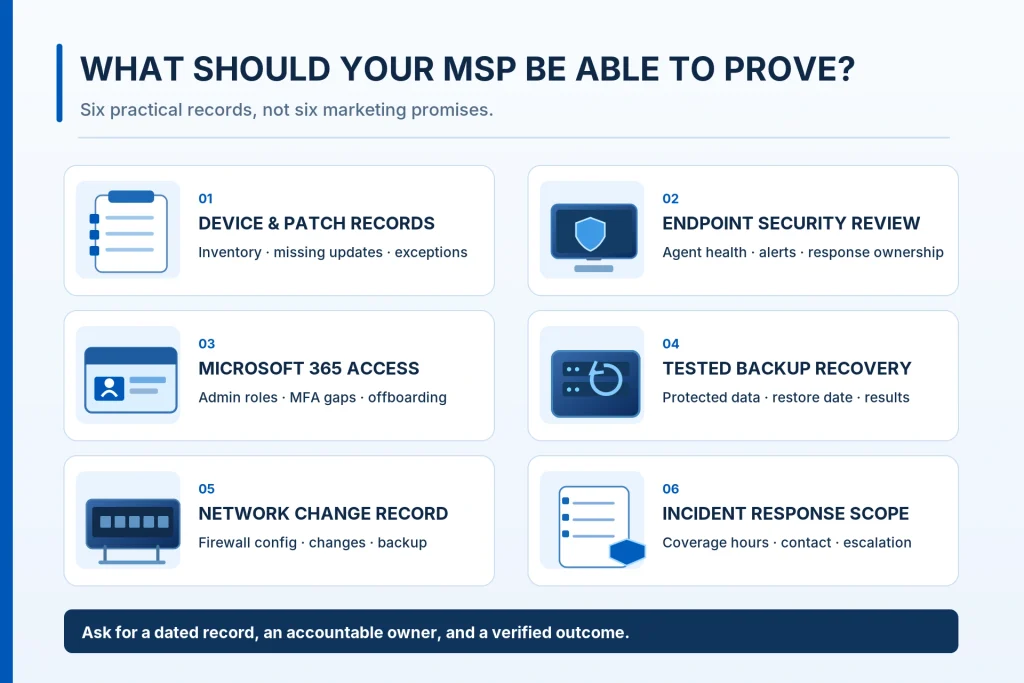
What Your MSP Should Be Able to Prove
Many companies receive reports showing that devices are online or security software is installed.
Those reports can be useful, but they are not sufficient evidence of complete oversight.
A more meaningful operational review asks:
- Patching: Which covered devices are missing required updates, and why?
- Endpoint protection: Which agents are unhealthy, and who reviews significant detections?
- Identity: Who has privileged access, and how are MFA exceptions managed?
- Backups: Which systems are protected, and when was restoration last verified?
- Networking: Are important configurations documented, backed up, and reviewed?
- Incident response: Who receives critical alerts, and what happens outside ordinary support hours?
A provider should distinguish completed work from unresolved exceptions.
For example, a successful backup job means the backup process reported success. It does not establish that the business can restore an entire server or a critical application.
Our Microsoft 365 backup guide explains why retention, backup coverage, and recovery validation must be evaluated separately.
Cybersecurity Is More Than Antivirus and a Firewall
Business cybersecurity involves several overlapping safeguards.
Endpoint protection may identify malicious activity on laptops and desktops. Email protection can reduce exposure to certain phishing attacks. MFA strengthens account security. Patch management addresses known software vulnerabilities.
Firewalls provide network controls, while backup systems support recovery after selected failures or incidents.
None replaces the others.
A particularly important issue is alert ownership.
If endpoint software detects suspicious activity at 8:00 p.m., who receives the notification? Is the alert merely recorded, automatically handled, or reviewed by a person? What response is contractually available?
Those are different levels of service.
CISA’s guidance for MSPs and small businesses identifies practical areas such as authentication, backups, and protecting MSP-customer relationships.
The right cybersecurity plan connects safeguards with people who are responsible for maintaining them.
Does Massachusetts Law Affect Managed IT Requirements?
Massachusetts businesses may have information-security responsibilities under 201 CMR 17.00 when they own or license personal information covered by the regulation.
Depending on applicability, the requirements address written security programs, access controls, authentication, technical safeguards, and oversight of relevant service providers.
The regulation does not require every business to purchase an identical MSP package.
A law firm, accounting practice, healthcare organization, and construction company may handle different information and face different legal or contractual obligations.
An MSP can help assess and implement technical safeguards.
Legal interpretations and compliance determinations should involve qualified advisers.
Read the official Massachusetts 201 CMR 17.00 regulation.
How Should Businesses Evaluate Managed IT Pricing?
Monthly price alone tells you relatively little about the service.
A $115-per-user plan and a higher-priced agreement may include different Microsoft 365 licenses, endpoint-security products, backup coverage, support hours, and on-site work.
Even two agreements described as “fully managed” can have different exclusions.
Before signing, ask whether the quoted price includes:
- Necessary licensing and security subscriptions
- Remote support and scheduled on-site assistance
- Security alert review and escalation
- Backup monitoring and restoration assistance
- Employee onboarding and offboarding
- Projects, emergencies, and after-hours work
Compare the written scope rather than assuming every service is included.
Our Massachusetts managed IT pricing guide provides a more detailed purchasing comparison.
Managed IT Readiness Checklist for Massachusetts Businesses
Ask your current provider to answer these questions with supporting documentation.
- Do we have an accurate inventory of covered users and devices?
- Are update failures and security exceptions reviewed?
- Are administrator accounts and MFA requirements documented?
- Do we know who responds to important security alerts?
- Can we identify which systems and files are backed up?
- Has a representative restoration been tested?
- Are firewall, network, and vendor configurations documented?
- Does our agreement explain emergency and on-site charges?
One failed item does not necessarily justify replacing your MSP.
It identifies something worth investigating.
The objective is to establish which risks require correction, which responsibilities need clarification, and whether the existing arrangement meets business requirements.
Frequently Asked Questions
Do small businesses need managed IT and cybersecurity?
Businesses that depend on interconnected systems may benefit from ongoing technical oversight. The right arrangement depends on their users, applications, risks, and internal IT capabilities.
Does managed IT include cybersecurity monitoring?
Not automatically. Monitoring capabilities, human review, after-hours coverage, and response responsibilities depend on the contract.
Can an MSP prevent ransomware?
No provider can guarantee prevention. Managed safeguards can reduce certain risks and support detection, containment, and recovery.
Can one provider manage Microsoft 365 and office networking?
Yes, when the provider has the technical capabilities and those systems are included in the agreed scope.
Reliable IT Starts With Clear Responsibility
A Massachusetts business should not have to determine whether a problem belongs to its network provider, Microsoft 365 administrator, software vendor, or backup company.
Technical accountability means investigating the relevant systems, documenting findings, and coordinating the next action.
Mass IT Pro Solution provides managed IT services, cybersecurity and endpoint protection, Microsoft 365 administration, networking, and backup planning for Massachusetts businesses.
We serve organizations throughout Greater Boston, MetroWest, Worcester, and surrounding communities with remote and scheduled on-site support.
Request a free business IT consultation to review your current technology environment, identify priorities, and determine whether a focused project or ongoing managed support is appropriate.
Mass IT Pro Solution
508-254-4704 | support@massitpro.com
Service capabilities, monitoring hours, recovery arrangements, and support responsibilities depend on the written agreement. Cybersecurity services cannot guarantee prevention of every incident, uninterrupted operations, or recovery of all data.