
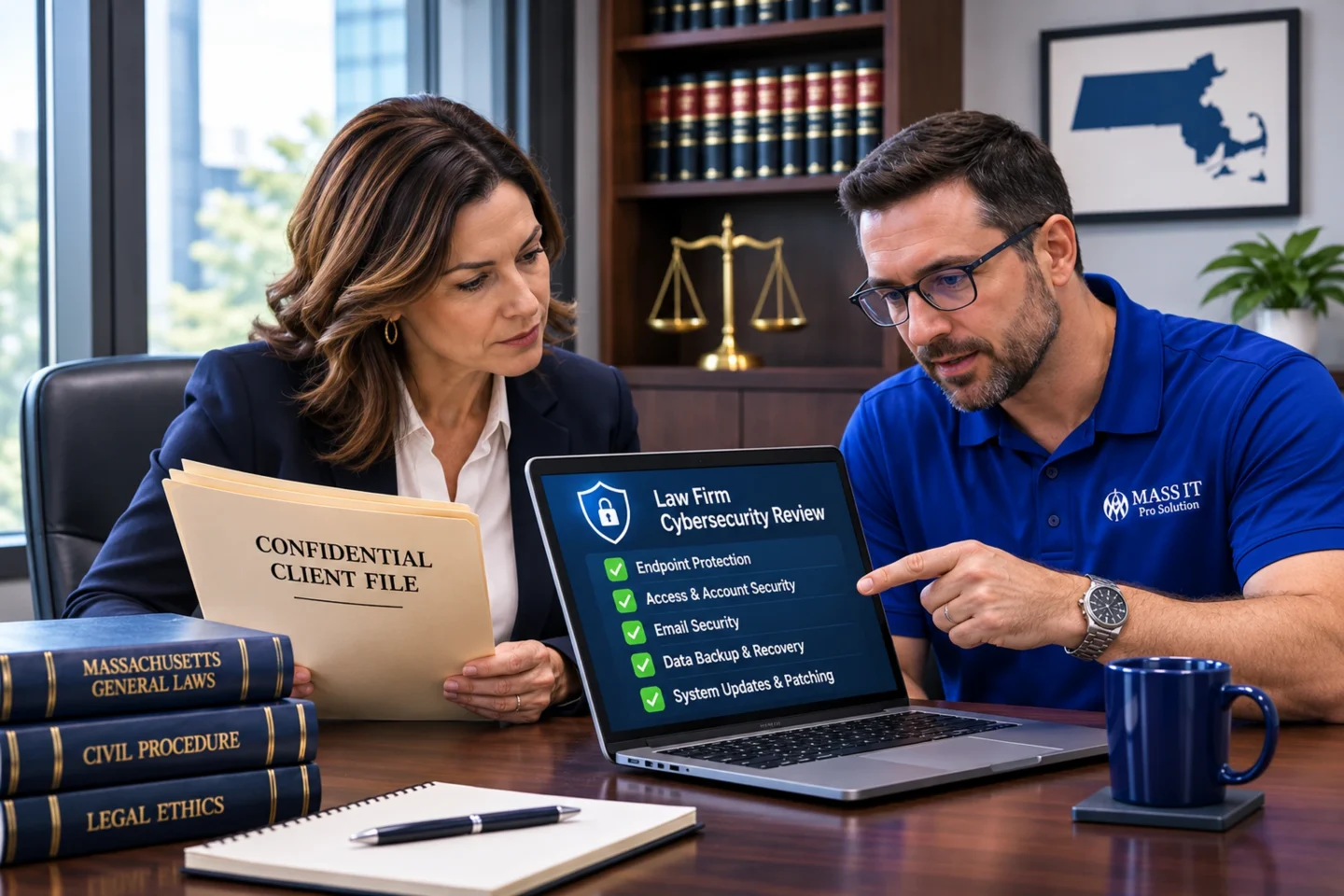
An evidence-based 2026 cybersecurity checklist for law firms covering client confidentiality, Microsoft 365, email fraud, secure documents, endpoint protection, backup recovery, and Massachusetts security obligations.
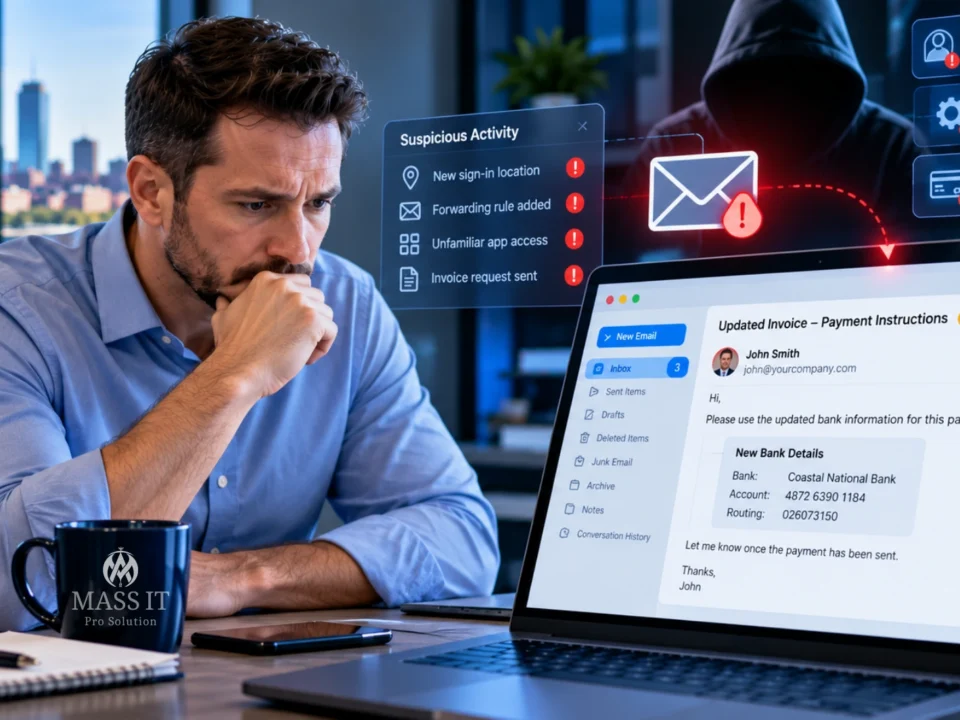
Your paralegal receives an email that appears to come from a client.
It references a real matter, uses the client’s familiar signature, and asks the firm to update the account information for an upcoming payment.
Nothing about the message looks obviously suspicious.
But the banking instructions have changed.
Would anyone at your firm verify the request before money is transferred?
Now consider another question.
If someone gained access to that paralegal’s email account, could they also open confidential client documents, shared matter folders, or files stored in Microsoft 365?
For a small Massachusetts law firm, these questions are just as important as whether the office has antivirus software.
Quick answer: A small law firm needs cybersecurity controls appropriate to the sensitivity of its client information and its operations. A practical baseline generally includes strong identity security, managed devices, secure email and file sharing, limited access to client matters, supported software, protected backups, tested recovery procedures, vendor oversight, and an incident-response plan. The precise safeguards depend on the firm’s risks, technology, clients, and legal obligations.
The goal isn’t to buy every available security product.
It’s to know where confidential information lives, who can access it, what could go wrong, and whether the firm can demonstrate reasonable protective measures.
Why Cybersecurity Is Different for a Law Firm
A legal practice may have only five or ten employees, but its systems can contain extremely sensitive information.
Consider what might be stored in its email, case-management platform, file shares, and cloud applications:
- Attorney-client communications
- Litigation strategy and evidence
- Contracts and settlement discussions
- Financial and banking information
- Identity documents
- Medical or employment records
- Immigration or family-law documents
- Confidential business transactions
- Documents subject to preservation obligations
Not every document has the same confidentiality, retention, or security requirements.
A publicly available court filing is different from a privileged memorandum.
A routine scheduling message is different from a confidential settlement instruction.
Security needs to reflect those differences.
What Massachusetts professional conduct rules actually require
Under Massachusetts Rule of Professional Conduct 1.6(c), a lawyer must make reasonable efforts to protect confidential information against unauthorized access or disclosure.
The rule doesn’t mandate a particular firewall brand, antivirus vendor, cloud platform, or encryption product for every law practice.
Its commentary describes several factors involved in evaluating reasonable safeguards, including the information’s sensitivity, the likelihood of exposure, the cost and difficulty of additional controls, and how those controls affect legal work.
Massachusetts Rule 1.1 also addresses maintaining competence, including understanding the benefits and risks of relevant technology.
This is why cybersecurity for a law firm shouldn’t begin with a generic product quote.
It should begin with an understanding of the practice and the information it is responsible for protecting.
What Are the Biggest Cybersecurity Risks for Small Law Firms?
A law firm can be exposed through its people, devices, cloud accounts, applications, third-party vendors, or physical network.
The most important risks are not always the most technically complicated.
Consider these scenarios.
| Risk | What could happen | What deserves review |
|---|---|---|
| Email account takeover | An attacker reads correspondence or impersonates an attorney | MFA, sign-ins, mailbox settings, account response |
| Fraudulent payment instructions | A client or firm employee transfers money incorrectly | Independent financial verification |
| Lost or stolen laptop | Locally accessible client files may be exposed | Encryption, device management, access revocation |
| Inappropriate document sharing | An unauthorized person accesses matter files | SharePoint and practice-management permissions |
| Ransomware | Case files or business applications become unavailable | Endpoint security, containment, backups, recovery |
| Unmanaged outside vendor | A third party retains unnecessary access | Vendor permissions, contracts, offboarding |
| Unsupported software | Known vulnerabilities remain unaddressed | Inventory, patching, lifecycle plans |
| Departed employee access | Former staff retain access to business systems | Documented account and device offboarding |
These are possible security scenarios, not allegations about any particular firm or claims that every law office has these weaknesses.
The purpose of an assessment is to identify which risks actually exist.
1. Protect Attorney and Staff Accounts With Strong Identity Security
Email and cloud accounts often provide access to far more than messages.
A Microsoft 365 account may connect to Outlook, OneDrive, SharePoint, Teams, shared calendars, and business applications.
If an attacker compromises that identity, the incident may extend beyond the inbox.
What a law firm should establish
At minimum, the firm should review:
- Multi-factor authentication for user accounts
- Stronger authentication for administrators and high-risk users
- Individual accounts instead of unnecessary shared credentials
- Restricted administrative permissions
- Appropriate controls for outside contractors
- Secure account recovery procedures
- Prompt removal of access when employees leave
- Monitoring and escalation of suspicious sign-ins
Not all MFA methods provide equal protection
MFA adds an important defense against stolen passwords.
But certain phishing attacks can trick users into approving prompts or surrendering authenticated sessions.
Where supported, phishing-resistant authentication, including suitable FIDO2 security keys or passkeys, may provide stronger resistance.
Microsoft recommends phishing-resistant MFA for privileged Microsoft Entra administrative roles.
For a small practice, the correct implementation depends on licensing, supported applications, device compatibility, and recovery arrangements.
A stronger sign-in process is useful only when employees can still securely perform their authorized work.
The administrative account problem
Suppose a law firm has one Microsoft 365 Global Administrator account used for everyday email, billing, device setup, and troubleshooting.
That creates unnecessary concentration of privilege.
A better administrative design uses appropriately limited roles and separate privileged access where practical.
The firm should also know who controls emergency account recovery.
An outside IT provider should have defined, authorized access rather than permanent, unnecessary privileges to every system.
2. Prevent Business Email Compromise and Fraudulent Payment Instructions
Law firms regularly exchange communications involving money, contracts, settlement arrangements, and sensitive documents.
That makes convincing impersonation and payment-change requests particularly concerning.
An attacker may use a lookalike domain, forge a display name, compromise a vendor, or gain access to a real mailbox.
A realistic hypothetical scenario
A Boston law office receives a message apparently sent by a familiar business contact.
The email asks that an upcoming transfer use updated banking information.
The amount matches an expected transaction.
The signature looks familiar.
But the account number is new.
If the firm approves that change based only on the email, the existing business relationship may be used against it.
What the firm should do
A documented process should require independent verification of sensitive financial changes through a previously established, trusted channel.
That may include:
- Confirming changes to wire instructions
- Verifying vendor banking updates
- Reviewing payroll account changes
- Using an additional approval for higher-risk transfers
- Escalating unexpected urgency or secrecy
- Training staff to report suspicious messages promptly
Never verify a suspicious payment request using only the phone number contained in that same message.
What email security software can and cannot do
Email filtering, anti-phishing policies, sender authentication, and account monitoring can reduce exposure to certain threats.
But they cannot independently establish that every payment request is legitimate.
An attacker sending from a genuinely compromised account may pass SPF, DKIM, and DMARC authentication.
That’s why technical email security and financial approval procedures need to work together.
For a deeper technical explanation, see our Business Email Compromise guide.
3. Secure Client Files in SharePoint, OneDrive, and Legal Applications
Small firms often begin with simple file-sharing arrangements.
An attorney creates a folder.
A paralegal shares it with another employee.
An outside consultant receives access.
Over time, folders may be copied, permissions inherited, and external links forgotten.
The result can be a document structure that nobody has fully reviewed.
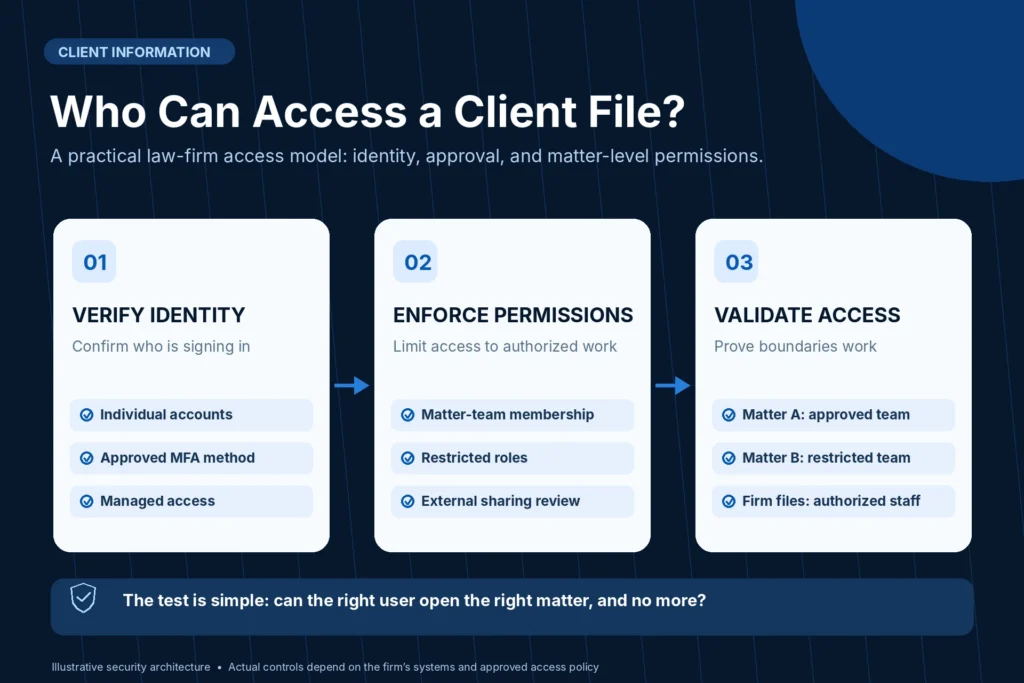
What least privilege means for client matters
Employees should have access appropriate to their responsibilities.
An associate working on one matter may not need unrestricted access to every confidential file in another practice area.
A temporary contractor may need selected documents without access to the firm’s entire document repository.
Some firms also require additional access separation because of conflicts, ethical walls, client instructions, or contractual restrictions.
These requirements must be defined by the firm’s authorized legal leadership.
A conceptual client-document access model
                LAW FIRM IDENTITY
                  AND MFA CONTROLS
                         |
                         v
               APPROVED FILE ACCESS
                         |
          +--------------+--------------+
          |              |              |
          v              v              v
      MATTER A       MATTER B       FIRM OPERATIONS
      WORKSPACE      WORKSPACE       WORKSPACE
          |              |              |
    Approved team   Approved team   Authorized staff
          |              |              |
          +--------------+--------------+
                         |
                         v
             LOGGING AND ACCESS REVIEW
Illustrative architecture. Actual access boundaries may be implemented through a document-management system, SharePoint, application-specific permissions, or other controls.
Avoid two common mistakes
Mistake one: Everyone has access to everything.
It’s convenient until the firm needs to limit access to a particular client, matter, or sensitive record.
Mistake two: Every matter gets an unnecessarily complicated technical structure.
Creating hundreds of SharePoint sites is not automatically a better solution.
The right design depends on the document-management platform, confidentiality rules, administrative capacity, and how legal teams collaborate.
External sharing needs an actual policy
Microsoft supports several SharePoint and OneDrive sharing options, including authenticated external guests and anonymous links.
The organization can configure different restrictions at the tenant and site levels.
For sensitive legal material, the firm should determine which sharing methods are appropriate and who may authorize them.
Review Microsoft’s SharePoint and OneDrive external-sharing guidance.
A document being stored in Microsoft 365 does not automatically mean it is accessible only to the correct people.
4. Protect Every Laptop and Workstation That Handles Client Data
A law firm may have a well-configured office firewall while attorneys routinely access confidential information from laptops outside the office.
Those laptops deserve their own security controls.
A practical endpoint baseline
An appropriate managed-device program can include:
- Supported Windows or macOS versions
- Operating-system and application patching
- Endpoint protection
- Disk encryption
- Screen-lock policies
- Appropriate administrator restrictions
- Device inventory
- Secure remote support
- Reporting of lost or stolen equipment
- Approved access to firm applications
For organizations with advanced requirements, the plan may include managed endpoint detection and response, device-compliance policies, and security-event escalation.
The correct level of monitoring should be defined in the service agreement.
Why disk encryption matters
Suppose an attorney’s laptop is stolen from a vehicle.
A login password may prevent an ordinary user from casually accessing the desktop.
But full-disk encryption addresses a different problem: protecting information stored on the drive if someone attempts to access the storage outside normal operating-system controls.
Encryption should be configured correctly, and recovery information must be secured.
It is not sufficient to assume that encryption is active because the laptop is relatively new.
Technical check: Windows BitLocker status
An authorized administrator can use the following read-only PowerShell command on a supported Windows device:
# Read-only: examine available BitLocker status.
# Run only on a device you are authorized to assess.

Get-BitLockerVolume |
    Select-Object MountPoint,
                  VolumeStatus,
                  ProtectionStatus,
                  EncryptionMethod
This reports selected BitLocker information.
It does not establish that every firm device is encrypted, that recovery keys are appropriately protected, or that sensitive data isn’t stored elsewhere.
A complete review should also consider devices managed through organizational policies, macOS FileVault, removable storage, and approved recovery procedures.
Don’t confuse device enrollment with security
A laptop appearing in a device-management console is useful.
But enrollment alone does not prove that every security policy is correctly applied or that the computer is protected against every threat.
A managed IT provider should review important exceptions rather than only reporting the number of enrolled devices.
5. Secure Remote Work Without Exposing the Entire Office
Attorneys and support staff may work from home, court, client offices, or other locations.
Remote work can be appropriate when access is designed around the actual business application and information involved.
A firm may use Microsoft 365 cloud services, a hosted legal practice application, a VPN, or a controlled remote-desktop environment.
Each has different security responsibilities.
Questions worth asking
- Does remote access require appropriate MFA?
- Is the connecting device managed or otherwise trusted?
- Can the user reach more internal systems than necessary?
- Are obsolete remote-access accounts still enabled?
- Are administrative interfaces exposed unnecessarily?
- Can the firm revoke access promptly when an employee leaves?
- Is remote activity logged where appropriate?
A VPN is not a complete security program
A VPN can provide an encrypted connection to designated network resources.
It does not automatically establish that the user’s computer is safe.
It also doesn’t mean every connected user should be able to reach servers, printers, administrative interfaces, and other network devices.
Secure remote access depends on both identity and authorization.
For a small law firm, the best solution is the one that provides approved access without unnecessarily expanding the systems a compromised account could reach.
6. Review the Firewall, Wi-Fi, and Office Network
Not every security problem begins at the internet edge, but the office network still matters.
A typical law firm may connect:
- Attorney and staff workstations
- Printers and scanners
- VoIP telephones
- Wireless access points
- Network storage or servers
- Conference-room equipment
- Guest devices
- Third-party vendor systems
That environment should be documented and appropriately managed.
Practical network controls
A professional review may consider:
- Supported firewall and wireless equipment
- Firmware and maintenance status
- Restricted administrative access
- Reviewed inbound firewall rules
- Secure wireless encryption
- Guest-network isolation
- Appropriate network segmentation
- Secure vendor connectivity
- Logging and fault monitoring
- Configuration backups
A guest Wi-Fi password by itself does not prove guests are isolated from internal systems.
Likewise, creating separate VLANs does not guarantee security if firewall policies allow unrestricted communication between them.
What should a firm verify?
An authorized technician should test whether the intended restrictions actually work.
For example, a visitor on guest Wi-Fi should not be able to reach confidential internal file services unless the firm has explicitly approved that connection.
The test must reflect the real network configuration and avoid disrupting production systems.
Security is not established merely by showing a screenshot of a firewall dashboard.
7. Back Up Client Data and Prove It Can Be Restored
Law firms often operate with substantial document-retention and business-continuity needs.
But backup coverage is not always obvious.
A firm might store email in Exchange Online, documents in SharePoint, working files in OneDrive, and active matters in a separate cloud practice-management application.
Those systems may require different backup and recovery arrangements.
What a law firm should ask
Which systems are protected?
Identify the actual workloads rather than accepting a generic claim that the firm has “cloud backup.”
How often are recovery points created?
The answer should relate to how much potential data loss the firm can tolerate.
Where are recovery copies stored and who can access them?
An attacker who obtains broad administrative access should not automatically have an unrestricted ability to destroy every available recovery copy.
What happens when an employee leaves?
Required mail and files may need preservation before account deletion.
Has recovery been tested?
A successful backup notification is not the same thing as a verified restore.
Example recovery priorities
| System | Why it matters | What needs testing |
|---|---|---|
| Legal practice-management application | Matter records, calendars, workflows | Application and data recovery arrangements |
| Exchange Online | Client communication | Mailbox or item recovery |
| SharePoint/OneDrive | Documents and collaboration | Selected file, folder, or site recovery |
| Local file server | Office file access | Files, shares, and applicable permissions |
| Firm workstations | Employee productivity | Device rebuild and necessary data recovery |
Illustrative priorities. Each firm should determine its own critical applications and recovery requirements.
What about Microsoft 365 Backup?
Microsoft 365 includes several native recovery capabilities and offers a separate Microsoft 365 Backup product for supported workloads.
But this does not automatically protect every legal application or every category of Teams content.
Read our Microsoft 365 Backup guide for a deeper explanation.
A law firm’s recovery plan should be designed around actual legal work, not just a list of purchased subscriptions.
8. Review Legal Software Vendors and Outside IT Access
Law firms frequently depend on applications and outside providers that store, process, or access information.
A practice-management vendor may host case records.
A document-management provider may store client files.
An outsourced billing service may handle financial information.
An external IT provider may administer the firm’s Microsoft 365 tenant, computers, and firewall.
Each relationship deserves a clearly defined security and operational scope.
Questions to ask service providers
- What information will the provider access or store?
- Who can administer the environment?
- How are access permissions assigned and removed?
- What security and availability responsibilities are contractual?
- How are relevant incidents communicated?
- What backup or export options are available?
- How are records preserved when the agreement ends?
- What happens if the vendor’s service is unavailable?
- How does the firm recover its data if it changes providers?
These questions are especially useful during software selection and contract renewal.
What about Massachusetts vendor oversight?
For organizations covered by 201 CMR 17.00, service-provider selection and appropriate contractual safeguards are part of the regulation’s requirements.
But the regulation’s applicability depends on whether the organization owns or licenses personal information as defined in the rule.
Not every confidential legal document necessarily meets that specific definition.
A qualified attorney or compliance adviser should determine the firm’s actual legal obligations.
A provider’s security certification or marketing claim does not replace the firm’s own vendor-risk review.
9. Know What to Do When a Client File or Email Account May Be Compromised
A small firm may not need a large internal security operations department.
But it needs a clear incident-response process.
An employee should know whom to contact when:
- A suspicious MFA prompt appears
- A client reports fraudulent payment instructions
- A laptop is lost
- Files become inaccessible
- An unfamiliar external sharing link is discovered
- An email account shows suspicious activity
- A security product reports a significant event
A practical incident-response sequence
              SUSPICIOUS ACTIVITY
                      |
                      v
                REPORT PROMPTLY
                      |
                      v
            TRIAGE AND CONTAINMENT
                      |
                      v
          PRESERVE RELEVANT EVIDENCE
                      |
                      v
          DETERMINE AFFECTED SYSTEMS
                 AND INFORMATION
                      |
                      v
             LEGAL / PRIVACY REVIEW
              WHERE APPROPRIATE
                      |
                      v
              RECOVER AND VERIFY
                      |
                      v
             DOCUMENT AND IMPROVE
An actual response may involve parallel steps, particularly when funds have been transferred or unauthorized access is ongoing.
Does a cybersecurity incident automatically trigger client notification?
Not every suspicious email, malware detection, or blocked attack requires notifying every client.
The circumstances matter.
The firm may need to consider the nature of the information, evidence of access or disclosure, professional-conduct duties, contractual terms, and applicable breach-notification law.
The American Bar Association’s Formal Opinion 483 discusses lawyers’ obligations following an electronic data breach under the ABA Model Rules.
Massachusetts lawyers should evaluate applicable Massachusetts rules and other governing law rather than treating the ABA opinion as an automatic substitute for local requirements.
Technical responders can help establish facts, but lawyers and qualified advisers must make the relevant legal determinations.
10. Understand Massachusetts 201 CMR 17.00 Without Assuming It Covers Every File
Massachusetts has specific requirements for organizations that own or license defined personal information about Commonwealth residents.
Under 201 CMR 17.00, covered organizations must maintain a written information security program with safeguards appropriate to their circumstances.
The regulation includes administrative, technical, and physical security requirements.
What counts as protected personal information under this regulation?
The definition generally involves a Massachusetts resident’s name or first initial and last name combined with certain specified identifying or financial data, such as a Social Security number, driver’s license or state identification number, or qualifying financial account information.
Not every confidential communication fits that exact statutory definition.
But a law firm can have confidentiality duties even when 201 CMR 17.00 does not apply to a particular record.
How this affects a law firm’s IT planning
Depending on applicability, the firm may need to review:
- Written information security policies
- Risk assessment and safeguards
- Employee responsibilities
- Access controls
- Authentication
- Encryption requirements where applicable
- Security patches and malware protection
- Monitoring
- Service-provider oversight
- Incident-response and documentation procedures
The requirements should be evaluated according to the actual organization and information involved.
Buying a firewall, Microsoft 365 license, or managed IT subscription is not proof of regulatory compliance.
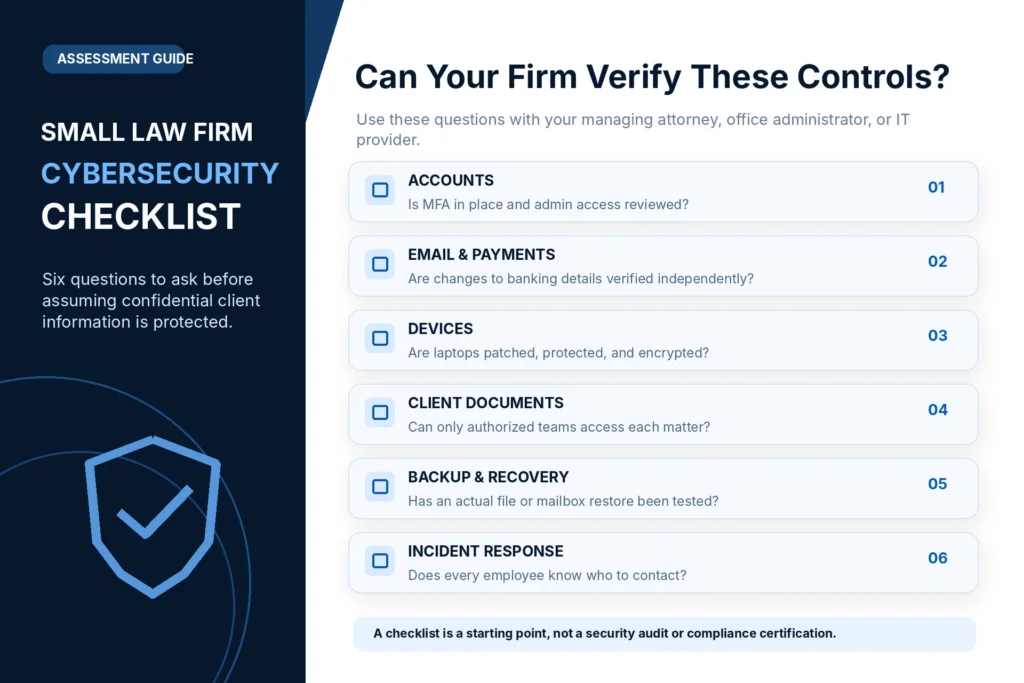
A Practical Cybersecurity Checklist for Small Massachusetts Law Firms
Use this checklist with your office administrator, managing attorney, internal IT employee, or managed IT provider.
It is an assessment aid, not an official bar association certification or validated legal compliance score.
Identity and access
- Every employee uses an individually assigned account where practical.
- Appropriate MFA is configured for important services.
- Administrative privileges have been reviewed.
- Former employees and vendors no longer retain unnecessary access.
- Emergency account recovery procedures are documented.
- Matter-specific access requirements are understood.
Email and client communications
- Suspicious mailbox activity has an assigned response process.
- Email security and impersonation protections are appropriately configured.
- Banking instruction changes require independent verification.
- The firm has an approved method for sharing sensitive documents.
- Employees know how to report suspicious messages.
Devices and networking
- Supported operating systems are used on firm-managed devices.
- Important security updates are managed.
- Endpoint protection is in place on covered devices.
- Laptop encryption status has been verified.
- Lost-device response procedures are documented.
- Remote access is approved and appropriately restricted.
- Firewall and wireless equipment are supported and maintained.
- Guest connectivity is isolated where appropriate.
Files, backups, and vendors
- Critical client-document locations are inventoried.
- SharePoint or document-management permissions are reviewed.
- External sharing is governed by firm policy.
- Critical application backups are identified.
- Recovery requirements are documented.
- At least one appropriate restoration workflow has been tested.
- Departing-employee data preservation is part of offboarding.
- Important vendor access and responsibilities are documented.
Governance and incident response
- The firm has a designated security decision-maker.
- Relevant written security policies are maintained.
- Staff understand how to report potential incidents.
- Incident evidence-preservation responsibilities are established.
- The firm knows which legal or regulatory advisers to involve.
- Outstanding security risks have owners and next actions.
The value of this checklist is in the evidence behind each answer.
A box marked complete should mean that the control has actually been reviewed or verified.
What Should a Small Law Firm Fix First?
Not every practice has the same budget or the same technical environment.
A practical security roadmap prioritizes actual exposure and business impact.
First priority: Serious exposure or active compromise
Potential examples include:
- Suspected unauthorized email access
- Exposed administrative accounts
- Missing MFA on critical accounts
- Former employees retaining sensitive access
- Significant unresolved backup failures
- Unsupported critical systems without appropriate mitigation
Active incidents require appropriate containment and investigation, not a routine future maintenance appointment.
Second priority: Close important operational gaps
Examples include:
- Endpoint management and patching
- Laptop encryption
- Secure document sharing
- Matter-access reviews
- Email impersonation protections
- Approved remote-access arrangements
- Vendor-access reviews
Third priority: Improve resilience and documentation
Examples include:
- Restore-testing exercises
- Hardware lifecycle planning
- Incident-response procedures
- Regular permission reviews
- Employee security awareness
- Written operating procedures
- Periodic technology risk reviews
This is an example framework. Real priorities should reflect the firm’s assessment findings.
A serious problem should not wait merely because it appears under a later heading.
What Should a Law Firm Cybersecurity Assessment Produce?
A useful assessment should generate more than a collection of software recommendations.
It should explain which risks matter to the firm and what work would address them.
Example assessment findings
| Review area | Example finding | Recommended next step |
|---|---|---|
| Identity | Some users lack required MFA | Establish a suitable MFA deployment plan |
| Devices | A firm laptop is unsupported | Evaluate replacement or approved temporary controls |
| Client documents | External sharing permissions aren’t documented | Review and approve access arrangements |
| Backup | No recent restore-test record | Perform an authorized recovery test |
| Financial procedures | Wire changes rely on email alone | Create an independent verification requirement |
| Vendor access | Old administrative account remains | Verify ownership and remove unnecessary access |
Illustrative findings. These are not results from an actual Mass IT Pro Solution customer assessment.
What business leadership should receive
The final report should identify:
What is already working?
Document meaningful protections that are properly configured and managed.
What requires attention?
Describe the risk and available evidence without exaggeration.
What should be done first?
Separate urgent exposure from scheduled improvements.
What will the work involve?
Explain the proposed changes, likely disruption, and any required decisions.
What is included in the service agreement?
Make clear which work is covered and which projects require separate authorization.
A good assessment makes security decisions understandable.
How Much Cybersecurity Does a Five- or Ten-Person Law Firm Need?
A small staff doesn’t automatically mean low cybersecurity risk.
A solo attorney handling highly confidential matters may have more sensitive information than a larger business with relatively routine records.
Likewise, a ten-person firm with remote employees and several cloud platforms may have more complex access requirements than a similarly sized office using one centrally managed system.
Cost depends on the actual security responsibilities
Important factors may include:
- Number and type of devices
- Cloud and legal application environment
- Endpoint protection requirements
- Email and identity security
- Firewall and remote-access infrastructure
- Backup coverage and recovery expectations
- Vendor and compliance-related requirements
- Monitoring and incident-response scope
- Existing technical debt and remediation needs
One firm may need focused corrections to an otherwise well-managed environment.
Another may require a more comprehensive security and managed IT program.
The appropriate proposal should follow the risk assessment, not be determined by employee count alone.
Managed IT, Co-Managed IT, or a One-Time Cybersecurity Project?
Not every law firm needs a fully outsourced IT agreement.
A firm with capable internal IT staff may benefit from specialized cybersecurity, backup, or infrastructure assistance.
A smaller practice without technical staff may prefer ongoing management of its workstations, Microsoft 365, network, and user support.
A firm facing a specific problem may only need a defined project.
Choosing the right engagement
| Firm situation | Possible approach |
|---|---|
| A known security configuration issue | Focused technical project |
| No consistent IT or security ownership | Managed IT assessment |
| Existing internal IT with specialist gaps | Co-managed services |
| Suspected compromise | Authorized incident-response engagement |
| Infrastructure and recovery weaknesses | Scoped security and resilience improvements |
The engagement should state what will be managed, what is excluded, how urgent requests are handled, and which decisions remain with the firm.
For more information, review our IT Support for Massachusetts Law Firms and Cybersecurity and Endpoint Protection Services.
Frequently Asked Questions About Law Firm Cybersecurity
What cybersecurity protection does a small law firm need?
A small law firm generally needs security controls appropriate to its confidential information and technology environment. Common priorities include strong authentication, managed devices, appropriate document access, email protection, secure remote work, backup recovery, vendor oversight, and incident-response procedures.
Does Massachusetts require law firms to use a specific cybersecurity product?
Massachusetts Rule of Professional Conduct 1.6(c) requires reasonable efforts to protect confidential client information. It does not prescribe one universal software package. Specific obligations may also arise from data-security laws, client agreements, or other applicable requirements.
Does 201 CMR 17.00 apply to every Massachusetts law firm?
The regulation applies to organizations that own or license personal information as specifically defined under the rule. Whether it applies depends on the information held and the organization’s circumstances, not simply the fact that the business is a law firm.
Is Microsoft 365 secure enough for a law firm?
Microsoft 365 provides substantial identity, collaboration, and security capabilities. Appropriate protection depends on licensing, settings, administrator access, device management, document sharing, user practices, and ongoing oversight. A subscription alone doesn’t establish that a particular law firm is secure or compliant.
Should attorneys use MFA?
MFA is an important security control for attorney and staff accounts. A firm’s authentication requirements should account for the applications, devices, and risks involved. Phishing-resistant methods may be appropriate for administrators and other sensitive accounts where supported.
Do law firms need encrypted email for every message?
Not necessarily. The appropriate protections depend on the information’s sensitivity, communication method, applicable duties, and client instructions. Massachusetts Rule 1.6 commentary supports a reasonableness-based assessment rather than a blanket conclusion that every message must use a particular encryption product.
Can a law firm use OneDrive and SharePoint for client files?
Yes, these platforms can support appropriate document collaboration when access permissions, sharing policies, retention, security, and other requirements are configured and governed properly. The firm must still consider whether a specialized document-management system is needed for its workflows.
Does a law firm need endpoint detection and response?
Managed endpoint security and detection capabilities can be valuable, especially where workstations handle sensitive data. The appropriate product and monitoring model depend on the firm’s risks, staffing, budget, and contractual needs.
Are law firm backups covered by Microsoft 365?
Microsoft 365 includes built-in recovery capabilities and offers a separate backup product for supported workloads. It does not automatically cover every legal practice application or every recovery requirement. The firm should inventory its actual systems and verify protection and restoration.
What happens if a law firm’s email account is hacked?
The firm should promptly involve authorized technical responders, contain unauthorized access, preserve relevant evidence, assess affected accounts and information, and consider financial, legal, professional, and regulatory obligations where applicable. Changing the password alone may be insufficient.
Should a law firm notify clients after a cyberattack?
Not every security alert requires client notification. Duties depend on the incident, affected information, governing professional conduct rules, applicable laws, and contractual requirements. The firm should seek qualified legal guidance and establish the relevant facts.
Can an MSP handle cybersecurity for a small law firm?
An MSP can manage defined technical responsibilities, including endpoint protection, Microsoft 365, networking, backup oversight, and support. The agreement should clearly state coverage and response responsibilities. The firm’s leadership retains responsibility for its legal and business decisions.
Protecting Client Confidentiality Requires More Than Security Software
A law firm can purchase endpoint protection, Microsoft 365, a business firewall, and a cloud backup service.
Those tools may all be useful.
But security depends on whether the firm understands its information, assigns access appropriately, maintains its systems, verifies recovery, and responds effectively when something goes wrong.
A good cybersecurity plan should answer:
Who can access our client information?
What happens if an attorney’s account or laptop is compromised?
Can we recover the files and applications needed for active matters?
Do we understand our vendors’ responsibilities?
Can we demonstrate the safeguards we have actually implemented?
For a Massachusetts law firm, cybersecurity is not simply about protecting equipment.
It is about supporting the confidentiality, continuity, and trust that legal representation requires.
Need a Law Firm Cybersecurity Review in Massachusetts?
Mass IT Pro Solution helps Massachusetts law firms assess and improve the technical systems supporting their daily operations.
Our services can include Microsoft 365 administration, endpoint protection, managed IT support, firewall and network management, backup oversight, secure remote access, and technology planning.
We begin by reviewing the firm’s environment and identifying appropriate priorities rather than assuming every practice needs the same products.
Request a Free Business IT Consultation
You can also explore our IT Services for Massachusetts Law Firms.
Mass IT Pro Solution
Law Firm IT Support | Cybersecurity | Microsoft 365 | Backup & Recovery | Managed IT
Phone: 508-254-4704
Email: support@massitpro.com
Serving law firms across Greater Boston, Cambridge, Waltham, Newton, Dedham, MetroWest, Worcester, and surrounding Massachusetts communities.
This article is general technical and educational information, not legal advice or a finding of regulatory compliance. Professional-conduct, breach-notification, confidentiality, and records-management obligations depend on the facts and applicable law. Cybersecurity services do not guarantee prevention of every incident, uninterrupted operations, or recovery of every item. Service scope and response arrangements depend on the written agreement.
Primary Legal and Technical References
- Massachusetts Rule of Professional Conduct 1.6: Confidentiality
- Massachusetts Rule of Professional Conduct 1.1: Competence
- Massachusetts 201 CMR 17.00: Protection of Personal Information
- Massachusetts Data Breach Notification Requirements
- American Bar Association Formal Opinion 477R: Securing Client Communications
- American Bar Association Formal Opinion 483: Lawyers’ Obligations After a Cyberattack
- NIST SP 1300: Cybersecurity Framework 2.0 Small Business Quick-Start Guide
- Microsoft: SharePoint and OneDrive External Sharing
- Microsoft: Phishing-Resistant MFA for Administrative Roles
- Microsoft: BitLocker PowerShell Reference