
From Wi-Fi and firewall hardening to network segmentation, endpoint protection, remote access, and incident response, here’s what business owners should know about securing their office networks.
Your office Wi-Fi has a password. The firewall is online. Antivirus is installed on the computers.
Everything looks secure.
But when was the last time someone checked whether your firewall’s administrative interface was exposed to the internet? Can a visitor connected to guest Wi-Fi reach your office computers? Are your network switches still receiving security updates? Who investigates a suspicious connection, and what happens if the firewall itself is compromised?
The difference between having security equipment and having a secure network is how that equipment is configured, maintained, and verified.
Quick answer: Securing a small-business network requires a layered approach: maintain supported routers and firewalls, protect administrator access, use WPA3 or appropriately configured WPA2, separate business and guest traffic, restrict unnecessary connections, manage device updates, protect user identities, monitor meaningful security events, and maintain tested backups and incident-response procedures.
For Massachusetts businesses handling confidential information, the work should also align with applicable data-security requirements.
At Mass IT Pro Solution, we believe security should begin with understanding the business environment, not purchasing another product because its packaging promises advanced protection.
The objective isn’t to create a network that can never be attacked. It’s to reduce avoidable exposure, limit unnecessary access, and make problems easier to detect and respond to.
What Does a Secure Small Business Network Actually Look Like?
A small-business network is more than its internet connection.
Depending on the organization, it may include:
- Internet service and the provider’s modem or gateway
- Router or next-generation firewall
- Managed network switches
- Wireless access points
- Windows and macOS workstations
- Servers and network-attached storage
- Printers, scanners, and security cameras
- VoIP phones
- Payment terminals
- Mobile devices and guest Wi-Fi
- VPN connections and remote workers
- Cloud applications such as Microsoft 365
Every connected component introduces functionality, dependencies, and potential security concerns.
An office firewall may protect the internet boundary, but a poorly configured internal network may still allow unrelated devices to communicate freely.
Likewise, strong Wi-Fi encryption does not stop an attacker who has stolen an employee’s valid cloud credentials.
Five layers of practical network security
| Security layer | What it protects | Examples of controls |
|---|---|---|
| Network perimeter | Connections entering and leaving the business | Firewall policies, secure administration, restricted inbound access |
| Internal network | Communication between device groups | VLANs, access controls, network segmentation |
| Devices | Workstations, servers, and other endpoints | Patching, endpoint security, device management |
| Users and identities | Business accounts and administrative access | MFA, least privilege, individual accounts |
| Operations and recovery | Detection, response, and business continuity | Logs, monitoring, backups, recovery tests, incident procedures |
No single control covers every layer.
A firewall cannot restore deleted files.
Endpoint security doesn’t automatically protect an improperly configured wireless network.
MFA does not replace software patching.
The strongest practical approach is to combine controls appropriate to the organization’s risks and confirm that they work together.
Start With a Security Baseline, Not a Shopping List
Before upgrading the firewall or installing new wireless equipment, determine what the company currently operates.
A business may already own capable network hardware.
Its greatest problem could be unsupported firmware, unnecessary administrative access, or poorly documented configuration.
Replacing every device would be expensive and might not correct those weaknesses.
What an initial network-security assessment should identify
| Area | Questions an engineer should answer |
|---|---|
| Internet connection | Which provider and gateway are in use? |
| Firewall/router | Is the model supported, licensed, updated, and appropriately configured? |
| Switches | Are they managed, supported, and correctly configured? |
| Wi-Fi | Which SSIDs exist, and what networks do they actually connect to? |
| Connected devices | Which workstations, servers, printers, cameras, and other devices are present? |
| User access | Who has administrator credentials or remote-access permissions? |
| External exposure | Are any unnecessary services accessible from the internet? |
| Security controls | What is monitored, updated, and protected? |
| Backups | Which systems are covered, and when was restoration tested? |
| Documentation | Is there a usable network diagram and equipment inventory? |
Why asset inventory matters
You cannot consistently update equipment you don’t know exists.
Consider an office with a firewall, two switches, and three wireless access points.
A technician may update the firewall regularly while an old access point continues operating with firmware that has not been reviewed in years.
The business might also have a printer, camera recorder, or network storage device with default credentials or unnecessary services enabled.
These devices are easily overlooked because employees do not interact with their administrative interfaces every day.
A useful inventory identifies the manufacturer, model, management owner, support status, and purpose of important connected equipment.
The goal is not to collect serial numbers for their own sake. It is to establish which systems require attention and who is responsible for maintaining them.
1. Harden Your Router and Business Firewall
For most small offices, the router or firewall is a central control point between the internal network and the internet.
A supported business firewall can provide functions such as traffic filtering, network segmentation, VPN access, and selected threat-prevention capabilities.
But advanced hardware is not automatically secure.
Its protection depends on the installed firmware, configuration, licensing, and how administrators maintain it.
Firewall hardening checklist
- Confirm the firewall model is supported by its manufacturer.
- Review firmware and security-update status.
- Replace vendor-supplied default administrator credentials.
- Use individual administrative accounts where supported.
- Require suitable MFA for management access where available.
- Restrict administrative services to trusted sources.
- Disable unnecessary management services on internet-facing interfaces.
- Review inbound firewall rules and port forwarding.
- Remove obsolete rules after reviewing business dependencies.
- Use appropriate remote-access methods instead of exposing internal management services.
- Maintain securely stored configuration backups.
- Enable relevant logging and define who reviews important alerts.
The danger of exposed administration
A business might believe its firewall is secure because incoming connections are generally blocked.
However, the device may still have a web-administration interface, SSH service, or another management function exposed to an untrusted network.
That deserves immediate review.
Firewall administration should be restricted to explicitly authorized users and access paths.
Avoid using the everyday business owner’s Microsoft 365 or workstation account as the default identity for every infrastructure-management task.
What about opening ports for applications?
Some business applications require defined network connectivity.
But creating a broad inbound rule simply because a vendor asks for internet access may introduce unnecessary exposure.
A responsible process should establish:
- What application requires the connection.
- Which source and destination actually need access.
- Which protocol and ports are required.
- Whether a safer connection method is available.
- Who approves the change.
- How the connection will be tested and reviewed.
A good firewall rule permits a necessary business function without opening unrelated systems to the same traffic.
For broader guidance, see our business networking and firewall services.
2. Secure Wi-Fi With WPA3 or Properly Configured WPA2
Wireless security is an important part of business-network security because employees, visitors, phones, and other devices may connect throughout the workday.
The Federal Trade Commission recommends WPA2 or WPA3 encryption for business wireless networks.
WPA3 is generally preferable when the infrastructure and connecting devices support it properly.
However, many environments still rely on devices that require WPA2.
Wireless security settings to review
| Setting | Recommended approach | Important consideration |
|---|---|---|
| Wi-Fi encryption | WPA3 where suitable; WPA2-AES where needed | Compatibility varies by device |
| Legacy protocols | Avoid WEP and obsolete WPA modes | Unsupported devices may need replacement |
| Wireless password | Strong, unique credentials | Shared passwords should be managed appropriately |
| WPS | Disable when unnecessary | Reduces an avoidable enrollment mechanism |
| Guest access | Separate and restrict visitor connectivity | A separate SSID alone does not prove isolation |
| Administrator access | Restricted and protected | Different from the password used to join Wi-Fi |
| Firmware | Maintain supported, updated equipment | Coordinate potentially disruptive updates |
| Device onboarding | Defined authorization process | Remove access no longer required |
WPA3 Personal versus WPA3 Enterprise
For a small office, an appropriately configured WPA3-Personal network may be suitable.
Organizations with more demanding user-access requirements may consider WPA3-Enterprise or enterprise authentication through an appropriate 802.1X/RADIUS design.
Enterprise authentication can support more individualized access management, but it requires suitable infrastructure and ongoing administration.
Not every small business needs that complexity.
Why the Wi-Fi password is not the whole security model
Even a strong shared wireless password can remain in circulation after staff changes.
It may be stored on personal devices that the business does not manage.
And someone who legitimately joins the wireless network may have more network access than they actually need.
This is why wireless encryption and network authorization are separate design decisions.
A secure wireless connection does not automatically authorize a device to access confidential company records.
3. How to Segment a Small Business Network Without Breaking Applications
Network segmentation is one of the most useful ways to limit unnecessary communication between different types of devices.
Instead of putting every workstation, printer, camera, visitor, and payment terminal on one unrestricted network, an organization can establish logical boundaries.
Those boundaries may be enforced through VLANs, firewall policies, managed switching, wireless configurations, or other suitable controls.
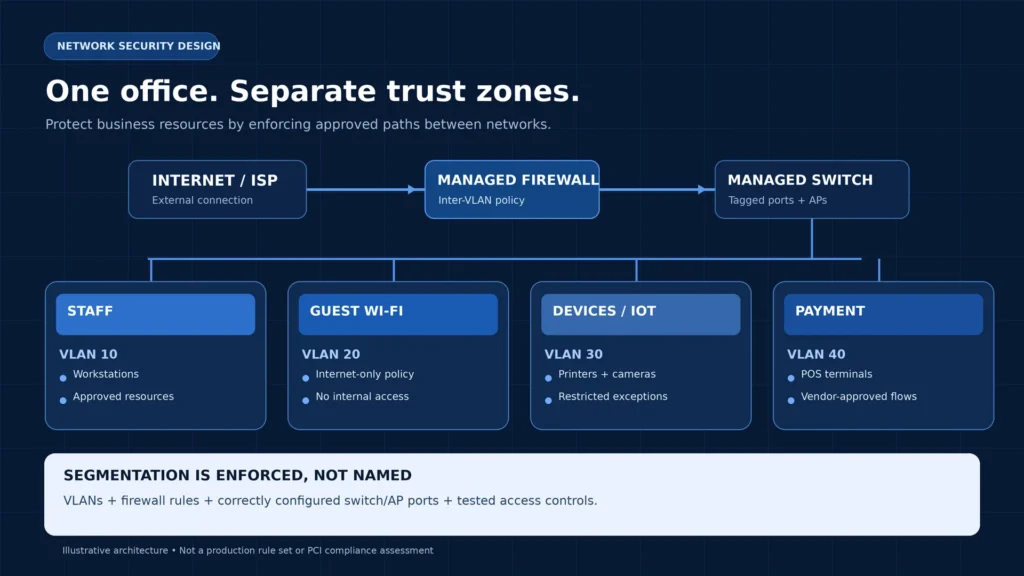
Example: A small office with four network zones
                       INTERNET
                          |
                    MANAGED FIREWALL
                    Security policies
                          |
                    MANAGED SWITCH
                          |
        +-----------------+-----------------+
        |                 |                 |
        v                 v                 v
      STAFF           GUEST WI-FI       DEVICES / IoT
      VLAN 10          VLAN 20           VLAN 30
        |                 |                 |
   Workstations      Visitor access   Printers, cameras
   Approved apps     Internet only    Approved device flows

                          |
                          v
                      PAYMENT
                      VLAN 40
                          |
                    POS terminals
                 Vendor-approved access
Illustrative architecture. VLAN numbers and traffic descriptions are examples, not deployment instructions or a PCI-compliance design.
A real deployment may also include a dedicated management network, voice network, server segment, or other controls depending on the environment.
A VLAN alone does not establish security
Creating VLAN 20 for visitors is only one part of the design.
Engineers must also consider:
- Switch port membership and tagging
- Access point-to-VLAN mapping
- DHCP and DNS behavior
- Firewall rules between networks
- Required business application access
- Guest isolation
- Administrative access
- Testing from representative devices
If the firewall still allows unrestricted traffic between VLANs, the intended separation may not exist.
Segmentation must be enforced by actual access controls and tested against the business’s intended communication requirements.
Example security-policy review
| Source network | Destination | Intended policy |
|---|---|---|
| Guest Wi-Fi | Internet | Allow approved access |
| Guest Wi-Fi | Business workstations | Deny unnecessary access |
| Cameras | Business file server | Deny unless explicitly required |
| Staff network | Approved business services | Allow required connections |
| Payment terminals | Vendor-required services | Permit reviewed connections |
| Authorized management devices | Network administration | Restrict to necessary administrators |
Conceptual policy table only. Production rules require environment-specific source, destination, protocol, identity, and dependency review.
What about printers and device discovery?
Segmentation can interrupt legitimate functions if it is implemented without understanding application dependencies.
For example, employees on one network may need to print to a device on another.
Some discovery protocols do not cross network boundaries automatically.
A professionally designed network should identify the required services and create appropriately scoped access rather than simply removing every restriction.
The goal is not maximum isolation regardless of business impact.
The goal is to restrict unnecessary communication while allowing approved business operations.
CISA’s StopRansomware guidance identifies network segmentation as one way to limit opportunities for lateral movement during an intrusion.
However, segmentation cannot guarantee that malware or an attacker will be contained.
4. Control Administrator Accounts and Remote Access
One of the most serious risks in a business network is unnecessary privileged access.
A technician may have the ability to configure firewalls, reset credentials, modify backups, and administer cloud applications.
A business owner may still be using a single administrator account created during the original network installation.
A former employee or vendor may retain access long after their work ended.
These situations require clear ownership.
What least privilege means
Least privilege means giving a person or system the access necessary for its approved function rather than broad access by default.
Examples include:
- Employees use standard accounts for routine work.
- Network administrators use designated privileged accounts.
- External vendors receive access only to approved systems.
- Temporary access is reviewed and removed when no longer needed.
- Remote employees reach the applications required for their work, not every internal device.
MFA is essential, but it isn’t magic
Multi-factor authentication adds an important layer beyond a password.
It can reduce the risk of unauthorized access when credentials are stolen.
However, some MFA methods can be targeted through phishing, prompt fatigue, token theft, or other techniques.
Where supported, phishing-resistant authentication methods, such as suitable FIDO2 security keys or passkeys, may provide stronger protection.
The correct controls depend on the system and available authentication options.
Never treat MFA as permission to ignore suspicious sign-in activity or weak access policies.
Avoid exposing Remote Desktop directly to the internet
A business should not casually expose Windows Remote Desktop Protocol (RDP) or infrastructure-management interfaces to the public internet.
Secure remote access may involve a properly configured VPN, Zero Trust Network Access service, remote desktop gateway, or another approved architecture.
Each option needs appropriate identity protection, supported software, restricted permissions, and monitoring.
A VPN encrypts relevant traffic.
It does not guarantee that the remote computer is safe or that the user should have unrestricted access to the internal network.
Administrative access checklist
- Identify current administrative users and third-party access.
- Remove obsolete accounts after appropriate review.
- Require MFA where supported and appropriate.
- Use unique accounts for privileged personnel.
- Restrict management interfaces to trusted access paths.
- Review service accounts and their permissions.
- Protect credentials using approved secure storage.
- Document emergency-access and recovery procedures.
- Log and review important privileged activity where supported.
5. Replace Unsupported Systems and Manage Security Updates
A secure network cannot depend indefinitely on unsupported systems.
An outdated firewall, operating system, wireless controller, or network storage device may no longer receive fixes for newly discovered vulnerabilities.
That creates a risk even when the equipment still appears to work.
Windows 10 in October 2026
Microsoft ended standard support for Windows 10 on October 14, 2025.
Some eligible Windows 10 devices can receive critical and important security updates through the Extended Security Updates (ESU) program.
ESU is a transitional option. It does not provide normal feature development or restore full product support.
Organizations should confirm the exact Windows edition, version, ESU eligibility, enrollment status, and migration plan.
Specialized editions and Long-Term Servicing Channel releases may have different support lifecycles.
A computer continuing to turn on after its support deadline does not mean it remains appropriately supported for business use.
What else needs security updates?
- Firewalls and routers
- Managed switches
- Wireless access points
- Windows and macOS
- Business applications
- Network-attached storage
- Virtualization hosts
- Printers and scanning systems
- Security cameras and recorders
- VPN clients
- Endpoint-security products
Patch management requires validation
An effective process should establish:
- Which systems are covered.
- Which updates are relevant.
- How important vulnerabilities are prioritized.
- When changes can be deployed.
- What happens when an update fails.
- Which systems have approved exceptions.
- Who verifies successful maintenance.
Blindly updating every network component in the middle of a workday can cause unnecessary interruptions.
For production infrastructure, significant updates may require configuration backups, release-note review, and maintenance windows.
Security maintenance should be regular, documented, and appropriate to the business environment.
6. Protect Workstations, Microsoft 365, and Business Email
A well-configured firewall doesn’t prevent every attack against employees.
Consider a phishing message that directs an employee to a convincing Microsoft 365 sign-in page.
The employee may be at home, using a mobile device, or connecting from a network outside the office.
The attacker may attempt to compromise the user’s cloud identity without ever connecting directly to the company’s internal LAN.
That is why office network security must be supported by endpoint, email, and identity protection.
A practical layered approach
| Threat or weakness | Relevant protective measures |
|---|---|
| Malicious email or attachment | Email filtering, endpoint protection, user training |
| Stolen password | MFA, phishing-resistant authentication where suitable, sign-in monitoring |
| Unsupported workstation | Patching and lifecycle management |
| Excessive user permissions | Least privilege and account reviews |
| Malware on a device | Endpoint detection, containment processes, backups |
| Unauthorized cloud sharing | Appropriate identity, application, and sharing controls |
| Infected or unmanaged device | Device security checks and suitable network restrictions |
No single control guarantees prevention.
Why endpoint security should be monitored
Installing an endpoint agent is not the same as operating a cybersecurity service.
An endpoint may stop reporting to its management console.
A detection may require investigation.
A protection feature may be disabled.
An alert might need authorization before a disruptive containment action is taken.
A business should understand who is responsible for reviewing these events and when.
For more information, explore our business cybersecurity and endpoint protection services.
7. Use Logging and Monitoring That Someone Actually Reviews
Network equipment generates logs.
But logs sitting on an appliance are not automatically useful.
Their value depends on whether relevant events can be retained, interpreted, correlated, and escalated.
Events worth considering
Depending on the environment and installed features, useful information may include:
- Firewall administrative sign-ins
- Configuration changes
- Failed or unusual VPN access attempts
- Relevant intrusion-prevention alerts
- Unexpected exposed services
- Device health and failure events
- Significant connectivity changes
- Unusual traffic requiring investigation
- Security subscription or update problems
The monitoring approach should reflect the company’s risks and service agreement.
What a useful security report should contain
| Finding | What the business should understand |
|---|---|
| Firewall support status | Whether replacement or maintenance is needed |
| Important configuration change | What changed, why, and who approved it |
| Administrative alert | Whether it required investigation |
| Network device offline | Which business functions may be affected |
| Unresolved risk | What action is recommended |
| Backup failure | Whether protection or recovery requires follow-up |
A blocked connection is not automatically a successful attack.
An allowed connection is not automatically harmless.
A large number of alerts does not necessarily mean a business is more secure.
Reporting should distinguish actual findings from normal background activity and explain what needs attention.
Automated monitoring versus human response
A firewall may generate notifications at any time.
That does not automatically mean a technician is reviewing them around the clock.
Businesses should ask which events are monitored, which hours have staffed response, and which actions require additional authorization.
8. Backups and Incident Response Are Part of Network Security
Even well-managed environments can experience incidents.
A compromised workstation, failed device, accidental deletion, or ransomware infection can interrupt business operations.
That is why an effective security plan includes recovery.
A backup program should answer
- What systems and information are protected?
- Where are recovery copies stored?
- Can attackers or ordinary administrators modify or delete those copies?
- Who investigates backup failures?
- Are Microsoft 365 workloads included where required?
- How frequently are recoveries tested?
- What credentials and systems are needed for restoration?
- Which business functions must return first?
CISA recommends protected backups and regular recovery testing as part of ransomware resilience.
Incident-response readiness
A small business should have a practical procedure for reporting suspicious activity.
This might include:
- Who employees contact
- How to report suspicious emails or sign-in requests
- Who can authorize account restrictions
- Who coordinates with security and software vendors
- How critical systems are isolated when justified
- Who preserves relevant evidence
- How affected business functions are recovered
- Who manages applicable notification decisions
If an employee suspects an account or device is compromised, they should promptly notify the designated support or security contact.
They should not begin randomly deleting logs, factory-resetting equipment, or making undocumented changes to a suspected system.
Actions that alter evidence or disrupt production should be coordinated with authorized responders.
A business should know who to call before a serious incident, not discover the process during one.
For a deeper recovery discussion, see our backup and disaster recovery services.
9. Train Employees Without Making Every Mistake Their Fault
Cybersecurity awareness is important because employees regularly interact with email, websites, files, and authentication prompts.
But security failures should not automatically be blamed on careless staff.
Sophisticated phishing messages, impersonation attempts, fraudulent payment requests, and malicious applications can be convincing.
Good technical controls help reduce exposure.
Training gives employees a better chance of recognizing a problem and responding appropriately.
What employee training should cover
- Recognizing suspicious email and messaging requests
- Verifying unusual payment or account changes through a trusted channel
- Reporting unexpected MFA prompts
- Using approved password managers and authentication methods
- Understanding company policies for personal devices
- Reporting lost or stolen devices promptly
- Handling confidential documents appropriately
- Knowing whom to contact when something feels wrong
A practical example: A fraudulent payment request
An employee receives an email that appears to come from a manager requesting an urgent change to a vendor’s banking details.
The request may use familiar names and convincing formatting.
A useful control is an established verification process requiring confirmation through a known, independent communication channel before changing financial instructions.
That process matters even if the email appears to come from a trusted account.
A good security culture encourages employees to report concerns early instead of staying quiet because they’re afraid of being blamed.
10. Test Your Security Controls Instead of Assuming They’re Working
This is one of the most important differences between having security settings and maintaining security.
A guest network may be labeled “isolated” in the wireless controller.
But can an authorized test device on that network reach a business file server?
A firewall may show that a rule is enabled.
But does it actually restrict the intended traffic?
A backup platform may report successful jobs.
But can the business restore the information it needs?
Security validation checks whether the intended control behaves as expected under specified conditions.
Example: Read-only Windows Firewall profile check
On an authorized Windows workstation, an administrator can view the local Windows Firewall profile settings.
# Read-only: display Windows Defender Firewall
# profile configuration on this computer.

Get-NetFirewallProfile |
    Select-Object Name,
                  Enabled,
                  DefaultInboundAction,
                  DefaultOutboundAction
This provides information about the Windows firewall profiles.
It does not establish that a separate network firewall is correctly configured or that every effective endpoint policy is represented by these fields.
A local profile showing Enabled does not guarantee that every relevant threat is blocked.
Example: Confirm the operating system version
# Read-only: identify the Windows edition
# and installed operating system build.

Get-CimInstance Win32_OperatingSystem |
    Select-Object Caption,
                  Version,
                  BuildNumber
The result can support a lifecycle and compatibility review.
It does not prove that every required security update has been applied.
Example: Check a defined network-access rule
An authorized technician can use the following command from a designated test workstation to check whether a selected TCP service is reachable.
# Illustrative connectivity test.
# Replace the address and port with an
# explicitly approved test target.

Test-NetConnection `
    -ComputerName "192.168.10.20" `
    -Port 445
Suppose the workstation is connected to the guest network, and the approved security policy says that guest devices must not reach a particular staff-network SMB service.
The test can provide evidence about that specific path.
However:
- A failed connection doesn’t independently prove every guest isolation rule is correct.
- The destination computer’s own firewall may block the connection.
- A successful connection doesn’t prove a vulnerability was exploited.
- Testing should use authorized devices, ports, and approved conditions.
The engineer should evaluate the result alongside the network’s actual topology and intended access policies.
Never disable production firewall rules simply to see whether a test works.
A useful validation record
| Control | Intended result | Evidence to review |
|---|---|---|
| Guest isolation | Visitor devices cannot reach restricted business services | Approved connectivity tests |
| Firewall management | Untrusted networks cannot administer the device | Configuration review and authorized tests |
| MFA | Required accounts use the approved method | Identity policy and sign-in review |
| Patch management | Covered systems receive appropriate maintenance | Update reports and exceptions |
| Endpoint protection | Covered devices report expected protection state | Management-console evidence |
| Backup recovery | Selected data can be restored and used | Documented restore test |
These are example acceptance checks, not a claim that every network audit should follow the same procedure.
What About Payment Terminals, Cameras, Printers, and Other IoT Devices?
Small businesses often connect equipment that receives less attention than workstations.
Examples include payment terminals, security cameras, printers, copiers, smart TVs, and building-management devices.
Some have limited administrative interfaces.
Others have irregular update schedules or rely on specialized protocols.
Those characteristics deserve review.
Treat connected devices according to function
Payment terminals: Follow the payment provider’s approved network requirements and evaluate applicable PCI DSS responsibilities.
Cameras and recorders: Restrict unnecessary internet access and management permissions while preserving required operation.
Printers and scanners: Review administrative credentials, firmware, and required communication paths.
Smart TVs and meeting-room devices: Keep them on appropriately controlled networks rather than granting unrestricted access to confidential systems.
Network storage: Use supported updates, restricted administration, appropriate data protection, and a recovery plan.
Segmentation is not automatic PCI compliance
Separating a payment environment can help reduce unnecessary exposure.
But creating a VLAN for payment terminals does not by itself establish PCI DSS compliance.
The actual payment architecture, security controls, vendor requirements, and effectiveness of segmentation must be assessed.
Businesses should consult their payment service providers and qualified specialists as required.
Massachusetts 201 CMR 17.00: What Network Security Responsibilities Apply?
Massachusetts businesses should understand whether their information-security obligations extend beyond general cybersecurity best practices.
201 CMR 17.00 applies to organizations that own or license certain defined personal information about Massachusetts residents.
The regulation’s definition of covered personal information is specific. It does not mean every company document or every customer email is automatically covered under that definition.
Organizations subject to the regulation must implement a written information security program with appropriate safeguards.
Network-security topics addressed by the regulation
Depending on applicability and technical feasibility, relevant requirements can involve:
- Secure user authentication
- Restricted access to protected records
- Removal of access for terminated employees
- Protection of passwords and authentication information
- Encryption of covered information in applicable circumstances
- Firewall protection and operating-system security patches
- Malware protection and relevant software updates
- Monitoring for unauthorized access
- Employee education and training
- Third-party service-provider oversight
- Incident documentation and follow-up review
The regulation also addresses service-provider selection and contractual safeguards.
Does a managed firewall make a business compliant?
No.
A firewall may contribute to relevant technical safeguards.
It cannot independently satisfy requirements involving written policies, employee practices, physical protections, vendor oversight, incident procedures, or governance.
A business should determine its obligations with appropriate legal and compliance professionals.
An IT provider can assist with technical assessment, implementation, documentation, and ongoing administration within the agreed scope.
Official references:
A Small-Business Network Security Checklist for 2026
Use this as a starting point for an internal review or a discussion with your IT provider.
It is not a certification or substitute for a professional risk assessment.
Network and Wi-Fi
- We know which firewall, router, switches, and access points are installed.
- Business network equipment is supported and its update status is known.
- Router and firewall administrator credentials are protected.
- Unnecessary internet-facing management is disabled or restricted.
- Existing firewall rules and port forwarding have been reviewed.
- Business Wi-Fi uses appropriate WPA3 or WPA2 security.
- Guest access is separated from restricted business services.
- Network segmentation is implemented and tested where appropriate.
- Printers, cameras, IoT devices, and POS systems have approved access paths.
Accounts, devices, and applications
- Administrative accounts follow a least-privilege approach.
- MFA is applied to relevant accounts and management systems.
- Former employees and vendors no longer retain unnecessary access.
- Workstations and servers are supported or have approved transition controls.
- Endpoint-security coverage is reviewed for covered devices.
- Important operating system and application update exceptions are tracked.
- Remote access follows an approved security architecture.
Monitoring and recovery
- Important network and security events have assigned review responsibility.
- Configuration changes are documented.
- Network and recovery documentation are securely maintained.
- Critical information and workloads have agreed backup coverage.
- Appropriate restoration tests have been performed.
- Employees know how to report suspicious activity.
- Incident escalation contacts and responsibilities are documented.
- Outstanding risks have been prioritized and assigned to someone.
A checked box should mean the control has been reviewed and supported by appropriate evidence.
A network-security checklist is most valuable when it leads to documented improvements, not when it becomes another form nobody revisits.
What Should You Fix First? A Practical Security Roadmap
Not every business can replace its entire network or complete every security improvement at once.
Prioritization matters.
A useful roadmap considers the severity of an exposure, the systems affected, business impact, and the complexity of remediation.
Priority 1: Address serious exposure
Examples might include:
- Unnecessary internet-facing administration
- Known compromised credentials
- Unsupported critical infrastructure with no appropriate mitigation
- Former employees retaining privileged access
- Important backup failures
- Unreviewed access to sensitive systems
Potentially compromised systems and active security incidents require an appropriately coordinated response.
Priority 2: Improve everyday controls
Examples include:
- Reviewing WPA3/WPA2 configuration
- Correcting unnecessary access between network segments
- Establishing MFA requirements
- Improving patch coverage
- Removing obsolete firewall rules
- Organizing administrator access
- Reviewing device inventories
Priority 3: Strengthen operational resilience
Examples include:
- Network documentation
- Backup restoration exercises
- Incident-response preparation
- Improved monitoring
- Defined maintenance schedules
- Hardware lifecycle planning
- Employee training and periodic review
This prioritization is illustrative.
An actual security assessment may identify issues requiring a different sequence.
A business should not delay an urgent correction merely because it appears in a later category of a general checklist.
How Much Does It Cost to Secure a Small Business Network?
There is no meaningful universal price.
A single-location office with a supported firewall and a few configuration gaps may require less work than a multi-location organization running unsupported equipment, unmanaged switches, and several remote-access systems.
Cost depends on the scope of the problem and the target security controls.
| Cost factor | Why it matters |
|---|---|
| Assessment | Equipment inventory, configuration review, risk findings |
| Firewall | Supported model, licensing, deployment, and management |
| Switches and access points | Segmentation capabilities and network design |
| Cabling | Physical infrastructure corrections |
| Endpoint security | Devices covered and monitoring arrangements |
| Identity protection | MFA, administrative roles, policy implementation |
| Backup | Protected workloads, storage, retention, restore tests |
| Documentation | Network records, inventory, procedures |
| Ongoing management | Updates, monitoring, changes, support, and reporting |
Why buying another security product may be the wrong first step
If the current firewall is supported and appropriately sized, replacing it may be unnecessary.
The more important work could be correcting exposed administration, removing unused policies, or designing guest-network isolation.
Conversely, if equipment is already end-of-life, a configuration adjustment may not be sufficient as a long-term plan.
A credible proposal should explain the identified risk, recommended control, expected operational impact, and what is included in the cost.
Small-Business Network Security in Greater Boston and Massachusetts
Mass IT Pro Solution helps Massachusetts organizations assess and improve business-network infrastructure, endpoint security, cloud access, and the controls supporting their day-to-day operations.
Different industries have different dependencies.
Law firms in Boston and Cambridge
Law offices may rely on protected client information, secure remote access, document management, confidential email, and appropriately restricted staff permissions.
Accounting firms in Waltham and Newton
Financial businesses may require dependable applications, protected records, identity security, network access controls, and backup planning around demanding operational deadlines.
Contractors in Framingham and Worcester
Construction and trades businesses may have office networks, field laptops, mobile users, accounting systems, and employees accessing shared resources from several locations.
Medical and dental offices
Healthcare environments may depend on specialized applications, protected information, vendor connections, and additional privacy and security requirements.
These are examples of potential technology needs, not descriptions of specific customer incidents.
The right network-security plan depends on the actual infrastructure, sensitive information, applications, and business requirements.
Our business network services and cybersecurity services can be scoped as individual projects or coordinated with broader managed IT services.
Frequently Asked Questions About Securing a Small Business Network
What is the best way to secure a small-business network?
Begin with an inventory and assessment. Maintain supported firewall and wireless equipment, protect administrator access, use appropriate Wi-Fi encryption, restrict unnecessary connectivity, secure endpoints and identities, review relevant alerts, and test recovery procedures. The right controls depend on the environment and risks.
Is WPA3 required for every business Wi-Fi network?
Not universally. WPA3 offers improvements and is generally preferable where supported, but WPA2-AES may remain appropriate for compatible devices and properly configured environments. Applicable contracts, regulations, and industry requirements may impose additional conditions.
Is a guest Wi-Fi password enough to protect company computers?
No. A guest password controls access to the wireless network. It does not prove that guests are isolated from internal business resources. Appropriate network boundaries and firewall policies must be configured and verified.
Does a small business need a dedicated firewall?
A business should evaluate its internet boundary, security requirements, remote access, device count, and operational dependencies. A suitable supported firewall may provide important controls. The appropriate design depends on the environment; purchasing a firewall alone does not guarantee security.
Can a firewall stop ransomware?
A properly configured and appropriately licensed firewall may block certain malicious connections and attack techniques. It cannot guarantee prevention of ransomware or replace endpoint protection, identity security, patching, backup, and incident-response planning.
Are Windows 10 computers safe to use in business in 2026?
Windows 10 reached standard end of support on October 14, 2025. Eligible devices enrolled in Microsoft’s ESU program may continue receiving specified security updates, but ESU is a temporary transition measure. Businesses should review edition-specific support and move toward appropriately supported systems.
Should printers and security cameras be on a separate network?
Segmentation may be appropriate when those devices do not need unrestricted access to employee workstations or confidential resources. The design must preserve legitimate printing, management, recording, and vendor dependencies.
Is network segmentation necessary for a company with only five employees?
Not every five-person business requires a complicated VLAN design. But small companies can still benefit from appropriately separating guest devices, administrative interfaces, and other equipment where risks justify it. The design should match the environment rather than employee count alone.
Does MFA prevent account compromise?
MFA provides important additional protection, especially when credentials are stolen. It does not prevent every account compromise. Phishing-resistant methods, appropriate access controls, monitoring, and user procedures remain relevant.
How often should a business review its firewall rules?
There is no single universal interval appropriate for every environment. Important changes should be reviewed when requested and after relevant operational changes. Periodic review should be scheduled according to the environment, support agreement, and risk.
Does securing the network make a Massachusetts business compliant with 201 CMR 17.00?
No. For organizations subject to the regulation, a secure network may support certain technical requirements. The broader written information security program, administrative safeguards, employee procedures, oversight, and applicable obligations must also be addressed.
Can Mass IT Pro Solution assess an existing business network?
Yes. Mass IT Pro Solution provides business networking, firewall, cybersecurity, and managed IT services for Massachusetts organizations. Assessment scope, findings, remediation work, and ongoing management arrangements are determined through the agreed engagement.
A Secure Network Requires More Than a Password and a Firewall
A small-business network doesn’t become secure because it uses expensive hardware or the latest wireless standard.
Security depends on what is connected, who can access it, which connections are permitted, whether important systems are supported, and how the business detects and responds to problems.
For some organizations, the most important improvement will be removing an exposed administrative interface.
For others, it will be correcting guest-network isolation, replacing outdated equipment, enabling stronger authentication, or finally testing whether critical data can be restored.
The best security improvements are the ones that address the actual weaknesses in your environment and can be verified after implementation.
Need a Small-Business Network Security Review in Massachusetts?
Mass IT Pro Solution helps organizations review business firewalls, wireless networks, switching, access controls, endpoint protection, and related technology security concerns.
We can assess the current environment, identify appropriate priorities, and develop a proposed scope for corrective work.
When contacting us, include your approximate employee count, office locations, current firewall or router model, network concerns, and whether your organization handles sensitive information.
Request a Business Network Security Consultation
Mass IT Pro Solution
Business Networking | Managed Firewalls | Cybersecurity | Microsoft 365 | Managed IT
Phone: 508-254-4704
Email: support@massitpro.com
Serving Greater Boston, MetroWest, Worcester, and surrounding Massachusetts communities.
Consultation fees, if applicable, are confirmed before scheduling. Security assessment, implementation, monitoring, on-site work, and response responsibilities depend on the approved scope and written agreement. No firewall, wireless system, or managed security service guarantees prevention of all attacks, uninterrupted operation, recovery of all data, or regulatory compliance. This article provides general technical guidance, not legal advice.
Primary Technical and Regulatory Sources
- NIST SP 1300: Cybersecurity Framework 2.0 Small Business Quick-Start Guide
- FTC: Cybersecurity for Small Business
- CISA: StopRansomware Guide
- Microsoft: Windows 10 End of Support
- Microsoft: Windows 10 Extended Security Updates
- Microsoft Learn: Get-NetFirewallProfile
- Microsoft Learn: Test-NetConnection
- Massachusetts: 201 CMR 17.00
- Massachusetts: 201 CMR 17.00 Compliance Checklist