
What Massachusetts businesses should know about next-generation firewalls, Sophos XGS hardware, network segmentation, secure remote access, licensing, and ongoing firewall management.
A business can have antivirus on every computer, strong Microsoft 365 passwords, and regularly updated software, yet still have a serious weakness sitting between its internal network and the internet.
That weakness might be an outdated firewall, an exposed administrative interface, an overly permissive security rule, or equipment nobody has reviewed since installation.
The problem isn’t always that a business lacks a firewall. Sometimes it’s that nobody is managing the one it already has.
Quick answer: A managed firewall service combines supported network-security hardware with professional configuration, security-policy maintenance, firmware updates, monitoring, and technical oversight. Mass IT Pro Solution helps Massachusetts businesses deploy and manage Sophos Firewall solutions using appropriately sized, supported Sophos XGS appliances. Pricing depends on hardware, licensing, users, connectivity, and the agreed scope. Our previously advertised small-office firewall plan was $155 per month; current XGS pricing and inclusions are confirmed through a written proposal.
For a small office, the goal is not to purchase the most expensive security appliance. It is to build a network that is appropriately protected, maintained, and documented.
What Is a Managed Firewall, and Why Does Your Business Need One?
A firewall controls network traffic according to configured security rules.
At its most basic, it evaluates which connections should be allowed or denied between different networks.
A next-generation firewall (NGFW) can add more advanced capabilities, including intrusion prevention, application controls, web filtering, and inspection of selected traffic. These capabilities depend on the appliance, active licenses, and configuration.
A managed firewall adds ongoing technical responsibility to that technology.
Instead of installing an appliance and leaving it untouched, the service provider maintains the agreed configuration, reviews relevant alerts, plans updates, and addresses approved policy changes.
A firewall is not the same as a managed firewall service
| Basic firewall installation | Managed firewall service |
|---|---|
| Initial network setup | Initial configuration plus ongoing responsibility |
| Rules created during installation | Rules reviewed and updated as requirements change |
| Firmware updates when someone remembers | Defined update review and maintenance process |
| Logs available on the appliance | Relevant logs and alerts reviewed within an agreed scope |
| VPN configured during deployment | VPN configuration and approved user changes supported |
| Configuration may be undocumented | Important rules and changes documented |
| Support requested after a problem | Defined remote management and support arrangements |
A managed service does not mean every possible security event will be detected or every outage prevented.
It means responsibility for the covered firewall functions is defined before something goes wrong.
For a small business without an internal network engineer, that structure can be particularly useful.
Important 2026 Update: Sophos XG vs. Sophos XGS
If your company currently operates a Sophos XG firewall, this section deserves attention.
Sophos XG Series hardware reached end-of-life on March 31, 2025.
The manufacturer has directed customers toward supported replacement hardware, including the Sophos XGS Series.
Sophos Firewall OS (SFOS) version 22 and later also do not support XG Series hardware.
That makes the distinction between XG and XGS important in 2026.
| Firewall generation | Current consideration |
|---|---|
| Sophos XG Series | Legacy hardware that has reached end-of-life |
| Sophos XGS Gen.1 desktop | Later hardware generation, with model-specific lifecycle dates |
| Sophos XGS Gen.2 desktop | Current-generation desktop options for appropriately sized deployments |
| Sophos Firewall virtual/software | Alternative deployments requiring separate infrastructure and licensing evaluation |
An existing XG appliance may still power on and route traffic.
However, functioning hardware is not the same as a manufacturer-supported security platform.
Businesses should review the appliance’s support status, available updates, subscription eligibility, and replacement path rather than assuming it remains suitable for ongoing protection.
Mass IT Pro Solution’s current firewall recommendations focus on supported equipment and an appropriate licensing arrangement.
Manufacturer references:
Who Is a Managed Sophos Firewall Plan Designed For?
Managed firewall services are useful for businesses that depend on a reliable internet connection, need controlled access to internal systems, or handle information that should not be exposed unnecessarily.
Typical environments include:
- Law firms and professional offices
- Accounting and financial service firms
- Medical and dental practices
- Retail stores and service businesses
- Construction companies and contractors
- Small offices with remote employees
- Growing businesses without dedicated network-security staff
A single-location business with approximately five to fifteen employees may be a good candidate for a small-office XGS deployment.
However, employee count alone does not determine the correct firewall model.
A ten-person office with a high-speed fiber connection, multiple VLANs, encrypted traffic inspection, remote workers, and cloud-based applications may require a different appliance from a ten-person office using primarily email and basic web applications.
What determines the correct firewall size?
| Planning factor | Why it matters |
|---|---|
| Internet speed | Security inspection must be considered alongside expected traffic |
| Number of simultaneous users and devices | Phones, printers, cameras, and wireless equipment also generate traffic |
| Security features enabled | Intrusion prevention and TLS inspection can increase processing requirements |
| VPN usage | Remote users and site-to-site connections create additional workloads |
| Network segmentation | Multiple VLANs and policies add design requirements |
| Future growth | A deployment should leave reasonable capacity for anticipated changes |
| Availability requirements | Businesses requiring redundancy may need additional appliances or connectivity |
Sophos publishes appliance specifications, but headline firewall-throughput figures are not the same as performance with every security feature enabled.
We recommend selecting firewall hardware based on the environment and anticipated inspection workload, not simply purchasing according to headcount.
What Should Be Included in a Professional Managed Sophos Firewall Service?
A credible managed firewall proposal should separate the appliance, security licenses, ongoing management, and optional services.
Here is how a complete arrangement may be structured.
| Service component | Purpose | Important limitation |
|---|---|---|
| Supported Sophos XGS firewall | Protects the network boundary and enforces traffic policies | Model depends on sizing |
| Initial configuration | Establishes interfaces, zones, NAT, firewall policies, and administration | Network redesign may be separate |
| Security subscriptions | Enable the protection modules selected for the plan | Features vary by license |
| Remote management | Allows authorized administration and maintenance | Coverage follows the service agreement |
| Firmware maintenance | Addresses updates and supported-version requirements | Updates may require scheduled interruptions |
| Monitoring and alerts | Provides visibility into defined firewall health and security events | Not automatically a 24/7 human response service |
| VPN administration | Supports approved remote connectivity | User count, MFA, and access design matter |
| Reporting | Summarizes selected security and operational findings | Depth and frequency depend on scope |
| Documentation | Records important configuration and changes | Sensitive details must be protected |
These are components to define in a proposal, not a promise that every deployment includes unlimited versions of each service.
Let’s examine the technical work behind them.
1. Business-Grade Firewall Hardware and Secure Configuration
A supported Sophos XGS appliance can provide a centralized point for managing traffic between the internet and protected business networks.
But the hardware is only the foundation.
The most important security decisions happen during configuration.
For example:
- Which internal networks may communicate?
- Are guest devices isolated from business systems?
- Which services are accessible from the internet?
- Who can administer the firewall?
- How are remote users authenticated?
- Are unused services disabled?
- Which traffic requires additional inspection?
How a small-business network should be organized
Consider a professional office with employee computers, a guest wireless network, printers, and security cameras.
Rather than placing everything on one unrestricted network, the business may benefit from appropriate network segmentation.
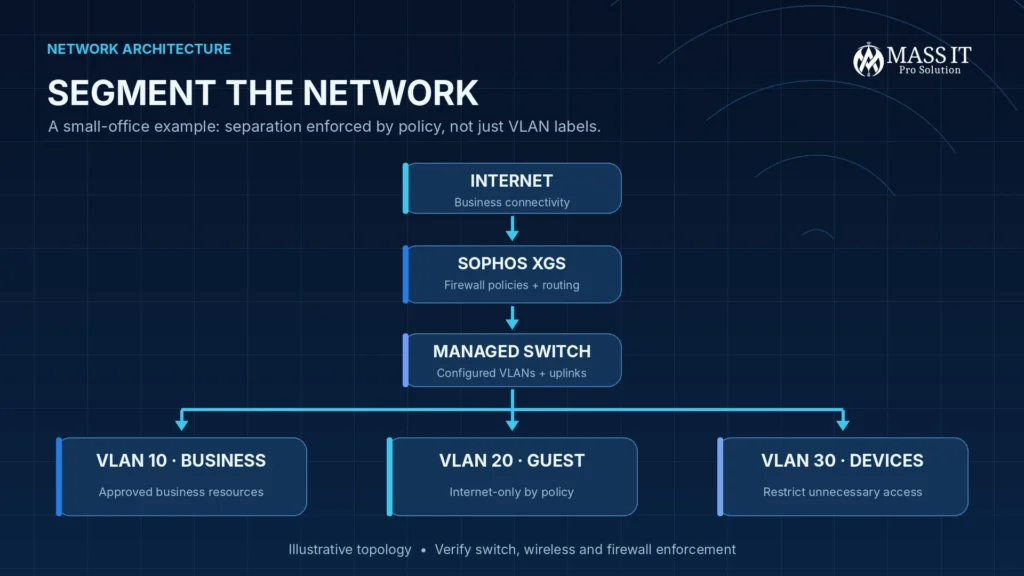
The network might be designed so that:
- Business computers access approved internal resources.
- Guest Wi-Fi users can reach the internet but not the business network.
- Cameras and other devices have only the connections required for their operation.
- Administrative access is restricted to authorized personnel.
Segmentation is not achieved merely by creating VLAN names.
The switches, wireless infrastructure, routing, and firewall rules must enforce the intended boundaries.
The CISA StopRansomware Guide recommends network segmentation as one measure that can limit opportunities for lateral movement during an intrusion.
Why it matters: If a guest device or another isolated endpoint is compromised, properly enforced segmentation may limit its access to other systems.
Segmentation reduces certain risks. It does not guarantee containment of every compromise.
2. Firewall Rules: The Difference Between Allowing Business and Allowing Everything
A common firewall-management problem is an accumulation of rules nobody remembers creating.
A temporary exception may be added so an application works.
Six months later, the exception is still there.
Meanwhile, the employee, vendor, or application that required the rule may no longer be using it.
Good firewall management includes reviewing rules for purpose, scope, ownership, and continued necessity.
Example firewall policy review
| Source | Destination | Intended access | Review question |
|---|---|---|---|
| Business workstations | Approved business applications | Required services | Is the rule limited to necessary traffic? |
| Guest network | Internet | Web access | Is access to private business networks blocked? |
| Camera network | Required management or recording systems | Device-specific traffic | Are unnecessary destinations restricted? |
| Approved VPN users | Authorized internal resources | Role-appropriate services | Is access limited to what users actually need? |
| Management workstation | Firewall administration | Restricted administration | Is management access limited to trusted sources? |
This table is a conceptual policy review, not a production-ready rule set.
Rule changes must consider dependencies.
Blocking a service without understanding how it is used can interrupt accounting systems, VoIP phones, remote access, or other critical applications.
Conversely, allowing all outbound traffic simply because an application failed to connect may introduce unnecessary exposure.
A responsible process uses:
- A documented business requirement.
- An appropriately narrow proposed rule.
- Approval when necessary.
- Controlled implementation.
- Functional testing.
- A recorded change and periodic review.
A good firewall rule is not merely one that makes an application work. It is one that enables the required business function without granting unnecessary access.
3. Intrusion Prevention, Web Filtering, and Threat Inspection
Sophos Firewall can offer several security capabilities beyond basic traffic filtering.
However, the exact features available depend on licensing.
Intrusion Prevention System (IPS)
An IPS can inspect relevant traffic for patterns and behaviors associated with certain attacks.
It can help detect or block activity that matches the enabled protections.
For example, intrusion-prevention controls may be relevant when a vulnerable network service is exposed to traffic associated with known exploitation methods.
That does not mean an IPS replaces security patches.
An intrusion-prevention rule is a compensating control, not permission to run unsupported software indefinitely.
Web filtering
Web filtering can help control access to selected categories of websites or known malicious destinations according to configured policies.
Organizations may use it to reduce exposure to identified malicious sites or enforce appropriate browsing restrictions.
Its effectiveness depends on policy configuration, traffic visibility, and the particular threat.
TLS inspection
Much of today’s internet traffic is encrypted.
Without appropriate decryption and inspection, some security controls have limited visibility into the contents of that traffic.
Sophos Firewall provides options for TLS inspection, subject to hardware, licensing, certificate deployment, compatibility, and privacy considerations.
But enabling TLS inspection everywhere without planning can cause problems.
Some applications use certificate pinning or other mechanisms that may reject interception. Sensitive applications can also raise privacy and policy concerns.
TLS inspection requires deliberate design, suitable exceptions, authorized deployment, and testing.
It should not be presented as an unconditional setting that is safe for every business or application.
4. Understanding Sophos Security Licensing in 2026
A Sophos appliance and a Sophos security subscription are not the same thing.
This distinction is important when comparing managed firewall quotes.
Sophos offers different subscription bundles and modules.
| Capability | General licensing consideration |
|---|---|
| Stateful firewall and base networking functions | Available through base firewall functionality |
| Intrusion prevention | Associated with Network Protection |
| Web and application protection | Associated with Web Protection |
| Advanced file analysis and zero-day protection features | Associated with Zero-Day Protection |
| Centralized management and reporting capabilities | Subject to qualifying licensing and feature availability |
| Additional email or web-server protection | May require separate modules |
| Endpoint security or MDR for workstations | Separate products or managed services |
The Standard Protection and Xstream Protection bundles are not identical.
According to Sophos’s published licensing information, Xstream Protection includes additional capabilities such as Zero-Day Protection that are not part of the Standard bundle.
A company should never assume that every security feature mentioned in a Sophos brochure is included in its specific firewall subscription.
Before accepting a proposal, ask for:
- The exact appliance model
- The security subscription name
- The subscription term
- Any separately licensed features
- What happens at renewal
- Which reporting and management functions are included
For current feature details, refer to Sophos Firewall licensing documentation.
What does “zero-day protection” really mean?
Zero-day threats involve vulnerabilities or attack techniques that may not yet have established fixes or conventional signatures.
Sophos offers advanced analysis technologies under appropriately licensed security features.
These may help identify certain suspicious or previously unknown malicious content.
However, no security product can guarantee detection or prevention of every zero-day attack.
Actual protection depends on traffic visibility, inspection policies, threat characteristics, device configuration, and the combination of controls protecting the organization.
For that reason, Mass IT Pro Solution recommends layered security rather than relying on a firewall alone.
5. Secure Remote Access: VPN Without Unnecessary Exposure
Remote employees sometimes need access to applications or resources that are not publicly available.
A virtual private network (VPN) can provide an encrypted connection between an authorized remote device and the business environment.
But encryption alone is not enough.
The security of remote access also depends on:
- Strong authentication
- Multi-factor authentication where supported and appropriate
- Controlled user provisioning
- Removal of access when employees leave
- Restriction of accessible internal resources
- Supported clients and protocols
- Current firmware and security policies
- Logging and investigation of unusual access
What should a business ask about VPN access?
| Question | Why it matters |
|---|---|
| Does each employee have an individual account? | Supports accountability and access removal |
| Is MFA required? | Reduces reliance on passwords alone |
| Can users access the entire network? | Unnecessarily broad access increases risk |
| Are remote devices managed and protected? | An infected endpoint can still create risk |
| What happens when an employee leaves? | Accounts and permissions must be revoked |
| How are unusual VPN events handled? | Logs require an escalation process |
CISA recommends MFA for remote and administrative access and advises organizations to prefer phishing-resistant methods where practical.
See CISA’s MFA guidance.
VPN access should be granted according to business need, not simply because someone knows a username and password.
Some environments may be better served by application-specific remote access or Zero Trust Network Access (ZTNA) rather than broad network-level VPN connectivity.
The appropriate option depends on the applications, users, identity architecture, and security requirements.
6. Protecting the Firewall’s Own Administrative Interface
A firewall intended to protect the network can itself become a security risk if its management interface is unnecessarily exposed.
This is why firewall hardening matters.
Sophos recommends restricting management services on the WAN interface and limiting administrative access to trusted sources.
A professional review should consider:
- Whether the web administration console is exposed to the internet
- Whether SSH or other management services are unnecessarily accessible
- Which administrator accounts exist
- Whether MFA and suitable authentication controls are applied
- Whether the device runs a supported firmware release
- Whether logging and alerting are configured appropriately
- Whether secure configuration backups are maintained
A safe administrative review
For an authorized administrator, Sophos documents device-access settings under:
Administration → Device access
The purpose of reviewing this area is to verify which services are accessible from each network zone.
Do not disable or modify production access during an unplanned inspection.
An incorrect change could lock out administrators or interrupt users.
Sophos provides detailed guidance in Hardening your Sophos Firewall.
A firewall should be difficult for unauthorized users to administer, even if they can reach the internet-facing connection.
7. Firmware Updates: What Managed Firewall Maintenance Actually Involves
Firmware updates can contain security fixes, stability improvements, and new features.
But applying an update during business hours without understanding the impact can interrupt the entire office.
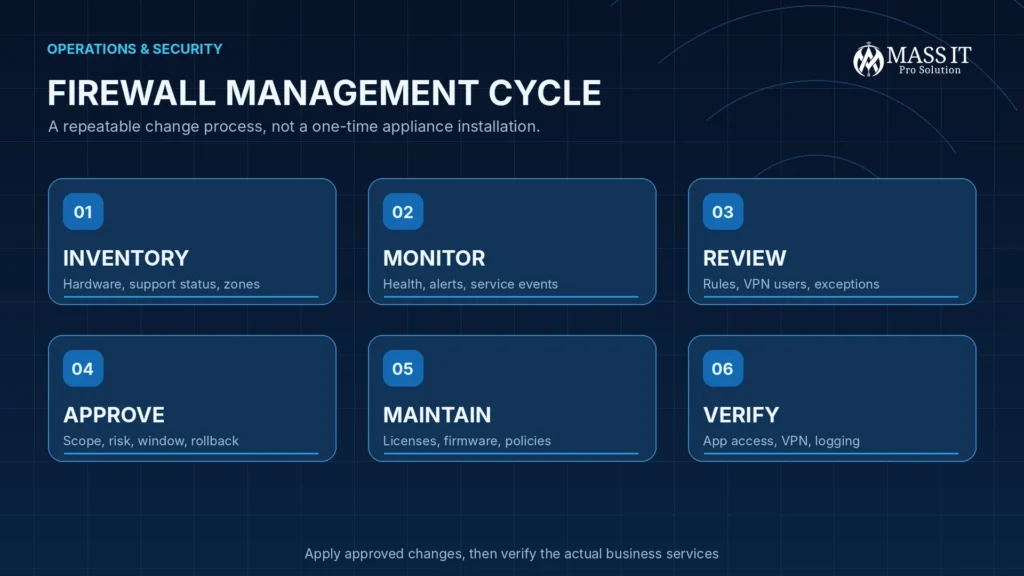
A controlled maintenance process should include:
- Reviewing manufacturer release notes.
- Confirming appliance and firmware compatibility.
- Checking the supported upgrade path.
- Reviewing relevant known issues.
- Creating and securely retaining a current configuration backup.
- Confirming an appropriate recovery or rollback procedure.
- Scheduling the maintenance within an approved window.
- Applying the update.
- Validating connectivity and required business services.
- Documenting the result.
Post-update firewall validation checklist
- Firewall administration remains accessible through authorized methods.
- Internet access works for intended users.
- Required business applications connect successfully.
- Approved VPN connections function.
- Network segmentation continues to enforce expected access.
- Security subscriptions and protection services show appropriate status.
- Logs and monitoring remain operational.
- Backup and recovery information is updated as necessary.
Sophos’s firmware upgrade guidance notes that standalone appliance upgrades require a restart and should be planned with expected downtime.
A managed firewall does not guarantee uninterrupted connectivity during maintenance.
The objective is to reduce avoidable risk through preparation, communication, verification, and documented changes.
8. How Firewall Monitoring and Troubleshooting Should Work
Firewall management is more than watching a dashboard turn green.
Engineers need to distinguish between relevant alerts, expected activity, and actual service problems.
For example, an employee reports that a cloud application stopped working immediately after a policy change.
A technician should investigate whether the application is affected by DNS, routing, web filtering, SSL/TLS inspection, authentication, or another dependency.
A reasonable investigation could look like this:
CLOUD APPLICATION FAILS
           |
           v
CONFIRM SCOPE AND TIMING
One user or many?
What changed?
           |
           v
CHECK DEVICE AND NETWORK
IP, DNS, gateway, connectivity
           |
           v
REVIEW FIREWALL EVIDENCE
Rules, logs, policy matches
           |
           v
IDENTIFY THE LIKELY CAUSE
           |
           v
PLAN A CONTROLLED CORRECTION
Approval and rollback
           |
           v
VERIFY THE APPLICATION
           |
           v
DOCUMENT THE RESULT
An engineer may use Sophos’s Log Viewer and diagnostic tools to review matching firewall events.
Supported troubleshooting tools include policy testing, log inspection, ping, traceroute, and DNS or route lookups.
See the official Sophos Firewall diagnostic tools documentation.
A useful Windows connectivity check
The following PowerShell example is read-only and can help establish whether a workstation has basic TCP connectivity to a selected public service.
# Read-only connectivity test
# Replace the hostname with the approved service
# you are troubleshooting.

Test-NetConnection `
    -ComputerName "www.microsoft.com" `
    -Port 443
If the result includes TcpTestSucceeded : True, the workstation successfully completed the selected TCP connection test.
That does not prove the firewall has no policy errors, that an application can authenticate, or that end-to-end functionality is healthy.
It is one diagnostic observation.
Why logs need interpretation
A blocked connection is not always an attack.
It may be a legitimate security policy preventing an unauthorized request.
A permitted connection is not always safe.
It may reflect traffic that matched a broadly configured rule.
Security value comes from interpreting events in context, not simply counting blocked connections.
9. What Should a Monthly Firewall Report Actually Show?
Many businesses do not need a fifty-page firewall report filled with raw events.
They need an understandable summary of the network’s operational and security condition.
A useful report might include the following.
| Reporting area | What the business should understand |
|---|---|
| Firewall availability | Whether monitoring detected relevant outages or interruptions |
| Firmware and support status | Whether maintenance or lifecycle actions are required |
| Subscription status | Whether agreed protection services remain active |
| Security events | Significant alerts and any investigation or escalation |
| Firewall policy changes | Important approved configuration changes |
| Remote access | Relevant VPN or access issues |
| Device health | Capacity, resource, or hardware concerns |
| Open recommendations | Risks or improvements requiring business approval |
The report should also identify unresolved issues and recommended next actions.
This is an example of useful reporting content, not a claim that every managed firewall contract automatically includes all these items at a particular frequency.
The actual reporting cadence and scope should be stated in the service agreement.
Why a blocked-threat count is not a security score
Imagine a report showing thousands of blocked connections.
That number might include repeated automated scans, routine background traffic, invalid connection attempts, or identified threats.
It does not automatically mean the business narrowly avoided thousands of successful attacks.
Similarly, a low blocked-threat count does not prove the environment is secure.
Reporting should help business owners understand risks, decisions, and work completed, rather than create unnecessary alarm.
10. Can a Managed Firewall Stop Ransomware or Protect Microsoft 365?
A managed firewall can form part of a layered defense against certain network-based attacks and malicious connections.
But it cannot independently secure every endpoint, user identity, application, or cloud service.
For example, an employee may enter Microsoft 365 credentials into a phishing website.
If an attacker successfully authenticates to the cloud account, the resulting activity may occur largely within Microsoft’s cloud environment.
An office firewall may have little or no visibility into what the attacker does from another location.
That is why businesses need separate identity, email, endpoint, and cloud-security controls.
| Security requirement | Firewall contribution | Other controls needed |
|---|---|---|
| Inbound network protection | Filters and restricts network connections | Secure configuration and supported services |
| Malicious web activity | May inspect or block selected traffic | Endpoint security and user awareness |
| Compromised Microsoft 365 account | Limited visibility into external cloud-account activity | MFA, identity monitoring, sign-in review, conditional access |
| Ransomware on an endpoint | May restrict some traffic or attack paths | Endpoint defense, patching, application control, recovery |
| Accidental file deletion | Firewall is not a backup solution | Data retention and backup |
| Insider data misuse | Can enforce some network restrictions | Access governance, audit controls, applicable DLP |
| Business continuity | Protects and manages a network boundary | Backup, recovery testing, power and internet redundancy |
A firewall does not replace endpoint protection, email security, secure identity management, or backup and disaster recovery.
Businesses needing broader protection can explore our cybersecurity and endpoint protection services and managed IT services.
How Much Does a Managed Sophos Firewall Cost in Massachusetts?
Pricing depends on the appliance model, licensing, deployment, network complexity, and management responsibilities.
Mass IT Pro Solution previously advertised a small-office Sophos XG managed firewall arrangement at $155 per month, with a twelve-month minimum commitment and provider-owned hardware.
Because that original plan referenced now-retired XG hardware, the price and terms must be reconfirmed for a supported XGS deployment.
What a properly written firewall quote should identify
| Cost or contract item | What to clarify |
|---|---|
| Monthly recurring fee | Exact rate and billing schedule |
| Appliance | Sophos XGS model and ownership |
| Security bundle | Named subscription and included capabilities |
| Deployment | Whether installation, migration, and configuration labor are included |
| Management | Routine rule changes, monitoring, and update coverage |
| VPN | Number of users and permitted administration |
| Reporting | Frequency and report scope |
| On-site service | Included visits or separately billed work |
| Contract term | Minimum commitment, renewal, and cancellation |
| Hardware return | Return, replacement, or buyout arrangements |
| Additional work | Cabling, switches, Wi-Fi, extra locations, complex changes |
The previously advertised $155 monthly plan
The original offer described:
- A single business location
- Small-office firewall management
- Use of provider-owned firewall hardware
- Required security licensing for agreed features
- Routine remote monitoring and administration
- Controlled firmware maintenance
- Defined normal-hours support
- A twelve-month minimum term
At $155 per month, twelve monthly payments total $1,860 before separately quoted work.
That figure is a calculation of the historical advertised rate, not a verified current quote for a new Sophos XGS appliance.
A refreshed offer should clearly identify the supported model, licensing, installation charges, service responsibilities, and current contract language before publication or sale.
A flat monthly fee only helps businesses budget when the scope and exclusions are clear.
What’s Usually Outside a Small-Office Firewall Management Plan?
A firewall service should not be confused with an unlimited IT support contract.
Depending on the agreement, separately scoped services may include:
- New Ethernet cabling, patch panels, and terminations
- Network rack installation or relocation
- Switching and wireless infrastructure replacement
- Major VLAN and network redesign projects
- Multiple-office connectivity designs
- Dedicated high-availability firewall pairs
- Secondary internet circuits and cellular failover services
- Workstation and server support
- Endpoint cybersecurity licenses
- Email security and Microsoft 365 administration
- Workstation and cloud backups
- Incident response or forensic investigations
- Emergency on-site service
- Work outside the agreed support window
- Hardware replacement or damage not covered by applicable terms
Some services can be incorporated into a broader managed IT agreement.
The purpose of stating exclusions is to prevent misunderstandings.
A company should know whether a firewall policy adjustment is included and whether replacing a failed network switch would require a separate service authorization.
One Firewall Does Not Eliminate Every Single Point of Failure
This is an important business-continuity consideration.
A firewall may protect traffic effectively while still being a single physical device.
If that appliance fails, loses power, or becomes unavailable, the business may lose internet access or connectivity between networks.
Depending on business requirements, an organization may need to consider:
- A suitably sized replacement strategy
- Uninterruptible power supply (UPS)
- Spare equipment or replacement arrangements
- High-availability firewall design
- Secondary internet connectivity
- Cellular failover
- Documented configuration recovery procedures
Those capabilities are not automatically included in a standard single-appliance managed firewall package.
Security and availability are related, but they are not the same design requirement.
A business that cannot tolerate an extended network outage should discuss its availability requirements before selecting the deployment.
What Should Happen Before a New Firewall Goes Live?
Replacing a business firewall can affect the entire office.
A planned migration is safer than disconnecting the existing router and hoping the new one works.
Professional firewall deployment checklist
- Document the existing internet connection and provider information.
- Identify public IP addressing, gateways, and relevant DNS settings.
- Review existing network segments and DHCP requirements.
- Inventory essential services, VPN connections, and inbound access rules.
- Select supported firewall hardware and appropriate licensing.
- Design the intended zones, interfaces, routing, NAT, and security policies.
- Review administrative security and MFA requirements.
- Plan the cutover and communicate any expected interruption.
- Preserve necessary configuration backups and recovery information.
- Test internet access, business applications, and approved VPN connections.
- Verify guest-network restrictions and other intended segmentation.
- Confirm logging, alerting, and remote-management arrangements.
- Document the final configuration and unresolved issues.
Why migrations fail when dependencies are overlooked
Consider a small accounting office.
After a firewall replacement, employees can browse the internet, but a specialized accounting application cannot reach its required service.
The internet connection is technically working.
The business process is not.
Possible dependencies might include destination restrictions, DNS behavior, outbound ports, VPN routing, or application-specific requirements.
A successful firewall cutover should therefore validate the systems employees actually use, not simply confirm that a web browser loads.
Is Your Current Business Firewall Properly Managed?
A company may already own an appropriate firewall.
It might still have gaps caused by neglected firmware, unused rules, exposed administrative services, expired licensing, or poor documentation.
Before paying for a new appliance, request a review.
Business-owner firewall security checklist
- Do we know our firewall’s exact manufacturer and model?
- Is the hardware still supported by its manufacturer?
- Are its operating system and security subscriptions current?
- Who is authorized to administer it?
- Is internet-facing administrative access appropriately restricted?
- Are unnecessary inbound connections blocked?
- Is remote access protected by suitable authentication and access controls?
- Are guest and business networks properly separated?
- Do we know which security modules are licensed and enabled?
- Are important policy changes documented?
- Do we have a protected configuration backup and a recovery plan?
- Who receives relevant alerts, and when are they reviewed?
- Do we know what happens if the firewall or internet connection fails?
A business that cannot answer several of these questions may benefit from an assessment.
That does not automatically mean the hardware needs to be replaced.
The appropriate next step depends on lifecycle status, technical condition, current configuration, and business requirements.
Managed Firewall Services for Massachusetts Businesses
Mass IT Pro Solution works with businesses throughout Greater Boston and surrounding Massachusetts communities.
Our networking and cybersecurity services can support professional offices, contractors, retailers, and other organizations that depend on secure connectivity.
Boston and Cambridge
Professional firms and offices often need reliable internet access, appropriately protected internal networks, secure remote connectivity, and coordination with cloud applications.
Waltham, Newton, and Wellesley
Accounting practices, legal offices, consulting firms, and other small businesses may benefit from a structured firewall policy, security maintenance, and network documentation.
Framingham and Worcester
Construction companies, trade businesses, retail operations, and multi-device offices may require dependable site connectivity, guest-network separation, and support for expanding network infrastructure.
Brookline, Dedham, and Needham
Small professional practices may need help replacing unsupported equipment, reviewing remote access, or understanding how the firewall fits into broader endpoint and email security.
Remote and on-site arrangements depend on the location, environment, and agreed scope of service.
For infrastructure projects beyond the firewall, visit our business networking solutions page.
Questions to Ask Before Hiring a Managed Firewall Provider
A professional proposal should make these questions easy to answer.
- What exact firewall model will be installed, and is it manufacturer-supported?
- Which Sophos subscription bundle is included?
- Is the hardware owned by us, rented, or provided as part of the agreement?
- Who can administer the device, and how is that access protected?
- What monitoring is included, and during which hours are alerts reviewed?
- Who approves firewall policy changes?
- How are firmware updates planned and tested?
- Are remote-access users and VPN changes included?
- What happens if the firewall fails or requires replacement?
- Are installation, on-site support, and after-hours work separate charges?
- Can the provider explain and document the actual security configuration?
- How are configuration backups, contract cancellation, and hardware return handled?
The provider should be able to answer without relying on phrases such as “enterprise-grade protection” or “total cybersecurity.”
Those terms do not establish what is included in a service agreement.
Frequently Asked Questions About Sophos Firewall Management
Is Sophos XG still supported in 2026?
Sophos XG Series hardware reached end-of-life on March 31, 2025. Businesses still operating XG appliances should evaluate migration to supported hardware, such as a suitably sized Sophos XGS appliance, rather than treating a functioning legacy device as a supported long-term security solution.
What is the difference between Sophos XG and XGS?
Sophos XG and XGS refer to different firewall appliance generations. XG Series hardware is end-of-life, while supported XGS models provide a current hardware path for Sophos Firewall deployments. Specific features and performance depend on the appliance model, firmware, licensing, and configuration.
How much does a managed Sophos firewall cost per month?
Costs vary by hardware, security licensing, number of locations, traffic requirements, and management scope. Mass IT Pro Solution’s previous small-office XG offer was advertised at $155 per month. Current pricing for supported XGS deployments should be confirmed through a written proposal.
Does Sophos Firewall stop ransomware?
A properly configured, appropriately licensed Sophos Firewall may help detect or block certain malicious traffic and attack techniques. It cannot guarantee prevention of ransomware or replace endpoint security, identity protection, backups, and incident-response planning.
Does Sophos Firewall include zero-day protection?
Sophos offers Zero-Day Protection capabilities through applicable licensing. They are not necessarily included with every Sophos Firewall purchase or subscription bundle. The exact service package must be verified.
Can a Sophos firewall protect Microsoft 365?
A firewall can apply network policies and inspect certain traffic moving through the protected network. It does not replace Microsoft 365 identity security, MFA, email protection, cloud activity monitoring, or cloud application backup.
Do small businesses really need network segmentation?
Not every office requires an elaborate design, but separating guest devices, business computers, and selected other equipment can reduce unnecessary network access. The appropriate segmentation strategy depends on the environment and how applications communicate.
Does managed firewall service include 24/7 monitoring?
Not automatically. Automated monitoring may operate continuously while human investigation, help desk support, and incident response follow separate schedules. The service agreement should state exactly what is monitored and when personnel respond.
Will a managed firewall improve internet speed?
Not necessarily. A correctly sized firewall can support the intended connection and traffic-inspection workload, but it cannot make the internet service itself faster. An undersized or misconfigured firewall can contribute to performance problems. Engineers should identify bottlenecks before recommending replacements.
Can employees work remotely through a Sophos firewall?
Yes, where supported and appropriately configured. Remote access may use VPN or other suitable access methods, with controls such as MFA, individual user accounts, and restrictions on internal resources.
Is the firewall hardware ours after twelve months?
That depends on the contract. Mass IT Pro Solution’s original plan described provider-owned hardware that remained company property during the service term. Any refreshed agreement should clearly state ownership, cancellation, return, replacement, and potential buyout arrangements.
Does a firewall make a business compliant with Massachusetts cybersecurity requirements?
No. A firewall may contribute to the technical safeguards required under applicable laws or contractual obligations, but regulatory compliance depends on the organization’s actual information, policies, procedures, and broader controls. A firewall subscription alone does not establish compliance.
Your Firewall Should Be Managed, Not Forgotten
A firewall is an important part of business network security.
But purchasing one is only the beginning.
The real work is selecting supported equipment, designing appropriate network policies, restricting administrative access, maintaining firmware, reviewing meaningful alerts, and documenting the environment.
For small businesses, those responsibilities can be difficult to maintain consistently without dedicated technical staff.
That’s why managed firewall services should be evaluated as an ongoing operational responsibility, not simply another hardware subscription.
At Mass IT Pro Solution, we help Massachusetts businesses assess existing network security, replace outdated equipment where appropriate, deploy supported Sophos Firewall solutions, and establish practical firewall-management arrangements.
Whether your company operates a single office or has more complicated connectivity requirements, the first step is understanding the environment.
Request a Managed Firewall Assessment
Already have a Sophos firewall?
We can review its model, support status, configuration, licensing, and current network requirements.
Using an internet-provider router or older business equipment?
We can help evaluate whether a managed firewall is appropriate for your office.
Request a Firewall & Network Security Consultation
When contacting us, please include your approximate number of employees, office locations, current internet provider, existing router or firewall model, and whether employees need remote access.
Mass IT Pro Solution
Managed Firewall Services | Business Networking | Cybersecurity | Secure Remote Access
Serving Greater Boston and Massachusetts
Phone: 508-254-4704
Email: support@massitpro.com
Firewall capabilities, management coverage, response arrangements, hardware ownership, subscription features, installation charges, and pricing depend on the final written agreement. Cybersecurity controls reduce certain risks but cannot guarantee protection from all attacks, continuous availability, or prevention of all data loss.