


Proof Over Promises: Why Real IT Projects Matter More Than Marketing Claims
How Massachusetts businesses can evaluate IT providers through documented work, technical decisions, testing, and verifiable results.
Every IT company seems to promise the same things: reliable support, stronger cybersecurity, faster networks, and fewer interruptions. Those promises sound reassuring until your business needs an actual engineer to diagnose a problem.
Can the company show you what it has done, explain why it made those decisions, and demonstrate how the work was verified?
That is a much more useful question.
Quick answer: Real IT projects provide evidence of a managed service provider’s technical experience. A credible case study identifies the client’s problem, explains the solution, documents the work performed, and distinguishes verified results from expected benefits. Photographs, configuration records, testing results, and clear explanations help businesses evaluate a provider, but no single project guarantees future performance.
At Mass IT Pro Solution, we publish examples of completed work because we believe businesses should be able to examine the engineering behind a recommendation, not simply accept a marketing claim.
And sometimes, the most meaningful evidence is not a photograph of new equipment.
It’s the troubleshooting decision that finally explains why an application wasn’t working.
Why IT Marketing Claims Aren’t Enough
Search for managed IT services in Massachusetts and you’ll encounter familiar descriptions.
Companies advertise:
- Responsive technical support
- Proactive monitoring
- Advanced cybersecurity
- Reliable business networking
- Cloud expertise
- Backup and disaster recovery
- Strategic IT planning
These are legitimate services, but the descriptions alone reveal little about the provider’s execution.
For example, what does proactive monitoring mean?
Does someone review failed software updates? Are backup alerts investigated? Is there a documented process for responding to security incidents? Who follows up when the same workstation fails repeatedly?
Or consider a provider advertising secure network installations.
Does that mean a firewall was connected and the internet worked? Or were the necessary firewall policies, wireless networks, switch uplinks, and business applications also validated?
The difference between a service claim and technical evidence is what can actually be demonstrated.
A capable provider should be willing to explain its methods, scope, limitations, and acceptance criteria.
That doesn’t require exposing confidential customer information or giving away sensitive security configurations.
It requires enough transparency for a prospective client to make an informed decision.
What Actually Counts as Proof of IT Experience?
Not all evidence provides the same level of assurance.
A photograph of a finished network rack demonstrates visible installation work. A test record may show whether specific cable links passed their checks. A signed project acceptance document may demonstrate that the agreed deliverables were reviewed.
Each answers a different question.
Five types of evidence worth examining
| Evidence | What it can demonstrate | What it does not automatically prove |
| Before-and-after photographs | Physical installation changes, equipment placement, cabling organization | Better security, throughput, or uptime |
| Configuration and change records | What was implemented or modified | Whether every change was correct or remains appropriate |
| Technical test results | Performance or functionality under specified conditions | Performance under every future condition |
| Customer acceptance documentation | Agreement that defined deliverables were accepted | A guarantee against future failures |
| Ongoing maintenance records | Work performed after deployment | Continuous availability or elimination of all risk |
A mature IT project may involve several of these evidence types.
For example, a wireless network project could include installation photographs, access point inventory, switch uplink verification, documented wireless configuration, and coverage testing.
The evidence becomes stronger when it answers the original business problem.
If the complaint was dropped wireless connections, the strongest result is not a photograph of an access point. It is documented testing showing that the affected connectivity issue was addressed under the tested conditions.
The evidence ladder
DOCUMENTED BUSINESS OUTCOME
Tested against agreed goals
▲
VALIDATION RESULTS
Tests, checks, acceptance
▲
CONFIGURATION RECORDS
Settings, changes, inventory
▲
PROJECT PHOTOGRAPHS
Installation and visible condition
▲
SALES CLAIMS
What the provider says it does
This is an illustrative framework for evaluating evidence, not an industry certification or formal assurance standard.
The point is simple: claims become more meaningful when they are supported by relevant documentation and independently understandable results.
What a Proper IT Project Case Study Should Tell You
A useful case study should answer five questions.
1. What problem did the business have?
Explain the symptoms, limitations, or operational requirements without exaggerating the problem.
2. What did the engineer investigate?
Describe the relevant assessment, existing infrastructure, constraints, and dependencies.
3. What solution was selected, and why?
The explanation should connect the technology to the client’s actual needs.
4. How was the work validated?
Document which checks were performed and what they established.
5. What was the observed result, and what remains outside the evidence?
Make a distinction between successful implementation, tested functionality, and long-term results that have not been measured.
A case study that skips these questions is often little more than a project announcement.
A case study that answers them gives the reader something to evaluate.
Real Project #1: Modernizing an Excavation Company’s Network Infrastructure
One of the stronger examples in our Massachusetts IT project portfolio is an infrastructure upgrade completed for an excavation business.
This project involved more than replacing a router.
It connected several parts of the company’s office technology environment: physical network organization, managed switching, firewall administration, wireless connectivity, endpoint management, Microsoft 365, and application troubleshooting.
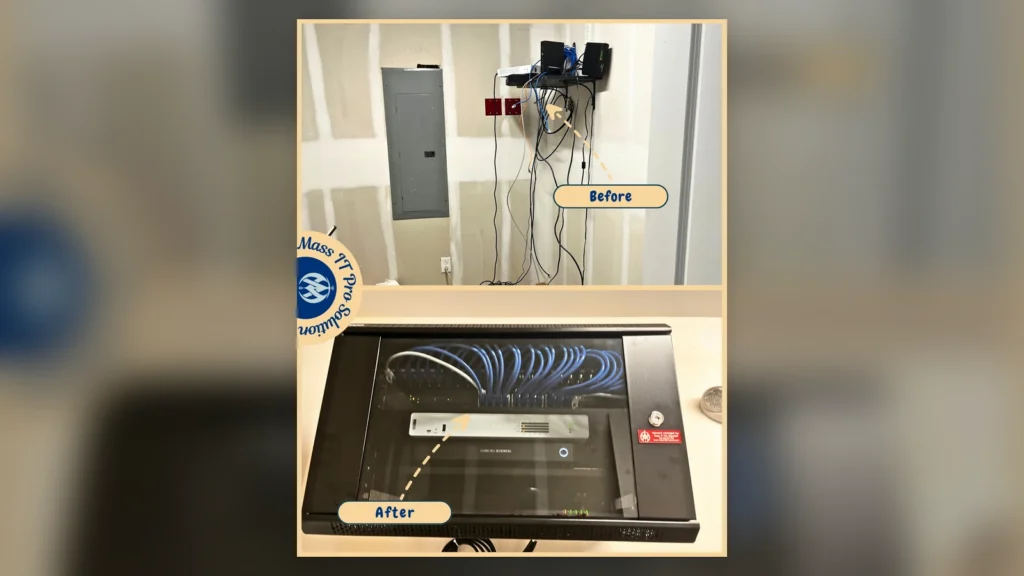
The challenge: equipment that was difficult to manage
Before the upgrade, the company’s network equipment was distributed across an open wall shelf.
The setup included separate networking components and loose cabling, creating an environment that was harder to identify, service, and maintain.
The business needed its network infrastructure organized, its firewall and wireless environment configured, and its office workstations brought under more consistent technical management.
That meant the work required both physical infrastructure changes and software configuration.
What was actually completed
The published project documents the following activities:
- Existing Ethernet cabling was traced and tested.
- A network rack was installed to centralize equipment.
- A 24-port managed switch was deployed.
- A Sophos firewall was activated, licensed, configured, and connected to cloud management.
- Wireless networking was configured through a centralized controller.
- Supported network equipment received firmware updates.
- UPS power protection was added.
- Microsoft 365 applications were installed and licensing was verified on office PCs.
- Remote management, patching, endpoint protection, and backup agents were deployed and checked where applicable.
The company also received follow-up support for a business application experiencing latency while connecting to resources through required VPN access.
The important technical detail: application latency
The published project identifies an issue involving the MiniFuel application and SMB Multichannel behavior on affected workstations.
This is the part of the project that reveals more than a finished installation photograph.
A technician investigating application latency needs to determine whether the bottleneck involves the application itself, the endpoint, a network dependency, remote connectivity, or another component.
In this documented case, troubleshooting isolated SMB Multichannel as the relevant source of the problem. The feature was disabled on the affected workstations, those systems were restarted, and application performance returned to normal while the required VPN access remained operational.
This was an environment-specific troubleshooting result, not a recommendation to disable SMB Multichannel across business networks.
SMB Multichannel can provide meaningful performance and availability benefits in supported configurations. Disabling it without understanding the workload can introduce unnecessary performance or resilience trade-offs.
What this project demonstrates
| Project evidence | Supported conclusion |
| Before-and-after rack documentation | Equipment was centralized and reorganized |
| Managed switch and firewall configuration records described in the case study | Network components were installed and configured |
| Firmware and agent verification described in the case study | Identified maintenance and endpoint-management tasks were performed |
| Documented follow-up troubleshooting | The team investigated an application dependency beyond the physical installation |
| Application function restored in the recorded environment | The reported latency issue was addressed under the conditions described |
What should we not claim without additional evidence?
That the project eliminated all cybersecurity vulnerabilities, guaranteed uninterrupted operations, or increased network performance by a specific percentage.
Those statements would require separate supporting data.
Read the documented project: Excavation Company Network Infrastructure & Security Upgrade
Technical Deep Dive: Why Documenting the Root Cause Matters
The excavation project provides a useful example of why an engineer should not stop at the first plausible explanation.
Suppose employees experience slow access to a business application that depends on remote file or server resources.
A troubleshooting process might begin by identifying the affected users and determining which application operations are slow.
It could then examine relevant client settings, network paths, authentication, application dependencies, and server-side information.
When SMB connections are involved, authorized Windows administrators have read-only diagnostic commands available.
Example: Inspect active SMB connections
# Read-only: displays SMB connections
# established by the local client.
Get-SmbConnection
This can help show information about active SMB shares and protocol dialects.
Example: Inspect SMB Multichannel connections
# Read-only: displays SMB Multichannel
# connection information, where available.
Get-SmbMultichannelConnection
Microsoft documents this command for examining the SMB client and server network interface connections involved in Multichannel operation.
Important: These are educational examples, not a representation of the precise commands used during the excavation project.
A blank result does not, by itself, prove that SMB is broken. The environment may have no relevant active connection, or Multichannel may not be operating in that session.
Administrators should evaluate the output alongside performance evidence and application requirements before deciding whether any configuration change is appropriate.
The business lesson matters more than the command:
A provider that documents why a specific technical change was justified is giving the customer more useful evidence than one that simply reports, “Problem resolved.”
Reference: Microsoft Learn: Get-SmbMultichannelConnection.
Real Project #2: Warehouse CAT6 Cabling and Access Point Installation
A warehouse network is not the same as a typical office Wi-Fi installation.
Warehouse environments may involve large floor areas, high ceilings, metal storage racks, changing inventory layouts, and devices used far from the network equipment room.
Those conditions affect both the physical installation and wireless design.
In one published Mass IT Pro Solution project, the warehouse required mapped access point locations, organized rack cabling, and CAT6 runs to support wireless infrastructure.

The documented work
The public project record identifies:
- Seventeen warehouse access point locations completed
- CAT6 cabling pulled and terminated
- Cable runs toned and tested
- Cisco access points mounted
- AP uplinks verified from designated switches
- Rack cabling and cable routing organized
These are specific deliverables rather than generalized marketing statements.
Why access point quantity is not the same as coverage quality
Seventeen installed access points tell us something about project scope.
They do not, by themselves, establish that every area has a particular signal level, roaming performance, throughput, or application availability.
Those conclusions would require suitable wireless validation data.
For example, a wireless assessment may examine:
| Engineering measurement | What it helps establish |
| Signal strength | Whether a client receives an adequate signal in the tested area |
| Signal-to-noise ratio | How distinguishable the desired signal is from background noise |
| Channel utilization | How busy a selected wireless channel is |
| Retry rate | Whether frames require repeated transmission |
| Roaming behavior | Whether clients transition between access points as expected |
| Uplink status | Whether an AP has suitable wired connectivity |
The required thresholds depend on the business applications, devices, frequency bands, environment, and design goals.
A warehouse barcode scanner and a laptop running video meetings may have different connectivity requirements.
Cabling tests also need accurate descriptions
A continuity or wire-map check may identify certain wiring faults, such as opens, shorts, or incorrect pin assignments.
A cable certification test is different. Certification against an applicable cabling performance standard requires appropriate test equipment and procedures.
We should not describe a cable as certified unless the relevant certification testing was actually completed and documented.
The published warehouse case states that cabling was terminated, toned, and tested, and that access point uplinks were verified.
That is the work this article claims.
Read the documented project: Warehouse CAT6 Cabling and Access Point Installation
Real Project #3: Business Workstation Setup and Cable Organization
Not every meaningful IT project involves firewalls, servers, or complicated network architecture.
An office workstation deployment can also reveal how carefully a provider completes its work.
Mass IT Pro Solution has published a business office project involving multiple workstation setups and cable organization.

The challenge
The office needed its computers, monitors, peripherals, and connections prepared for daily use without leaving unfinished wiring around work areas.
What was completed
The published project describes:
- Monitor-arm installation
- Dual-monitor workstation setup
- Peripheral connections
- Network connectivity checks
- Cable routing and organization around desks
The resulting workstations were documented as ready for daily use, with peripheral connections tested and visible cable clutter reduced.
Why small installation details matter
A monitor positioned incorrectly can create an uncomfortable workspace.
A loose display cable may cause intermittent problems.
An unlabeled or poorly routed network connection can make later troubleshooting harder.
And equipment that appears complete but was never checked with the actual user may still need additional setup.
A reasonable workstation handoff should confirm that the agreed devices are operating and the intended work can be performed.
What a workstation handoff should verify
- ☐ The computer starts and operates as expected.
- ☐ Monitors display correctly at appropriate resolutions.
- ☐ Keyboard, mouse, docking station, and other agreed peripherals work.
- ☐ Required network connectivity is available.
- ☐ Authorized business applications open.
- ☐ The employee can sign in with the appropriate account.
- ☐ Cable routing is safe and reasonably accessible for future maintenance.
- ☐ Remaining issues or excluded setup tasks are documented.
This is a recommended acceptance checklist, not a claim that every check was included in that specific project.
Read the documented project: Business Office Workstation Setup and Cable Cleanup
Before-and-After Photos: What They Prove and What They Don’t
Before-and-after photography can be one of the clearest ways to document physical IT infrastructure improvements.
A prospective customer can see the original equipment arrangement and compare it with the completed work.
That is useful.
But the photographs should be interpreted accurately.
What before-and-after images can show
| Visible improvement | What it can demonstrate |
| Equipment moved into a rack | Physical centralization and installation work |
| Organized patch cables | More structured cable routing |
| Installed wall plates | Finished physical cable terminations |
| Mounted access points | Equipment placement and physical installation |
| Completed workstation layouts | Visible desk setup and cable organization |
What photographs cannot verify on their own
A photograph generally cannot establish:
- Actual network throughput
- Firewall rule effectiveness
- MFA enforcement
- Endpoint protection coverage
- Recovery time after an outage
- Backup recoverability
- Application performance under business load
- Long-term system reliability
For these areas, an engineering report, configuration review, relevant test results, or acceptance record may be more meaningful.
Our network rack cleanup and cable management project provides another example of visible infrastructure work.
The published record describes cable organization and improved accessibility for servicing the rack.
What it does not publish is a measured reduction in troubleshooting time.
We should not invent one.
A professional project portfolio becomes more credible when it describes what can be observed and avoids turning expected benefits into unverified statistics.
What Does a Properly Validated IT Project Look Like?
A project should not be considered complete merely because the new hardware powers on or the installation photographs look attractive.
Validation should reflect the original business requirement and approved project scope.
Here is a practical engineering workflow.
BUSINESS REQUIREMENT
What must improve?
|
v
BASELINE ASSESSMENT
Record current conditions
|
v
SOLUTION DESIGN
Select approach and document risks
|
v
APPROVED IMPLEMENTATION
Controlled changes and installation
|
v
TECHNICAL VALIDATION
Test against agreed requirements
|
v
BUSINESS ACCEPTANCE
Confirm intended work functions
|
v
DOCUMENTATION
Findings, configuration, limitations
|
v
FOLLOW-UP SUPPORT
As defined in the agreement
This is a recommended process framework. Different projects require different testing and documentation.
For example, a workstation installation does not need the same acceptance procedures as a firewall replacement.
Define success before starting work
One of the most important questions a customer can ask is:
What will we test at the end to decide whether this project has met its requirements?
Consider these examples.
| Project | Weak acceptance criterion | More meaningful acceptance criterion |
| Business Wi-Fi | “The access points are online.” | Agreed areas and representative client devices are tested against defined connectivity requirements |
| Firewall replacement | “The internet works.” | Required applications, remote access, routing, and security policies are checked |
| Microsoft 365 migration | “The mailboxes copied.” | Approved users can access mail and agreed workloads, and relevant mail-flow and identity checks pass |
| Backup deployment | “The backup completed.” | Appropriate restore tests are performed and results documented |
| Workstation installation | “The monitors turn on.” | Approved user account, applications, peripherals, and connectivity work as agreed |
The criteria should be reasonable for the project’s scope.
There is no need to create an enterprise-sized acceptance document for every small task.
But there should be clarity about what successful completion means.
Why Microsoft 365 Migrations Need More Than a Completion Screenshot
Microsoft 365 migration experience is another area where businesses should request meaningful evidence.
A provider may claim to handle email and cloud migrations, but completing a data transfer is only part of the process.
A well-planned migration may involve:
- Discovery of existing users, domains, mailboxes, and applications
- Licensing and target-tenant planning
- Identity and authentication configuration
- Data migration scope and supported workloads
- Mail-routing and DNS cutover planning
- Shared mailbox and distribution-list validation
- SharePoint and OneDrive permissions, where applicable
- Endpoint and Outlook configuration
- Post-migration testing
- Documentation and user handoff
The exact steps depend on the source platform and the agreed migration scope.
What should a business ask to see?
| Migration area | Useful verification |
| User identity | Approved users can authenticate using the intended security controls |
| Mail flow | Authorized test messages can be sent and received |
| Data migration | Agreed mailbox and file content has been checked |
| Collaboration | Required sharing and permissions behave as expected |
| Devices | Relevant Outlook and application configurations work |
| DNS | Required records are published and validated |
| Support handoff | Known issues and unresolved items are documented |
A migration can be technically complete while still leaving outstanding user issues or limitations.
Those should be communicated instead of hidden behind a successful progress bar.
Important transparency: Our publicly referenced excavation project documents Microsoft 365 application installation and licensing verification. That is not the same as publishing evidence of a complete tenant migration.
We describe our broader Microsoft 365 and cloud services separately, without presenting that particular excavation project as proof of a full migration.
When a migration case study is published, it should identify its actual scope and validated results.
How Businesses Can Verify Cybersecurity Claims Without Exposing Sensitive Information
Cybersecurity is especially difficult to assess from photographs.
A firewall appliance can be installed neatly while containing overly permissive rules.
A workstation can display security software while important protection features are disabled.
A backup dashboard can show successful jobs even though nobody has tested restoration.
Security evidence requires more than showing a product logo or dashboard.
A business can request appropriate, redacted proof of relevant controls.
Examples of useful cybersecurity evidence
| Provider claim | Evidence worth requesting |
| “We manage endpoint protection.” | Coverage inventory and unresolved protection exceptions |
| “We maintain firewall security.” | Supported firmware status, relevant change records, and management scope |
| “We manage Microsoft 365 security.” | Authorized review of applicable identity and policy configurations |
| “We protect business data.” | Defined backup scope, retention, monitoring, and restore-test evidence |
| “We investigate security incidents.” | Documented escalation procedures and applicable response responsibilities |
| “We manage software updates.” | Patch status and exception reporting for covered systems |
The evidence should match the claim.
For example, deployment of an endpoint-security agent shows that a tool was installed. It does not independently prove that every device is protected or that every alert receives investigation.
Why NIST emphasizes more than technology
The NIST Cybersecurity Framework 2.0 Small Business Quick-Start Guide organizes cybersecurity risk management into six functions:
Govern, Identify, Protect, Detect, Respond, and Recover.
These functions help businesses think about responsibilities beyond purchasing security products.
An effective technical project may contribute to one or more of these areas.
However, installing a firewall or endpoint-security platform does not demonstrate full alignment with NIST CSF 2.0 or establish regulatory compliance.
The broader organization’s governance, processes, and evidence also matter.
Documentation Is Part of the Deliverable
Imagine an office network that works perfectly when the installer leaves.
Six months later, a different technician needs to replace a switch or troubleshoot an application that cannot connect.
What happens if nobody recorded the network layout, equipment inventory, VLAN structure, or important configuration changes?
The business may have to pay for the same discovery work again.
Documentation reduces dependence on any one person’s memory.
What useful project documentation may include
- Equipment manufacturer, model, and asset inventory
- Appropriate network diagrams
- Approved IP addressing and VLAN information
- Relevant configuration and policy changes
- Firmware and software versions
- Tested dependencies
- Cable and port labeling records
- Backup or configuration recovery arrangements
- Installation and validation results
- Outstanding risks or future recommendations
- Relevant support and warranty information
Not every deliverable belongs in a public case study.
Detailed internal network diagrams, IP addresses, credentials, recovery information, and security configurations should be handled according to their sensitivity.
CISA recommends maintaining network diagrams and protecting network documentation as part of resilience planning.
See the CISA StopRansomware Guide.
What businesses should retain
Customers should understand which project documentation they will receive, what remains in the service provider’s system, and how necessary information can be transferred if the business changes providers.
Contracts should define ownership, access, confidentiality, and handoff arrangements where appropriate.
Good documentation supports continuity even when the people supporting the environment change.
Why We Don’t Publish Every Technical Detail
Transparency is valuable, but so is confidentiality.
A project portfolio should not reveal information that could expose a client’s network or create unnecessary privacy risks.
For example, photographs and screenshots may need review for:
- Public IP addresses and internal addressing schemes
- Firewall administrative URLs
- Usernames or account identifiers
- Device serial numbers
- Wi-Fi credentials or QR codes
- Sensitive network diagrams
- Client records or personally identifiable information
- Physical access information
- Confidential application data
- Customer branding or staff identities without appropriate permission
Even small details can be meaningful when combined.
For example, a publicly visible network diagram that identifies internal systems, remote access routes, and administrative services could disclose information unrelated to the purpose of a marketing case study.
A responsible MSP can show genuine engineering work without publishing sensitive client configuration data.
At Mass IT Pro Solution, the objective of a published project is to explain the challenge, work performed, and supported result, not reveal the customer’s security architecture.
Privacy is not a reason to avoid evidence. It is a reason to present evidence responsibly.
Seven Warning Signs When Evaluating an MSP’s Project Portfolio
Not every project portfolio is equally informative.
Look carefully when a provider relies heavily on these approaches.
1. Every project uses the same generic description
A warehouse, law firm, and accounting office should not all have identical requirements.
A credible description should explain what was distinctive about the environment.
2. The result is only a list of products
“Installed firewall, switch, and access points” tells you what hardware was used.
It doesn’t explain the original problem, configuration choices, or validation.
3. Performance claims have no supporting measurements
Statements such as “three times faster” or “99.9% reliable” require context and evidence.
What was measured? When? Under which conditions?
4. Security is described as guaranteed
No firewall, endpoint platform, or MSP can guarantee that a business will never experience a security incident.
Be cautious about absolute promises.
5. The provider cannot explain what was excluded
A project may cover firewall replacement but not workstation support, backup redesign, or application migration.
Exclusions should be clear.
6. Before-and-after images don’t match the explanation
Photographs should support the described work.
They should not be unrelated stock images or AI-generated scenes presented as actual customer deployments.
7. No one can explain what was tested
If a provider cannot identify how it confirmed completion, the customer has less basis for assessing whether the work met its requirements.
A professional provider may not have public examples of every service it offers. Confidentiality, client approvals, and project type can limit what can be shared.
The absence of a public case study is not proof of incompetence. The concern is an unwillingness or inability to substantiate important claims through appropriate evidence.
A Practical MSP Evaluation Checklist for Massachusetts Businesses
Before hiring an IT provider, use this checklist to evaluate both capability and accountability.
Real project experience
- ☐ Can the provider describe projects similar to our environment?
- ☐ Do its case studies explain the original business problem?
- ☐ Are the described results supported by appropriate evidence?
- ☐ Can the team explain why it selected the technology used?
- ☐ Does it distinguish tested results from expected benefits?
Technical quality
- ☐ Does the provider assess existing systems before recommending replacements?
- ☐ Are infrastructure and application dependencies considered?
- ☐ Are changes planned, approved, and documented where appropriate?
- ☐ Is a validation or acceptance process defined?
- ☐ Are unresolved issues disclosed at project handoff?
Security and operational responsibility
- ☐ Are security claims realistic and clearly scoped?
- ☐ Is sensitive customer information handled appropriately?
- ☐ Are backup and recovery responsibilities defined?
- ☐ Does the contract explain monitoring and incident escalation?
- ☐ Can the provider support the completed environment after installation?
Business and contractual clarity
- ☐ Are deliverables and exclusions documented?
- ☐ Are licensing, hardware ownership, and recurring charges clear?
- ☐ Are response times and support arrangements defined?
- ☐ Does the proposal explain additional costs or project work?
- ☐ Is there a practical documentation and offboarding process?
A provider does not need the largest portfolio in Massachusetts.
It needs the appropriate capabilities, an understandable delivery process, and evidence relevant to your business.
What Should Be Included in an IT Project Handoff?
A successful implementation should end with a clear understanding of the completed work.
One useful approach is a short project acceptance summary.
Example project handoff record
| Field | Example of what to document |
| Business objective | Improve office network organization and supportability |
| Approved scope | Network equipment installation and agreed configuration |
| Equipment installed | Models and quantities from the actual project inventory |
| Configuration summary | Relevant network and security changes |
| Validation | Tests performed and observed outcomes |
| Exceptions | Outstanding items or known limitations |
| Customer responsibilities | Future decisions or required user actions |
| Support ownership | Who maintains the equipment after completion |
| Documentation | Records provided or securely retained |
| Acceptance | Agreed review and sign-off process |
Illustrative template. The entries are examples, not a record from a particular customer.
This kind of handoff helps prevent a frequent misunderstanding: assuming a service or feature is included simply because the provider installed related equipment.
It also gives the customer a better starting point when planning future upgrades.
Does Real Project Experience Guarantee Better Managed IT Services?
No.
A successfully completed installation is meaningful evidence of work performed, but it does not automatically establish the quality of every future service.
Managed IT involves responsibilities that continue after the project is finished.
A provider may be excellent at structured cabling but lack the processes necessary to handle cloud identity administration or cybersecurity incident escalation.
Likewise, a provider skilled in Microsoft 365 may still need specialist assistance for complex switching, routing, or wireless environments.
A business should evaluate the capabilities relevant to its own needs.
Project delivery versus ongoing managed services
| Project experience | Ongoing managed IT capability |
| Installing a managed switch | Maintaining network inventory and configuration |
| Deploying a firewall | Reviewing firmware, rules, and relevant security alerts |
| Configuring Microsoft 365 | Managing accounts, licenses, policies, and user changes |
| Installing endpoint-security software | Tracking coverage, investigating alerts, and handling exceptions |
| Deploying backups | Monitoring jobs and validating recovery procedures |
| Setting up workstations | Supporting users and maintaining devices after deployment |
These activities overlap, but they are not interchangeable.
For businesses evaluating recurring support, our managed IT services page explains the broader service areas available.
The appropriate responsibilities must still be defined in a proposal and service agreement.
Why Local Project Experience Matters in Massachusetts
A Massachusetts MSP may support organizations with very different operational needs.
A law firm in Boston might depend on secure access to confidential documents and reliable email.
A professional office in Waltham may rely on shared business applications and consistent workstation management.
A construction company in Framingham may need network infrastructure that supports both office staff and teams working remotely.
A warehouse near Worcester may have wireless coverage and cabling requirements unlike those of a traditional office.
The technologies are often similar.
The constraints are not.
Understanding the environment changes the recommendation
A responsible technical assessment should consider:
| Business environment | Planning considerations |
| Law firm | Confidentiality, identity controls, business applications, backup and access requirements |
| Accounting practice | Application dependencies, financial-data handling, seasonal workload, recovery needs |
| Medical or dental office | Protected data, specialized applications, device support, applicable regulatory requirements |
| Construction business | Field access, shared files, network reliability, remote connectivity |
| Warehouse or commercial facility | Physical cable routes, coverage areas, device mobility, equipment environment |
| Professional services office | Microsoft 365, workstations, collaboration, network stability, technical support |
These are planning considerations, not claims that every organization in an industry needs identical technology.
Local experience can help a provider understand common business workflows and practical site requirements.
But location alone is not proof of technical competence.
The strongest provider combines relevant hands-on experience with the discipline to assess each environment individually.
Mass IT Pro Solution supports businesses throughout Greater Boston, MetroWest, Worcester, and surrounding Massachusetts communities, with project and support arrangements determined by location and scope.
The Mass IT Pro Solution Approach: Show the Work, Explain the Decisions
We believe a business should understand what it is purchasing and why.
That begins with listening to the problem.
Sometimes the right solution is a complete network modernization.
Sometimes it is reorganizing existing infrastructure.
Sometimes it is tracing a damaged connection, correcting an application dependency, reviewing Microsoft 365 configuration, or helping employees work more effectively with equipment they already own.
Not every issue requires expensive replacement hardware.
And not every improvement can be demonstrated through a dramatic before-and-after photograph.
What you’ll find in our project portfolio
Our published Projects page includes examples of:
- Business network modernization
- Managed firewall and switching work
- Warehouse CAT6 cabling and access point installation
- Business workstation setup and cable organization
- Network rack cleanup
- Additional residential networking and infrastructure projects
Each project category has different deliverables and evidence.
The business-focused examples demonstrate portions of the practical work involved in deploying and maintaining professional technology environments.
Residential projects appear in the wider portfolio as separate service examples; they should not be mistaken for commercial managed-service engagements.
We will continue expanding our documentation as projects are completed and approved for public presentation.
Our intention is to show what was actually done, why it was done, and what can reasonably be concluded from the result.
That is a stronger foundation for trust than relying on superlatives.
Frequently Asked Questions About MSP Project Experience
Why should a business review an MSP’s completed projects?
Completed projects can provide evidence of the provider’s experience with relevant technologies and environments. The most useful examples describe the problem, solution, validation process, and supported results rather than merely showing equipment or making broad claims.
Are real project photographs enough to verify an IT company’s experience?
Photographs can help verify visible installation work, but they cannot independently demonstrate cybersecurity effectiveness, network performance, backup recoverability, or quality of ongoing support. Additional documentation or testing may be required.
What should an MSP case study include?
A useful MSP case study should explain the client’s challenge, project scope, technical approach, work completed, testing or validation performed, and observed outcome. It should also avoid disclosing sensitive customer information.
Can an IT company publish customer projects without revealing the customer’s name?
Yes, where the company has appropriate authorization to publish the relevant material. An anonymized case study can describe the industry, technical work, and results without identifying the customer. Confidentiality and contractual requirements still apply.
Does installing a firewall prove that a business is secure?
No. Installation shows that a device was deployed. Security depends on supported hardware, configuration, policies, licensing, maintenance, other protective controls, and the organization’s wider practices. No firewall guarantees protection against every attack.
What is the difference between a completed network installation and a validated network installation?
A completed installation means the defined installation tasks have been performed. Validation adds appropriate testing to determine whether the network meets its agreed functional requirements under the tested conditions.
Should I ask an IT provider for references?
References can be useful when customers have agreed to participate. Businesses can also review public case studies, documented project examples, contract terms, and technical explanations. A provider should not disclose private client information without appropriate authorization.
Is the cheapest IT provider necessarily the least experienced?
No. Price alone does not establish competence. Businesses should compare scope, relevant experience, technical documentation, ongoing support responsibilities, exclusions, and total expected costs.
Why are before-and-after network rack photos useful?
They help show visible changes in equipment placement, cable organization, and physical installation quality. Additional evidence is needed to establish any claimed improvements in performance, security, or uptime.
Can past IT project results guarantee future performance?
No. Past projects can help demonstrate relevant experience, but each environment has different equipment, dependencies, constraints, and risks. Future project scope and acceptance criteria should be evaluated separately.
Before You Hire an IT Company, Ask to See the Work
Your business depends on technology to communicate, serve customers, manage records, and complete daily operations.
Choosing the people who support that technology deserves more than comparing sales claims.
Ask how they investigate problems.
Ask what they test.
Ask how they document their work.
Ask what happens after installation.
And when they show you a finished project, ask what the evidence actually demonstrates.
The right MSP should be able to explain its work without asking you to accept every claim on faith.
At Mass IT Pro Solution, we believe documented engineering, practical solutions, and clear communication are the foundation of a trustworthy IT relationship.
Explore our growing portfolio of completed projects to see examples of the work we’ve performed for Massachusetts customers.
Ready to Discuss Your Business IT Project?
Whether you’re considering a network upgrade, firewall replacement, Microsoft 365 project, cybersecurity improvements, workstation deployment, or ongoing managed IT services, we’ll begin by understanding your existing environment and business requirements.
Tell us what isn’t working, what you’re trying to improve, and what technology you already have.
Our team can help assess the next steps and explain the proposed scope.
Request a Business IT Assessment
Mass IT Pro Solution
Business IT Support | Managed IT Services | Cybersecurity | Microsoft 365 | Business Networking
Serving Greater Boston, MetroWest, Worcester, and surrounding Massachusetts communities
Phone: 508-254-4704
Email: support@massitpro.com
Published projects describe work performed in specific customer environments. Results depend on project scope, existing infrastructure, configuration, testing conditions, and other factors. Past project outcomes do not guarantee identical performance, security, recovery, or availability for future clients.
Project Evidence and Technical References
Published Mass IT Pro Solution projects
- Excavation Company Network Infrastructure & Security Upgrade
- Warehouse CAT6 Cabling and Access Point Installation
- Business Office Workstation Setup and Cable Cleanup
- Network Rack Cleanup and Cable Management
- Full Project Portfolio
Independent technical guidance